Active
Project:
Genesis
Version:
6.x-2.4
Component:
Genesis SUBTHEME
Priority:
Normal
Category:
Support request
Assigned:
Reporter:
Created:
2 Aug 2010 at 17:34 UTC
Updated:
3 Aug 2010 at 12:01 UTC


Hello,
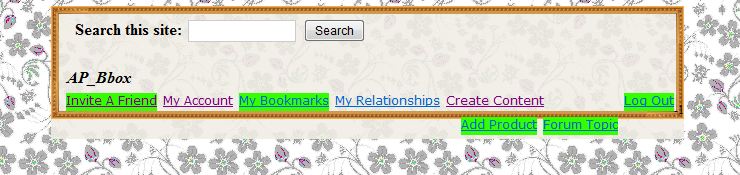
Attached is a picture describing my problems 1 and 2.
1-What I am trying to do is have the fancy frame wrap all around the Search + Primary Nav. However, the expanded leaves overlap the frame, so does the end leaf (Log Out). This is all placed in the "header" section of the page, and printed using:
        <div id="header-blocks" class="section region"><div class="region-inner"><div class="t"><div class="b"><div class="r"><div class="l"><div class="tr"><div class="tl"><div class="bl"><div class="br">
          <?php print $header; ?>
		  <?php print $block-menu-primary-links; ?>
        </div></div></div></div></div></div></div></div></div></div> <!-- /header-blocks -->
      <?php endif; ?>
2-A closer look at the picture attached shows under the "Log Out" link and over the frame a "-1". Is there a way to take this out?
Your help is very much apreciated and you will never know how much I enjoy using Genesis. It brings so much more flexibility.
Thank you.
A-P
| Comment | File | Size | Author |
|---|---|---|---|
| box_bg_error.JPG | 43.98 KB | anne-pierre |

Comments
Comment #1
Jeff Burnz commentedI think I really need to see this before I can make any advice - I have no idea what is generating the "-1" (never seen that before).
Generally though, can't you just make the font smaller or make the frame bigger?
Comment #2
anne-pierre commentedThank you Jeff for your answer. If you don't know what the "-1" is, I am even more puzzled. I am totally new to php. If it helps understand the situation,on occasions, appears a "-1" or a "0". Typically, "0" appears in public views as well as when a regular user is logged in. "-1" appears when admin is logged in.
As for changing the color of the "-1", I have no idea how to identify it: Web Developper does not identify it.
Please let me know if you have a pointer and thank you again for the super theme.