

Closed (fixed)
Project:
Fusion
Version:
6.x-1.0-beta3
Component:
User interface
Priority:
Normal
Category:
Feature request
Assigned:
Unassigned
Reporter:
Created:
9 Jan 2010 at 14:56 UTC
Updated:
25 Jan 2010 at 05:30 UTC
Jump to comment: Most recent file

Comments
Comment #1
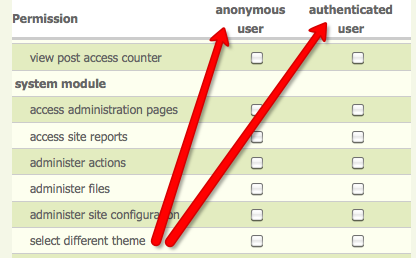
jeremycaldwell commentedThis can actually be done through Drupal itself and not the theme configuration settings. Check your Permissions page and either enable or disable access to those who can change the theme for their user. Admin will have the ability to change it but other users will only if you grant them access. Attached is a screenshot of those settings.
Comment #2
ManyNancy commentedBut what if you want them to be able to change themes but just not to fusion core? There should be an extra permission just for fusion core.
Comment #3
codycraven commentedWhy do you have Fusion Core enabled? It is perfectly safe to disable core to use a sub-theme.
Aside from this not being necessary, or maybe I am missing something o.0, creating an extra permission to do this would be quite hacky as there is not a good way to handle adding this permission.
I believe that maybe you thought you needed Fusion Core enabled to use a sub-theme so I am marking this fixed, if there is something else going on feel free to re-open and explain your situation.
[edit]
stephthegeek just pointed out to me that Fusion Core does need to be enabled to use the Skinr styles from Fusion Core in your sub-theme. To overcome this limitation you can just include the Skinr styles that you want within your sub-theme.
Comment #4
ManyNancy commentedThanks for the note, this is good enough for me.
Comment #5
cgrant3d commentedThank you - you've been a big help!
Chris
Comment #6
codycraven commentedYou're welcome, glad I could help - also points to stephthegeek for pointing out the Skinr styles from parent theme