Closed (fixed)
Project:
Fusion
Version:
7.x-1.x-dev
Component:
Code
Priority:
Normal
Category:
Support request
Assigned:
Unassigned
Reporter:
Created:
23 Feb 2011 at 21:29 UTC
Updated:
20 Mar 2011 at 17:41 UTC


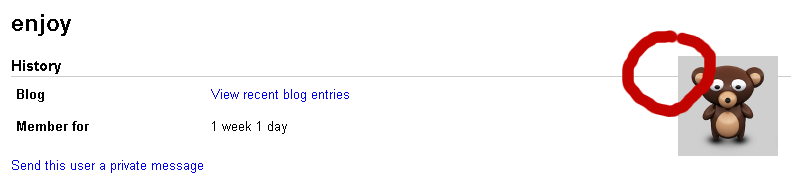
I have added picture to my account and when I wanted to view my account - tab View I have got this.
I am not sure but this picture should be in another place.
In Bartik I have seen that it is below user name.
| Comment | File | Size | Author |
|---|---|---|---|
| moving.png | 17.52 KB | enjoy777 |

Comments
Comment #1
stephthegeek commentedYou can use a template file to rearrange the order of user profile content: http://api.drupal.org/api/drupal/modules--user--user-profile.tpl.php/7
Possibly you may want to just not float the image, which can be done with CSS.
Comment #2
enjoy777 commentedhello
Thank you for your replay. I downloaded Fusion template, installed it on my site and added photo to my account. In standard Drupal template (I don't remeber Bartik?) I got this photo under text "Profile", but in Fusion I got this as I has showen on my screenshot. Probably I will correct it in my template. But I think this is small bug in Fusion so I reported it here.