

This project is not covered by Drupal’s security advisory policy.
Introduction
This project enables you to easily scaffold your module or theme requiring no manual coding. It works similar to Views contrib, which allows to build lists of content using just configuration.
Numerous hooks, preprocessing and theming functions and templates are supported. They are split into several groups for quick access, and you only have to choose those you need in the project. When you are done you build (“compile”) the module/theme, and Forge will generate all necessary files for you and fill them in with hooks you selected. Afterwards, you can download the generated source code and install the new component on your Drupal site for further development.
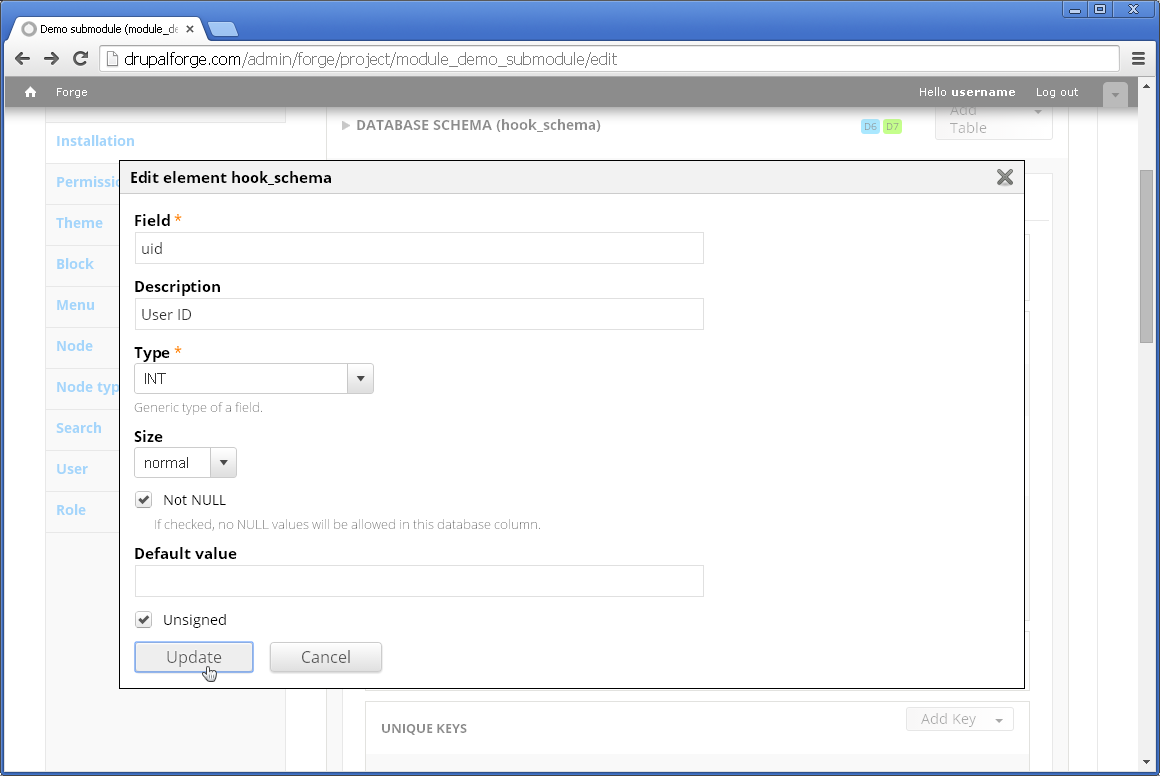
The majority of hooks are available only as stubs (in this case a function with an empty body will be created), but certain important hooks (hook_schema, hook_menu, hook_permission, hook_menu etc.) can be filled in with relevant and specific data. For example, while editing hook_schema you can combine both data modelling and coding, creating a ready-to-use DB schema array, understandable by Drupal.
Basic usage
So, you are done with installing Forge module and are eager to start. First of all, you should go to admin/forge URL (assumed you are root, or a user granted to use Forge), where you’ll see a list of all your modules/themes created using Forge. Naturally, it will be empty the first time you visit it. You have to click “Add new project” link and creation form will open. There you can select the type of your project (module or theme), Drupal’s core version and project title and description (optionally). Next, you save the project and start editing it.
As it was mentioned earlier, all elements (hooks etc.) are logically spread across several groups. For instance, the very first group (Info) allows you to indicate the contents of the ubiquitous .info file. Having configured all of the relevant elements in the current group, you can move to the next groups of elements (and always go back to any of them when needed).
If you want to define a schema for your module, you have to go to Installation group, and choose hook_schema option. There, you can add tables, table fields, keys, indexes and relations. It’s worth mentioning that enabling any of the hooks from this group will automatically create .install file. This is also true for the previous group Info, namely, if you fill in details for files, all of the files will be created automagically. More than that, all relevant files referred by hook_menu, hook_theme and some other hooks, will get created automatically.
When you are done, it’s time for building the project. You have to choose Build menu item in the project menu. The project will be compiled and View tab will become visible. There, you will see all your project catalogues/files. If you are satisfied just click the Download link and your module/theme archive will land into your downloads folder!
A hook I need is missing!
You can easily add it yourself. You may create a submodule that extends Forge (a recommended name would be forge_), and implement two hooks: hook_forge_group and hook_forge_element. The first one will create a new group (this is optional, since you can re-use existing groups). The second one must describe the new hook you want to add support for. Here is an example:
/**
 * Implements hook_forge_element().
 */
function forge_mymodule_forge_element() {
  $element['hook_myhook'] = array(
    'class' => 'Forge_Element_Hook',
    'name' => '<Title>',
    'defaultValue' => FALSE,
    'projectType' => Forge::PROJECT_TYPE_MODULE,
    'coreSupport' => Forge::CORE_SUPPORT_7x,
    'group' => 'mygroup',
    'options' => array(
      'args' => '$arg0, $arg1',
    ),
    'info' => array(
      'description' => '<Short description>',
      'apiUrl' => array(
        Forge::CORE_SUPPORT_7x => '<Link to api.drupal.org>',
      ),
    ),
  );

  return $element;
}
For more details you can refer to [hook_forge_element declared by Forge itself] (http://cgit.drupalcode.org/forge/tree/modules/node/module.inc).
Do you have a good Forge extension? You are then welcome to share it with the community and publish on drupal.org.
System requirements
- Drupal 7.x,
- PHP 5.2 or greater.
It is recommended to install the module on Linux/Unix hosting. Even though it was written as platform-independent, there might be some issues on Windows hostings, when project is being compiled and archive created.
Resources
Official site: http://drupalforge.com/
Roadmap
- Support for core modules
- Drush support
Drupal 8 support- UI improvements
Project information
- Project categories: Developer tools
- Created by webchick on , updated
 This project is not covered by the security advisory policy.
Use at your own risk! It may have publicly disclosed vulnerabilities.


