Closed (fixed)
Project:
Forest Floor
Version:
6.x-1.6
Component:
User interface
Priority:
Normal
Category:
Feature request
Assigned:
Reporter:
Created:
17 May 2008 at 09:41 UTC
Updated:
8 Feb 2009 at 10:23 UTC


is it a fixed with theme? (can you make it fluid?) i installed this theme and it messed up my tables. I have version 6.2, fluid with 3 columns.
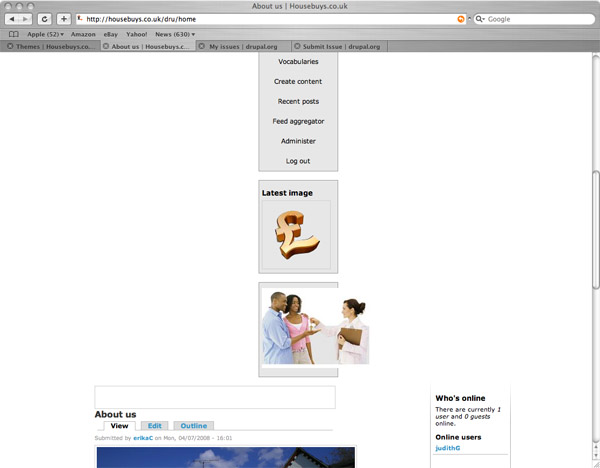
i get the header with links (but only 7 links fits in, the other 3 links are placed underneath)
then i get my "left side bar" placed in the middle, under this is my main content and right side bar next to it.
look at the screen shots attached. it doesn't help if i stretch the browser window, the only thing that helps is to zoom in (but then the type is too small). Otherwise a lovely theme! i was waiting for a theme with large header section (is it possible for me to swap the image?).
| Comment | File | Size | Author |
|---|---|---|---|
| window3.jpg | 77.92 KB | ErikaC | |
| window2.jpg | 63.31 KB | ErikaC | |
| window1.jpg | 84.29 KB | ErikaC |



Comments
Comment #1
Alan Cooney commentedThe theme was created as fixed width so as to prevent this type of problem occurring when users have low resolution monitors, however I appreciate the need for more space. I'm afraid that it is impossible to modify this theme to fluid width whilst retaining quality because the header image would display very badly when stretched by different amounts. I can however resize the header image from the original version to a width that would be more suitable to your site (say, 1000px wide), and write a patch for the code to implement this if you would also prefer that. Also I can write a patch so that the side-bars resize automatically depending on the content they contain within minimum and maximum limits. Please let me know if you would like this.
Alan Cooney
Avioso Designs
Drupal Website Design
Comment #2
Alan Cooney commentedComment #3
Alan Cooney commentedClosed due to inactivity
Comment #4
cmgui commentedthank you.
Comment #5
Alan Cooney commentedFor the interested reader: this has been added as a setting, but you need to install the theme settings module.
Comment #6
Alan Cooney commented