

 Come together with the global Drupal community in Rotterdam, 28 Sept – 1 Oct 2026. Sessions, contribution, connection, and Early Bird savings until 8 June.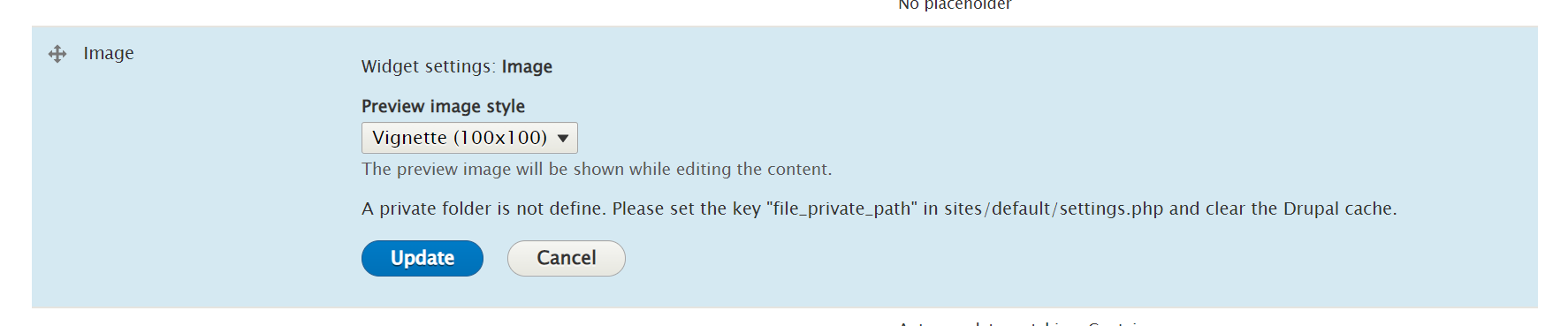

This project is not covered by Drupal’s security advisory policy.
This module allow the website administrator to change the location (public/private) of a file/image put in a field.
Installation
- Download or install with composer
- Enable file_upload_directory_change
Configuration
- Define the private folder in settings.php of your drupal instance. (if not already done)
- Be sure the private folder is created.
- Go to the file/image field configuration, in the form display of the content type you want.
- Edit the field configuration and check "enable" for the configuration "File upload directory change enabled"
- save the form diplay settings.
Using the directory change functionnality
- Go in a content you just changed the content type configuration
- Edit the content
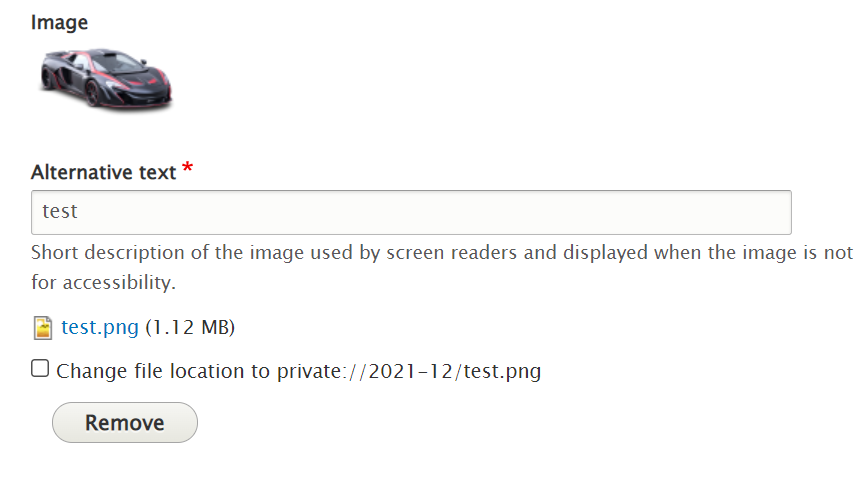
- check the checkbox "Change file location" near the image field.
- Save the content
- if your file directory was public before saving, now it's defined as private
- if your file directory was private before saving, now it's defined as public
Supporting organizations:
Project information
- Project categories: Media
 6 sites report using this module
- Created by olivierg on , updated
 This project is not covered by the security advisory policy.
Use at your own risk! It may have publicly disclosed vulnerabilities.

