Hi all,
(first sorry for my bad english)
I've created a custom content type, with some custom fields.
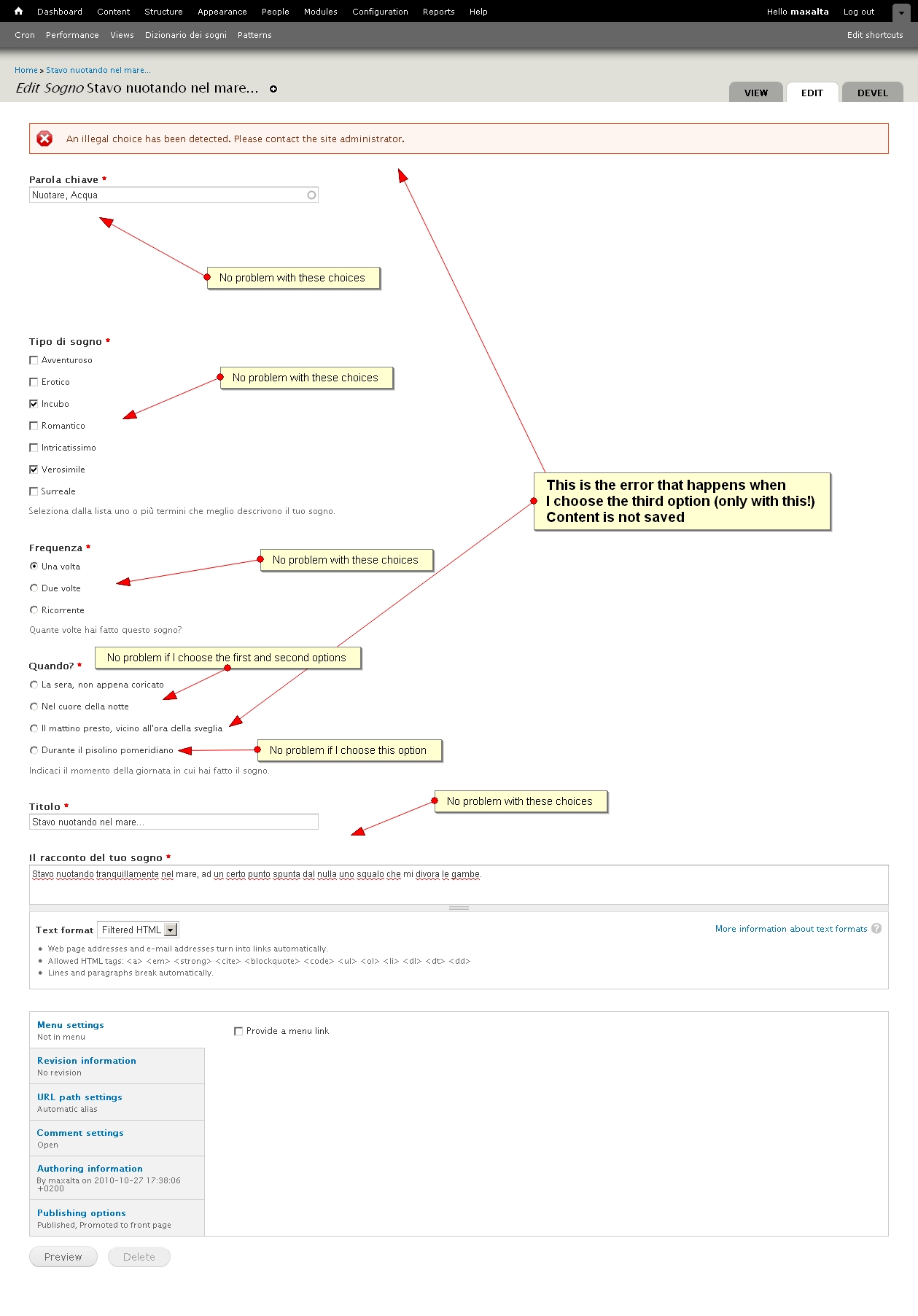
When I try to create the content, I receive the following system error message:
An illegal choice has been detected. Please contact the site administrator.
The problem occurs only when I choose a particular option in my radio options of a particular field.
REAL EXAMPLE:
Quando? ( <- this is my field label)
- La sera, non appena coricato (radio option #1: no problem if I choose this)
- Nel cuore della notte (radio option #2: no problem if I choose this)
- Il mattino presto, vicino all'ora della sveglia (radio option #3: THIS CAUSE THE ERROR!!!)
- Durante il pisolino pomeridiano (radio option #4: no problem if I choose this)
I think the problem is caused by the ' font in the radio text label (that only the third option has).
Hope this can help the Community to fix beta bugs.
Thank you for your work
MXT


Comments
Comment #1
marcvangendMax, thanks for reporting the error. I'm moving this issue to 7.x-dev, because that's where bugs are fixed. Also marking this as major, because this is obviously annoying, but it doesn't break entire websites.
Comment #2
Anonymous (not verified) commentedMXT - any chance you could convert your module into some code in a test module and a corresponding test that fails due to this bug? would really help us with fixing the issue.
if you need any help, just ask in this issue, or drop by the #drupal-contribute IRC channel on freenode - http://drupal.org/irc
Comment #3
mxtJustinRandell I think there is a misunderstanding, I have not made any module (I'm not a programmer), i simply created a new content type trough the default Drupal 7 admin and added some fields to it.
One of this field is a list of radio options, and one of this radio option (the one that has the font ' in the label) triggers the error if it is selected when I create new content based on this content type.
I think everyone can recreate the error condition following these steps:
I don't know if it may be useful: my database is MySql with default collation seated up to utf8_general_ci
Thank you very much
MXT
Comment #4
Anonymous (not verified) commentedMXT - thanks for the clarification. i'll try to write a test to reproduce this bug.
Comment #5
marcvangendI cannot reproduce this bug using Drupal 7 beta 3.
MXT, can you check if this error persists in the latest dev version, and if so, re-open this issue?
Comment #6
mxtI've just installed Drupal 7 BETA 3 and the error still exist.
For the moment I've only edited an existing content, trying to change the bugged option.
You can see the result in the attached screenshot.
My next test will be creating a new content.
MXT
Comment #7
mxtOk, I can confirm the error also with TEST #2: I cannot create a new content if I choose the third option for that content. Always the same error.
Content is correctly created if I choose first (or second or fourth) option.
MXT
Comment #8
mxtMy next test: follow the steps in #3 comment with a new Content Type, created from scratch, in the same site above.
Comment #9
marcvangendMXT: sorry, I don't quit understand what you mean with "TEST #2". Are the instructions from comment #3 still the way to reproduce the error?
Another question: when you tested this with beta 3, did you create a completely clean install, with fresh code and a completely new database? Or did you update an older test site?
Comment #10
mxtMarcvanged, here the answers to your questions:
1) After upgrade to D7 beta 3, I made 2 test:
- FIRST TEST: re-editing an existing content trying to choose the bugged option: ERROR
- SECOND TEST: creating a new content trying to choose the bugged option: ERROR
(my next days THIRD TEST will be following instructions in comment #3 from scratch., that are always valid)
2) I've updated an older site based on Drupal 7 beta 2 with existing database.
Comment #11
marcvangendOK, I have reproduced the problem.
Steps:
- Install D7 dev, checked out from CVS today, with the minimal install profile
- Enable field_ui, list and opttions modules
- Create a content type
- Add a field of type 'List (text)' with widget 'Check boxes/radio buttons'
- Define the following allowed values:
- Try to create 6 new nodes, one for each list field option
Results:
Conclusion so far:
The error occurs in the handling of the option key, not the option label. Both single and double quotes trigger the error.
To be continued. I'd like a committer to decide if this is critical. Wondering what the best fix would be - validating the field settings form, or automatically escaping option keys?
Comment #12
marcvangendJust checked if this works in D6. It does, so this is a regression.
Slightly off topic:
That said, it doesn't work great in D6, because the quotes produce loads of invalid HTML, for instance:
Comment #13
mxtAt this point, if I may, I'd say this bug is CRITICAL because:
1) a regression, if unintended, is always critical
2) if critical bugs are those that do not allow sites to work, well, this is the case, we are faced with a core functionality that can not successfully allow to create a content type with fields of type 'List (text)'.
Comment #14
marcvangendActually, I think this is not critical, because #11 shows a usable workaround: removing the quotes from the option key, for example
test7|te'st7, solves the problem (I will update comment #11 to show that explicitly).Of course, "not critical" doesn't mean we can't fix it before RC1 is released :-)
Comment #15
marcvangendOne thing we have learned so far, is that the error occurs only with the 'List (text)' type of field, not with the normal 'List' field (that's also why I couldn't reproduce this in #5). Going through the code, I found a description of this field type in list_field_info():
"This field stores keys from key/value lists of allowed values where the stored key has significance and must be a varchar, i.e. \'US States\': IL|Illinois, IA|Iowa, IN|Indiana"
(Makes me wonder where in the UI this description is displayed, but that's a different matter.) Anyway, because it is explicitly meant for significant alphanumerical keys, I think we should A) try not to restrict the allowed characters, and B) not silently remove the quotes from the keys. That means we shouldn't make the form validation more strict, but leave the quotes as they are and improve the way keys with quotes are handled.
Comment #16
marcvangendI'll just keep documenting everything I find :-)
The error message is generated in form.inc, _form_validate(), around line 1200:
What happens is that the submitted form value (here available as
$elements['#value']) is encoded, so te'st becomes te'st1. The allowed values in the $options array are not encoded, so!isset($options[$elements['#value']])returns true and the error is triggered.The encoding of the radio value happens when the following functions are called: theme_radio() -> drupal_attributes() -> check_plain() -> htmlspecialchars().
By the way, commenting the elseif-block above triggers an error in list_field_validate(): "[fieldname]: illegal value." In other words, the form value is validated twice and both validators do not take into account that the value has been encoded along the way.
Looks like we have to introduce htmlspecialchars_decode() somewhere to fix this.
Comment #17
yched commentedReassigning to form API then.
FAPI radios / checkboxes take #options, but if an option contains html special chars, you end up with a submitted #value that's not part of #options.
It sounds reasonable that FAPI radios / checkboxes should decode entities before assigning a #value.
Comment #18
yched commentedDoesn't need Dries / webchick feedback at this point.
Comment #19
marcvangendHmm, I guess I'm a bit stuck here, I got lost in the Form API internals...
First, I tried fixing this with inserting this at line 1186 of form.inc, in _form_validate():
That works for the "An illegal choice has been detected" error generated by _form_validate(), but the "[fieldname]: illegal value" error from list_field_validate() is still triggered. What happens is this:
- drupal_validate_form() calls
_form_validate($form, $form_state, $form_id);- in _form_validate(), a recursive function, the $form array or one of its elements is called $elements and gets validated
- near the end of _form_validate(), it calls
form_execute_handlers('validate', $elements, $form_state);- form_execute_handlers() passes on $form_state to be validated, which eventually leads to list_field_validate()
WTF? Why does _form_validate() validate the $form array while list_field_validate() validates $form_state? Is that correct? I don't get it.
So now I'm wondering, should the fix above simply be repeated in list_field_validate()? Or is there a better place to decode the value, preferably only once? Or is there a completely different method to solve this?
Comment #20
joachim commentedI don't think this is a problem with FormAPI. The following code works fine:
This produces a form with a checkbox
and it submits just fine.
Hence I think this is specific to FieldAPI.
Comment #21
yched commentedI'm sorry but I can reproduce the bug with just the code posted above
The HTML for the input does contain
value="o&#039;brien"(which seems only natural since this all runs through drupal_attributes() / check_plain().Select "O'brien", submit --> "An illegal choice has been detected" - o'brien is not in #options.
Comment #22
chx commentedYou were not supposed to break checkboxes ever again. There are a lot of tests. Add more.
Comment #23
joachim commentedIt seems intermittent!
I've put the above code into its own module (rather than hack it into whatever I was working on at the time), and I got the error once, but now I don't get it at all.
Comment #24
yched commented[crosspost with #23]
Looks like we'll need to add a form_type_radio_value() callback as well, then ?
Comment #25
marcvangendYes, we need to do something for radio values as well.
I'm not sure if the patch in #22 is what we need, I wasn't able to reproduce the error with checkboxes. Still, I did try an identical approach for radio's, adding the following function to form.inc:
Unfortunately that doesn't work.
I also tried changing line 2824 in form_process_radios():
'#return_value' => check_plain($key),to this:
'#return_value' => $key,That does solve the problem, but I'm not sure if it's allowed to remove the check_plain. (Can anyone explain what check_plain is doing there in the first place? It cannot be for rendering the radio button value, because drupal_attributes takes care of that, including the check_plain.) When fixing it like this, I also needed to make a small change in theme_radio in order to get the 'checked' attribute right. Patch attached.
Comment #27
marcvangendMy mistake. Try again.
Comment #29
marcvangend#27: 954628-27-radio-value-quotes.patch queued for re-testing.
Comment #31
marcvangendI guess this patch needs to fix the test as well.
Comment #32
bojanz commentedLike marcvangend, I too was unable to reproduce the checkbox issue.
Looks like that is fixed.
With chx's consent, I am marking this duplicate in favor of #971120: Radio button values get run through check_plain() twice, since that issue has the same fix as this one (for the radios), but with tests included.
A related bugfix is at #811542: Regression: Required radios throw illegal choice error when none selected.
Comment #33
marcvangendbojanz, that's great, thanks.
Comment #34
mattwmc commentedI have the same problem - however its for drupal 6.
i added img html in the allowed value list so users could pick an image to go with their article.
I get "An illegal choice has been detected. Please contact the site administrator."
Steps to reproduce:
Manage Fields-->New Field-->Text-->Check Boxes/Radio Buttons
Number of Values: 2
Allowed Values:
When creating/editing the node, the images are present with the check box, but when saving you get the illegal choice error. Just putting plain text minus ' works.
Is it related at all to this in bootstrap.inc?
I'm no programmer so...
Comment #36
jayboodhun commented