

 Come together with the global Drupal community in Rotterdam, 28 Sept – 1 Oct 2026. Sessions, contribution, connection, and Early Bird savings until 8 June.
The attached patch adds a module with a simple interface for associating images with taxonomy terms. The patch applies against current cvs. In addition to adding a new module and updating the database, it also updates the xtemplate theme to display category images (if enabled). If merged into core, all themes should then be updated to support category images.
Some changes may need to be made for this patch to be merged into core. Suggestions are welcome. (For example, perhaps the functionality should actually be merged into the taxonomy module itself?)
Features of this module include:
- integrated into existing taxonomy (category) menu structure
- allows one-to-one and many-to-one term-to-image relationships
- administrator can configure to auto-scale images
- images can be disabled by individual users (with proper permissions)
- utilizes core file api
- small, focused feature-set.
Requires:
- cvs version of Drupal
- taxonomy module
For a live demo, go to http://kerneltrap.org/
Screenshots to follow.
| Comment | File | Size | Author |
|---|---|---|---|
| #12 | taxonomy_image_0.patch | 20.76 KB | jeremy |
| #7 | multiple_terms.png | 34.23 KB | jeremy |
| #6 | frontpage.png | 34.15 KB | jeremy |
| #5 | settings.png | 26.28 KB | jeremy |
| #4 | edit.png | 24.08 KB | jeremy |



Comments
Comment #1
jeremy commentedHere's an overview look at the administrative interface. In this screenshot, one image has already been uploaded.
Comment #2
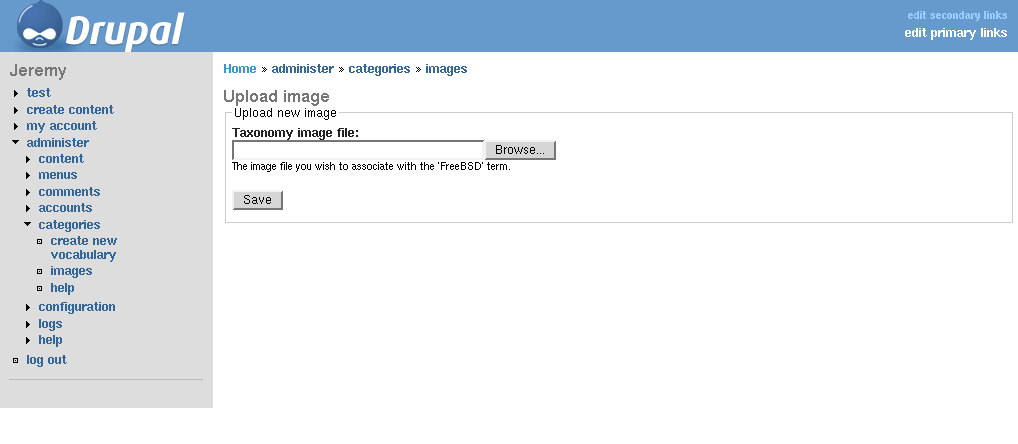
jeremy commentedHere's the upload page, after having clicked 'upload image'.
Comment #3
jeremy commentedAnd now we're back at the overview administration page, after having uploaded a new image.
Comment #4
jeremy commentedHere's the form you see when clicking 'edit image'. If you upload a new image when an old image was already uploaded, the old image will first be automatically deleted, then the new image will be saved.
Comment #5
jeremy commentedHere's a look at the module's settings page. It allows the administrator to auto-resize category images when displayed, and to support many-to-one term-to-image relationships (recursive image display) to support taxonomy hierarchies.
Comment #6
jeremy commentedAnd finally, here's a look at the front page of a site running with the patched xtemplate, displaying category images...
Comment #7
jeremy commentedI was asked how it handles multiple categories assigned to one node. This depends on the theme. The attached screenshot shows how xtemplate handles it with my patch applied, displaying both images together.
Comment #8
(not verified) commentedExcellent! I've been wishing Drupal had this feature for a long time; this would be so much easier than hardcoding images into my theme.
How does this interact with the avatar functionality? (Meaning: What would it look like if someone enabled both avatar display and taxonomy image display for a node?)
Comment #9
dries commentedI'm in favor of integrating this into taxonomy.module. Maybe we could start by reviewing the GUI?
Comment #10
jeremy commentedThe main argument for not merging this functionality into the taxonomy module is that it's very possible that the majority of Drupal users do not need this functionality.
Do you think it should retain its own menu item called 'images' under categories? Or should it actually be merged into the existing add/edit term page?
If kept as is, then what recommendations for improving the user interface?
If merged into the existing taxonomy add/edit page, where would you get an image overview? (It can't easily be added to the existing taxonomy overview page, which is already quite "busy")
Comment #11
jeremy commentedThis is up to the theme implementation. I've never used avatars - I don't even know how - so I didn't give this any though with my sample patch. A quick look at the code, however, suggests that they would all be displayed together on the right side of the screen.
I'm not a gui guy. I would hope that theme designers would be the ones to actually add taxonomy_image support to their themes once this functionality is merged.
Comment #12
jeremy commentedI've updated the patch mainly per feedback on the drupal-devel mailing list:
- added support for private images
- stores images in configurable files/ subdirectory
- refers to images as pictures, to standardize with avatar support
This brings the patch current with all outstanding recommendations.
(BTW: If interested in trying the latest code with Drupal 4.4.x, download the cvs version of the module in contrib)
Comment #13
jeremy commentedFWIW: This module has been updated to work with the latest CVS code (Drupal 4.5). I'm not going to update this patch though, as I assume effort is being made to address this issue in another way. Should an updated patch be desired, let me know.
Comment #14
nedjoThe proposed patch is an improvement on functionality previously roughed in in the node_image module. I'd like to look at the possibility of rolling node_image functionality into this patch. Potential modifications might be:
Would extending this to include nodes make sense?
Comment #15
jeremy commentedAs is, the module does exactly what I need it to do, so I'm very hesitant to add functionality.
However, the first idea on your list does interest me. I like the idea of being able to associate an image to a specific node, as opposed to only a taxonomy term. I would be interested in seeing a patch that accomplishes this without making the user interface exceedingly difficult. (ie, where would the administrative interface go for listing/editing/deleting these images go?)
Comment #16
nedjoI strongly support inclusion of this functionality in core. Yet I think it would be worth the time to genericize image association so that it can be used with multiple object types (at a minimum, terms, vocabularies, and nodes) and multiple image categories (at a minimum, thumbnail and full). Hard-coding this to taxonomies would have the disadvantage of requiring different, partially duplicated systems for associating images with other object types. Given the sound design of taxonomy_image, this additional functionality could be added with a minimum of additional code.
I'm working on proposed revisions. Meantime, a few comments:
Comment #17
Steven commentedWith the new image API, this function can probably be implemented very cleanly and with less code. Perhaps it should be revisited? I think many people will like it, but I also agree that it should not be in the way.
Comment #18
dries commentedComment #19
moshe weitzman commentedwould be nice to get this one done. anyone?
Comment #20
LAsan commentedFeature request moving to cvs.
Comment #21
dman commentedWoah!
This is so old. Check that date.
Surely taxonomy_image.module does all this nowadays?
Closing this, unless someone can say why this optional feature needs to be core, or what that's described here is lacking and can't be put into taxonomy_image.
Anyone interested can help out with taxonomy_image to make it more popular...
Comment #22
dman commenteddouble-post
Comment #23
dman commentedWoah!
That double-post took 3 hours lost in the system!
(triple-post actually, although I went back and checked each time before reposting :)