

 Come together with the global Drupal community in Rotterdam, 28 Sept – 1 Oct 2026. Sessions, contribution, connection, and Early Bird savings until 8 June.
I might be missing something but this issue was brought up a few times lately in drupal.org.il so I'm not the only one...
When a page is viewed the language set for the page (as in theme RTL/LTR and as in html lang attribute) are set by the choice the user has made using the language selection block.
BUT if node/x is in hebrew and node/y is in english and I want to let my users see them both, I have a problem setting the display directionality to change between them.
user 1 who chose english will see the whole site LTR, and user 2 who chose hebrew will see the whole site RTL disregarding the content language settings.
Two Three possible solutions are :
* Add an option at admin/config/regional/language/configure to set the language according the content language.
* Provide a body class that expose the content language so we can use conditional css.
* Make the xml:lang attribute obey the content language (not sure about that).
This issue affects D6 also but I figured it will be better backport.


Comments
Comment #1
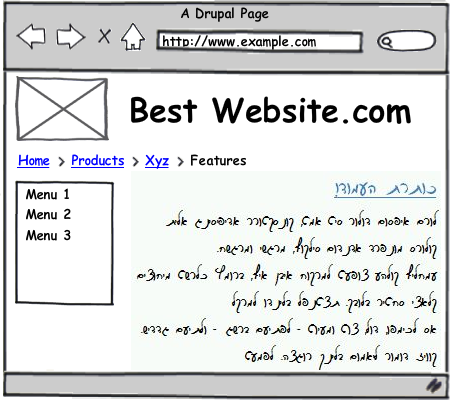
daphshez commentedTo clarify, the problem here is the case where you want the site's ui (menus, headers, etc.) to stay in the site's or user's default language, you just want to present some content in another language. I am attaching a mock-up, hope it explains better what I am trying to achieve.
Also note that on pages that show several nodes (front page, custom views) there may be some nodes in one language (and directionality) and some in the other.
I think the solution that makes the most sense for this problem is adding language css classes to the nodes. This is also a more general solution that may allow various language-dependent presentation (e.g. how about different colors to different languages?).
(TSI description may also refer to a separate problem. Sometimes you want the ui language (that is, menus, header etc.) to change according to the language of the node. This is partly solvable using path prefix or domain name language negotiation - e.g. you link to http://www.example.com/lang_code/page_name. )
Comment #2
tsi commentedYour last point is true only when you manually create the links which is usually not the case in drupal, if you think of the default front-page (/node) - all the links will have the same path prefix, determined by the current viewer's language and not by the linked node language.
nice mock-up BTW :)
Comment #3
plachSomehow related issue: #684982: Audit of global language variable use
Comment #4
Jeff Burnz commentedI have solved this sort of issue in D6 by setting body and node classes. It seems to work OK for the best part.
Comment #5
sunThe page/document must use UI language, inner elements may define language direction based on content language; specifying language itself additionally helps crawling machines/spiders.
However, quite a challenge, as we don't necessarily have wrapping containers around all content (in a language) that is output on a page. The system-main block (and to some extent, all blocks) perhaps needs to set the language direction?
Comment #6
good_man commentedThis problem affects RTL readers, I agree with separating page/document direction from content (nodes, menus, blocks and all translatable fields).
@sun: Do you have an example of content that don't have wrapping container?
P.S. This problem appears in twitter for RTL users, we solve it by userscripts wrapping RTL tweets in an RTL span
Comment #7
good_man commentedI think this issue is important, I mean nodes for example have no indicator in theme what the language inside them, can we move this issue to Content Translation, and maybe there we can begin with nodes, and set in node's class the language code as a simple yet effective solution, then in the next step provide the same thing for other entities.
Comment #8
plachChanges are performed in the development version first, backported then.
Comment #9
hanno commentedRelated issue: #1164926: Nodes need to have languages specified separately for accessibility
Comment #10
gábor hojtsyMarking duplicate of #1164926: Nodes need to have languages specified separately for accessibility.