

 Come together with the global Drupal community in Rotterdam, 28 Sept – 1 Oct 2026. Sessions, contribution, connection, and Early Bird savings until 8 June.
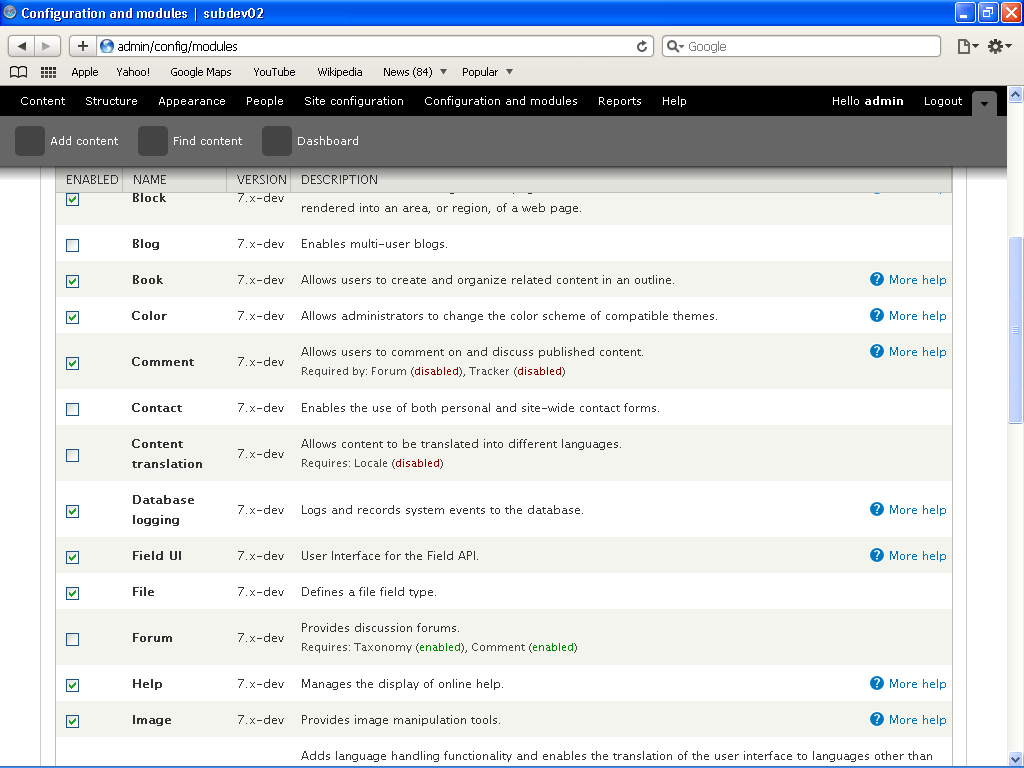
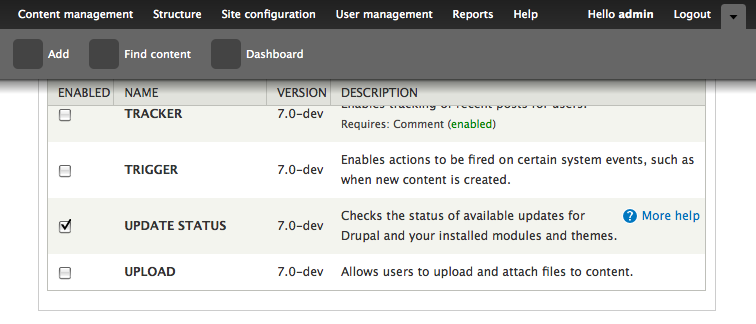
When you have the toolbar enabled, it covers sticky tableheaders when you scroll down.
| Comment | File | Size | Author |
|---|---|---|---|
| #14 | firefox-step-1.png | 54.36 KB | francewhoa |
| #14 | firefox-step-2.png | 57.42 KB | francewhoa |
| #14 | ie-step-1.png | 78.52 KB | francewhoa |
| #14 | ie-step-2.png | 78.5 KB | francewhoa |
| #14 | safara-step-1.png | 47.19 KB | francewhoa |




Comments
Comment #1
gábor hojtsyReproduced.
Comment #2
gábor hojtsyThere are basically two components to this:
1. The tracker() for the table header should consider that the table header might become invisible even if not out of the viewport yet.
2. The positioning of the scrolling header should be offset with the hidden body portion.
I've worked out a simple solution for this. Since the table header code should not have an explicit knowledge about the toolbar (given that other contrib modules can implement (similar) replacements), we need a generic mechanism. So tableheader.js looks for a callbak set in Drupal.settings.tableHeaderOffset and gets the offset value from that if set. If not, it still assumes 0 offset as it was before. Then this offset is used to position the scrolling table header and the checking of whether it should be turned on.
I've tested this patch on the modules page with both the toolbar enabled and disabled and it works the same way either. The table headers on all the tables are picked up when the table header goes under the toolbar and they are sticky to the bottom of the toolbar as if that would be the top of the viewport.
The approach taken also supports dynamic topOffsets, so if the user closes or opens the second level of the toolbar, the next scroll will adjust the table header position. Unfortunately it is not updated immediately, since that would require the opening/closing of the lower level of the toolbar to fire the repositioning of the sticky tableheaders. Since the next scrolling gets the header to the right offset, this patch is already a huge improvement over what we had before.
Feedback welcome.
Comment #4
webchickIt seems unlikely this patch would cause translation failures. Re-testing.
Comment #5
rszrama commentedRan into this problem today, too. Glad it was already reported and patched! I gave it a whirl, and it works. Only thing that's a little annoying is the shadow on Toolbar overlapping the tableheader. Makes it feel stuffy. Any chance this can be moved below the shadow, or would that screw things up? I mean... the overlap is a very easy thing to get over. : )
Comment #6
gábor hojtsyWell, we can push it down but that would make it look odd in a different way; some parts of the table would show *above* the *header*.
Comment #7
rszrama commentedThought that would be the case. Having a shadow seems more reasonable than having a funky bit of "table hair" on top of the table header.
Comment #8
catchThere's already an issue for toolbar shadow width: #535066: Use CSS3 / IE filter to render toolbar shadow
Comment #9
xmacinfoExactly, the toolbar shadow would prevent table sorting clicking. But most users will scroll the page to regain access to the table header... :-)
Comment #11
shunting commentedSorry if this is a n00b and obvious question:
Wouldn't the most generic way be for the sticky header to expose its own positioning? Then contributed UI effects could use that data to position themselves.
Comment #12
gábor hojtsy@shunting: well, it is not that others need to position themselves based on where the sticky table headers are but the other way around. There might be sticky stuff on top of the page, which should tell the table headers to move down. That is what the patch attempts to do. Rerolled for latest changes in HEAD.
Comment #13
cliffSubscribe
Comment #14
francewhoaConfirming that patch in #12 works. Thanks Gabor.
@all: Before applying the patch I noticed an issue in Internet Explorer 7. The fieldset button overlap with the tableheaders. If not already done I'll open a separate issue for that at http://drupal.org/node/578260. Patch in #12 doesn't seem to be the cause of this issue because it's working fine with other major browsers. What do you think? Find below screenshots or the following video to clarify. http://www.youtube.com/watch?v=SnM5eLooCVo
Tested with.
-Drupal 7 (September 9, 2009 - 05:11) fresh install.
-Garland theme.
-Windows XP
-Firefox 3, Internet Explorer 7, Opera 10, Safari 4.
Comment #15
dries commentedCommitted to CVS HEAD. Thanks for the patch Gabor, and thanks for careful testing Onopoc.
Comment #16
dries commentedComment #17
webchickOh, AWESOME! Thanks so much for fixing this! This has been driving me bananas. :)