

 Come together with the global Drupal community in Rotterdam, 28 Sept – 1 Oct 2026. Sessions, contribution, connection, and Early Bird savings until 8 June.
Problem/Motivation
If a pipeline fails, you have to click through to the failed job and ctrl-f to find the test failures.
DrupalCI's Drupal.org integration would (usually) show you which class failed and assertion errors or error messages at quite a high level.
For example:
https://git.drupalcode.org/project/drupal/-/pipelines/25459 shows a functional javascript failure.
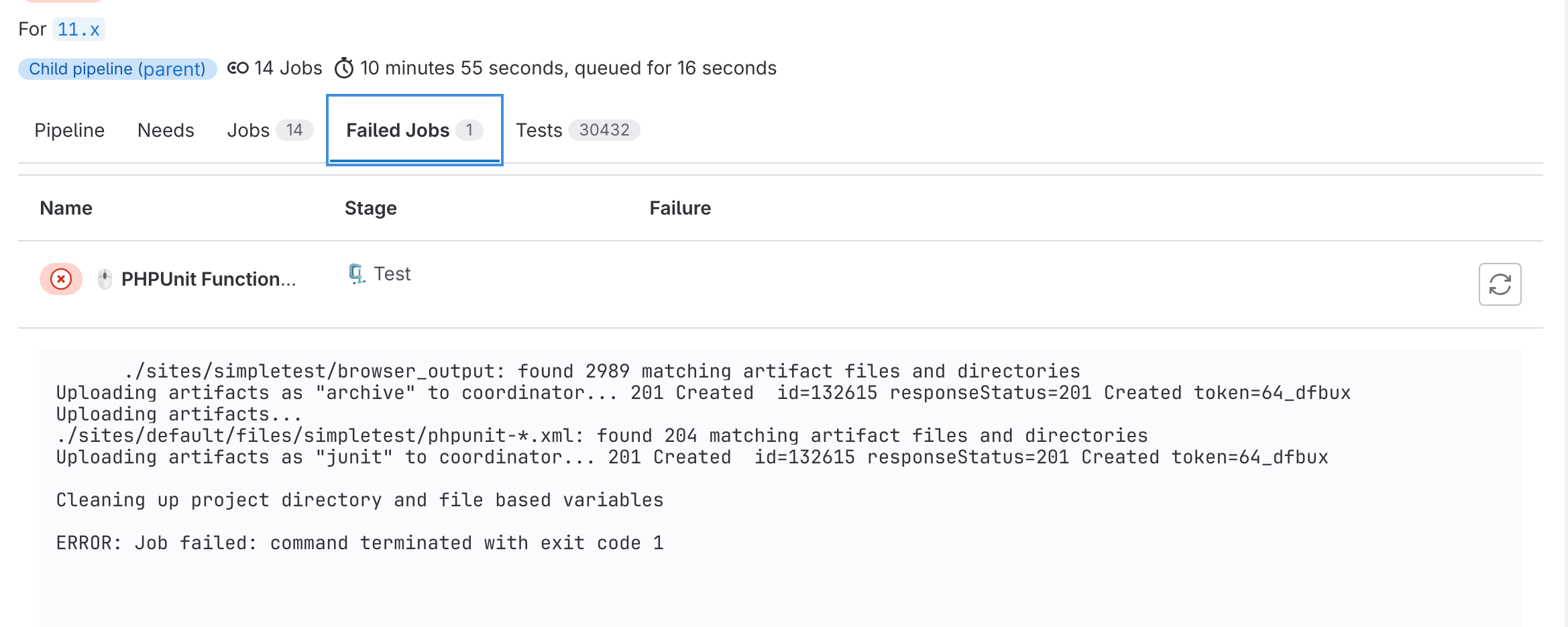
If I click on 'failed jobs', I get:
      ./sites/simpletest/browser_output: found 2989 matching artifact files and directories
Uploading artifacts as "archive" to coordinator... 201 Created  id=132615 responseStatus=201 Created token=64_dfbux
Uploading artifacts...
./sites/default/files/simpletest/phpunit-*.xml: found 204 matching artifact files and directories
Uploading artifacts as "junit" to coordinator... 201 Created  id=132615 responseStatus=201 Created token=64_dfbux

Cleaning up project directory and file based variables

ERROR: Job failed: command terminated with exit code 1
If I click on Functional Javascript tests, I get the last lines of the console log:
https://git.drupalcode.org/project/drupal/-/jobs/132615
I ctrl-f for 'fail', I get to:
Drupal\Tests\media_library\FunctionalJavascript\FieldUiInteg   0 passes             1 exceptions
FATAL Drupal\Tests\media_library\FunctionalJavascript\FieldUiIntegrationTest: test runner returned a non-zero error code (2).
Drupal\Tests\media_library\FunctionalJavascript\FieldUiInteg   0 passes   1 fails
If ctrl-f again, I get the actual error:
 PHPUnit Test failed to complete; Error: PHPUnit 9.6.8 by Sebastian Bergmann
    and contributors.

    Testing
    Drupal\Tests\media_library\FunctionalJavascript\FieldUiIntegrationTest
    E                                                                   1 / 1
    (100%)

    Time: 00:31.405, Memory: 4.00 MB

    There was 1 error:

    1)
    Drupal\Tests\media_library\FunctionalJavascript\FieldUiIntegrationTest::testFieldUiIntegration
    Behat\Mink\Exception\ExpectationException: Checkbox "set_default_value" is
    not checked, but it should be.

    /builds/project/drupal/vendor/behat/mink/src/WebAssert.php:794
    /builds/project/drupal/vendor/behat/mink/src/WebAssert.php:736
    /builds/project/drupal/core/modules/media_library/tests/src/FunctionalJavascript/FieldUiIntegrationTest.php:100
    /builds/project/drupal/vendor/phpunit/phpunit/src/Framework/TestResult.php:728

    ERRORS!
    Tests: 1, Assertions: 23, Errors: 1.

    HTML output was generated
Where you actually need to go to is the 'tests' tab, then click into the type you want to check, like:
https://git.drupalcode.org/project/drupal/-/pipelines/25513/test_report
However, I wonder if we can make this easier.
Steps to reproduce
Proposed resolution
Get the class, assertion failure and backtrace into the 'failed jobs' tab.
Remaining tasks
User interface changes
API changes
Data model changes
Release notes snippet
| Comment | File | Size | Author |
|---|---|---|---|
| Screenshot from 2023-10-01 08-55-11.png | 185.53 KB | catch |


Comments
Comment #2
catchLooks like https://docs.gitlab.com/ee/ci/testing/unit_test_reports.html
Comment #3
catchOK so there is a summary here, but it is a couple of clicks to find, and the failure details are in a modal:
https://git.drupalcode.org/project/drupal/-/pipelines/25513/test_report
Comment #4
catchComment #5
jonathan1055 commentedThis is also tedious on contrib testing too. Sometime even the 'tests' tab does not have the error. For example, this 'tests' tab /scheduler_content_moderation_integration/-/pipelines/25812/test_report - there is no phpunit job row in the table. But from the pipeline overview you can see that the phpunit job ran and failed.
[edit] The above might be due to gitlab config on that project, because even when the phpunit passes there is no row in the 'tests' tab. So it might not be an error with all contrib project results.
Comment #6
catchReading https://docs.gitlab.com/ee/ci/testing/unit_test_reports.html a bit more properly it's what we're already doing (for core at least) so is not helpful particularly for what I'm thinking of here.
Comment #7
ressaThanks for creating this issue @catch, and the tip about
Ctrl+F'ing until the actual error pops up, it was very helpful.Comment #8
joachim commented> the tip about Ctrl+F'ing until the actual error pops up, it was very helpful.
Sort of -- if you know what a failure looks like in the output of the particular test runner. I was recently working on a MR which added JS and I had no idea what string to search for in the test output.
Comment #9
ressaIt would still be great, if the reason why a test is failing, could be made clearer for the user :)