

 Come together with the global Drupal community in Rotterdam, 28 Sept – 1 Oct 2026. Sessions, contribution, connection, and Early Bird savings until 8 June.
Problem/Motivation
Following the implementation #956186: Allow AJAX to use GET requests.
Checkboxes are not rendered in the Media Library widget/the wrong media item is inserted after selection of a media item in the Media Library widget.
The issue is related to caching and pagination. Each paged record set in the filter builds the checkbox placeholders in PreRenderViewsForm method of the ViewsFormMainForm class from a 0 index resulting in search array looking like this
array:4 [▼
  0 => "<!--form-item-media_library_select_form--0-->"
  1 => "<!--form-item-media_library_select_form--1-->"
  2 => "<!--form-item-media_library_select_form--2-->"
  3 => "<!--form-item-media_library_select_form--3-->"
]
If Media items are returned from the cache having been on a page where the placeholder key is different then the rendered checkbox will return the wrong media item when selected.
If the placeholder key is beyond the range of the current result, then no substitution takes place and no checkbox is rendered. The following values returned for 4 media items result in only one checkbox being rendered (the one with the key of 3).
<!--form-item-media_library_select_form--3-->
<!--form-item-media_library_select_form--4-->
<!--form-item-media_library_select_form--5-->
<!--form-item-media_library_select_form--7-->

No JavaScript errors are observed, and there is nothing in the webserver or PHP logs.
Steps to reproduce
- Install the core Media and Media Library modules.
- Add an entity reference field of type Media to a content type.
- Create a new instance of this content type.
- Click the Add media button to open the media library modal.
- Perform a search for a media entity that yields just one result.
- Perform a different search for a media entity that yields just one result.
- Or page through search results that return multiple pages.
- The checkbox to select the media entity does not appear.
Proposed resolution
The buildForm method of the ViewsFormMainForm class looks for 2 methods on the MediaLibrarySelectForm field that don't exist so defaults to building the placeholders from the row index. The methods appear to be legacy code as the methods are snake case?
The getValue method and the viewsForm method on the MediaLibrarySelectForm field both use the ResultRow $row->index value where I think the $row->mid value might be more appropriate.
Adding the following methods to the MediaLibrarySelectForm class and updating the getValue and viewsForm methods to use the entity mid appears to fix the issue.
Add new methods to MediaLibrarySelectForm:
  public function form_element_name(): string {
    return $this->field;
  }

  public function form_element_row_id(int $row_id): string {
    return $this->view->result[$row_id]->mid;
  }
Refactor MediaLibrarySelectForm::getValue to use $row->mid
 public function getValue(ResultRow $row, $field = NULL) {
    return '<!--form-item-' . $this->options['id'] . '--' . $row->mid . '-->';
  }
Refactor MediaLibrarySelectForm::viewsForm to use $row->mid if views field is a media entity
    foreach ($this->view->result as $row_index => $row) {
      $entity = $this->getEntity($row);
      if (!$entity) {
        $form[$this->options['id']][$row_index] = [];
        continue;
      }
      $form[$this->options['id']][$row->mid] = [
        '#type' => 'checkbox',
        '#title' => $this->t('Select @label', [
          '@label' => $entity->label(),
        ]),
        '#title_display' => 'invisible',
        '#return_value' => $entity->id(),
      ];
    }
Remaining tasks
Reviews needed
User interface changes
None
API changes
None
Data model changes
None
Release notes snippet
None
| Comment | File | Size | Author |
|---|---|---|---|
| media_library.png | 135.81 KB | soulreceiver |
Issue fork drupal-3388913
 Show commands
Start within a Git clone of the project using the version control instructions.
Or, if you do not have SSH keys set up on git.drupalcode.org:
 changes

Comments
Comment #2
soulreceiver commentedComment #3
ttesteve commentedI've noticed the same issue since upgrading to Drupal 10.1 recently.
Like @SoulReceiver, it seems very random and I'm struggling to see any pattern. For example, myself and a colleague did the exact same search on different devices and I got all the checkboxes fine whereas he found that over 50% were missing. If I refine my search further, I then see checkboxes missing on some entities that showed them fine on the original search. I've not been able to consistently recreate the finding as yet where it always does it with a search returning a single result.
The one workaround I've found so far is that the issue only seems to happen on the Grid view. When I have missing checkboxes, if I switch to the table view, the checkboxes are all present. @SoulReceiver - Don't know if you find the same? If so, could it perhaps suggest an issue with the "Media: Rendered Entity" field as that's only used on the Grid view?
Comment #4
catchPlease try the MR on #3387039: Large placeholders are not processed. This sounds similar if not the same.
Comment #5
ttesteve commented@catch thanks for the suggestion. I applied the patch from the merge request (https://git.drupalcode.org/project/drupal/-/merge_requests/4778/diffs.patch) but it's not had any effect on resolving this particular issue unfortunately.
Comment #6
catchYou could also try #3348789: Compress ajax_page_state
Comment #7
ttesteve commentedThanks again @catch but the issue still remains after applying patch #91 from #3348789: Compress ajax_page_state unfortunately
Comment #8
catchCould you try reverting the change from #3196973: Use Mutation observer for BigPipe replacements to see whether that helps?
Comment #9
dpiTry disabling Twig debug... #2950758-28: Empty table cells never hidden if twig debug is true
I'm guessing this is why its a 'sometimes' problem: Twig debug isnt always on.
Comment #10
leewbutler commentedOur media image selection modal is showing similar issues. These issues only began after upgrading from Drupal 9 to Drupal 10.1. They were initially hard for us to reproduce but we have observed these patterns:
Just logging these observations here. I'll post more info when we get more clarity.
Comment #11
jamaral86 commentedFor some reason updating the view mode for the custom media type thumbnail improved the issue for me, we had it to show the original image in the media library grid and now I updated it to show the 200x200 thumbnail and I can't seem to see the checkbox issue anymore, the wrong image selection is harder to replicate, but I haven't been able to test it in prod which it's where it happens the most, but overall this is blocking us to be able to add some images on the site
Comment #12
rajab natshahI confirm having this issue
Feels that this is not one issue, maybe 2 or more issues in one case setup or after an update for Drupal 10 core
When I fill in the
"Name"filter field withAnd I press the
"Apply filters"buttonAfter that hit of AJAX for filters
I'm able to reproduce the issue of selecting one media item ( type of media image )
and getting another one in the filed.
Only
Having a media library select form order checkbox as 23 for example with value for the media id 905
Before the AJAX filter
<input data-drupal-selector="edit-media-library-select-form-23" type="checkbox" id="edit-media-library-select-form-23--R90go40dnks" name="media_library_select_form[23]" value="905" class="form-checkbox form-boolean form-boolean--type-checkbox" data-once="media-library-click-to-select media-item-change">After the AJAx filter
<input data-drupal-selector="edit-media-library-select-form-23" type="checkbox" id="edit-media-library-select-form-23--z_RRpXFgoaA" name="media_library_select_form[23]" value="897" class="form-checkbox form-boolean form-boolean--type-checkbox" data-once="media-library-click-to-select media-item-change">Comment #13
rajab natshahComment #14
rajab natshahHitting this issue when Aggregate JavaScript files is ON
When aggregation for js is off it has the default right behavior
Comment #15
rajab natshahComment #17
rajab natshahComment #18
rajab natshahStill when changing the number of Items filter to show more or less
Comment #19
rajab natshahWhen Allowing for Mini pager options has

"Allow user to control the number of items displayed in this view"The Sort criteria for Sort by is not showing up
find out that old configs has an empty identifier for the name sort criteria too
Sort field identifier ( name )
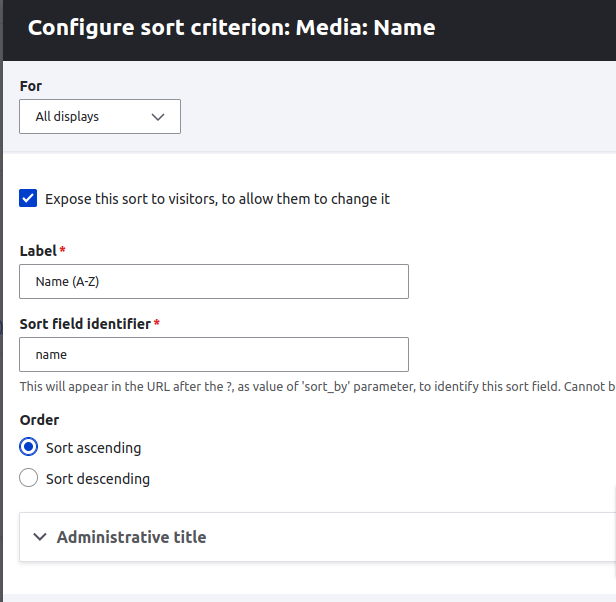
Sort field identifier ( name_1 )

Find out that both of them were empty
Comment #20
rajab natshahMaybe this issue is about when having an old config for Drupal 9 been upgraded to Drupal 10
or used as it was in the old config sync.
Updating the Sort field identifier and saving the view fixed this in my case
Comment #22
simonp98 commentedHaving this problem with Drupal 10.1.6 and the Media Library widget. Turning off caching for the widget and widget_table in the Media Library view makes the widget usable.
I think the issue is related to caching and pagination. Each paged record set in the filter builds the checkbox placeholders in PreRenderViewsForm method of the ViewsFormMainForm class from a 0 index resulting in search array looking like this
If Media items are returned from the cache having been on a page where the placeholder key is different then the rendered checkbox will return the wrong media item when selected.
If the placeholder key is beyond the range of the current result, then no substitution takes place and no checkbox is rendered. The following values returned for 4 media items result in only one checkbox being rendered (the one with the key of 3).
Hopefully this gives a bit more insight into the issue.
Comment #23
szato commentedSame here with Drupal 10.1.4.
Media library works by turning off the cache on the views displays.
Comment #24
dgsiegel commentedA few interesting notes:
Comment #25
catch#22 looks like good analysis, bumping to major.
Comment #26
agoradesign commentedregarding #24
After saving the view configuration, I've observed one thing. I don't know, if this makes any difference. I also only unset caching for the "widget" display, but the config for the other displays slightly changed too. The previously empty "tags" setting got filled with dependencies to different media EVD configurations. I do not believe that this has anything to do with the problem here, but I may be wrong... this part has changed (of course it'll differ from site to site, depending on what media bundles and view modes you have)
Comment #27
simonp98 commentedThe buildForm method of the ViewsFormMainForm class looks for 2 methods on the MediaLibrarySelectForm field that don't exist so defaults to building the placeholders from the row index. The methods appear to be legacy code as the methods are snake case?
The getValue method and the viewsForm method on the MediaLibrarySelectForm field both use the ResultRow $row->index value where I think the $row->mid value might be more appropriate.
Adding the following methods to the MediaLibrarySelectForm class and updating the getValue and viewsForm methods to use the entity mid appears to fix the issue; but I'm not familiar enough with the core code to know if there are further implications in making these changes.
Add new methods to MediaLibrarySelectForm:
Refactor MediaLibrarySelectForm::getValue to use $row->mid
Refactor MediaLibrarySelectForm::viewsForm to use $row->mid if views field is a media entity
Comment #28
catch@simonp98 those changes don't look like they would break anything else, or if they do, hopefully we'll find out via test coverage - and they make sense to me. Could you put then into a merge request on this issue?
Comment #34
simonp98 commentedAdded 2 new methods to the MediaLibrarySelectForm class and updated the getValue and viewsForm methods to use the entity mid. See comment #27.
Comment #35
smustgrave commentedThe issue summary is missing some sections, added the standard template and left the sections TODO or TBD, if not needed just add NA.
New functions should be typehinted with the return.
Adding new functions to the form believe warrants a change record.
Comment #36
simonp98 commentedComment #37
smustgrave commentedThink the last piece if the CR.
Comment #38
simonp98 commentedComment #39
simonp98 commentedComment #40
simonp98 commentedComment #41
smustgrave commentedTweaked the CR some
From the proposed solution looks like this part is still needed.
Comment #42
catchhttps://git.drupalcode.org/project/drupal/-/merge_requests/5619/diffs#6a... that's here isn't it?
Comment #43
smustgrave commentedMy mistake not sure how that didn't show.
But following the steps in the issue summary was able to replicate the issue.
MR does seem to fix the issue
Ran test only feature https://git.drupalcode.org/issue/drupal-3388913/-/jobs/446159 and got several failures, which I feel shows the coverage.
Marking but not sure if new functions require submaintainer approval.
Comment #44
quietone commentedI'm triaging RTBC issues. I read the IS, the comments, the MR and the change record. I didn't find any unanswered questions.
The change record should explain why someone would want to use the new methods and how to use them. And it should be written so it is understandable for anyone where English is not there first language. It should certainly not begin with the Problem statement from the issue summary. There is a link to the issue if someone wants to read more detail. I suggest searching the change records for high quality examples to help improve the change record for this issue.
Setting to NW for change record updates.
Comment #45
joelfp commentedIt's great to see all the work that's been done to resolve this as it's really been annoying our users getting the wrong image selected.
Looks like it's nearly at the finish line so I'm crossing my fingers it will make it into 10.2.2! Thanks!
Comment #46
simonp98 commentedImproved change record.
Comment #47
smustgrave commentedCR appears to have been updated, got lots of details now. Restoring status.
Comment #48
zeeshan_khan commentedThanks for fixing this issue.
I needed this fix for D10.1.8 so I have re-rolled it as patch.
Comment #49
smustgrave commentedChanging back to 11.x
Don't want the test bot to pick up the patch.
Comment #50
zeeshan_khan commented@smustgrave - sure thanks :)
Comment #51
quietone commentedThis is failing spell check. Adding tag for a reroll.
Comment #52
simonp98 commentedHow do I determine if this is actually a spelling error? The logs report the following and this code has previously passed all tests.
/scripts-124688-721749/step_script: line 277: /usr/bin/tr: Argument list too long
/scripts-124688-721749/step_script: line 277: /usr/bin/yarn: Argument list too long
Comment #53
catchIt just needs a rebase - the spelling check fails when the MR branch falls too far behind the target branch - there's an issue open, but until then a rebase works. Even if the spelling check wasn't failing, the MR can't be rebased with a fast forwards any more.
Comment #54
simonp98 commentedComment #57
catchCommitted/pushed to 11.x and cherry-picked to 10.3.x, thanks! There's enough changes here I'm not sure about backporting to 10.2.x, so leaving fixed against 10.3.x for now.
Comment #58
quietone commentedThanks for the improvements to the change records but it still needs work, The notice is a summary of the change and should focus on what someone should do to change existing code. If no change is needed then that should be stated. The notice should also mention when to use the new methods. The copy/paste of codes blocks should be removed.
Comment #59
catchThe form is a views plugin, which is internal, and doesn't need a change record, and no code should have to deal with the change. I've gone ahead and deleted it. The changes to the class aren't very easy to describe because the new methods are views 'magic' methods that aren't associated with an interface, but also nothing is going to have to directly interact with them (except views), so it's better to just fix the bug here and move on.
Comment #61
codebymikey commentedUpdated the issue summary to state the cause of the issue.
Comment #62
quotientix commentedDeactivating the caching in the view worked for me. Thanks!
Comment #63
japerryI don't know if there are other media type modules that have remote entities, but this issue fundamentally breaks that premise by requiring a media id. See https://www.drupal.org/project/acquia_dam/issues/3442662
For Acquia DAM we're working on a fix, but while its believed this change is internal, I 'think' (??) its expected modules can extend the view to include their media entities. Regardless, I'm leaving a comment here on the chance someone will run into this when updating to 10.3. It'd be nice if there was a BC shim in 10.3 so existing media modules could work.
Comment #64
oknaru commentedFYI, This issue is still existing with D10.2.6 using USWDS theme, Is there any update or patch that is available.