

 Come together with the global Drupal community in Rotterdam, 28 Sept – 1 Oct 2026. Sessions, contribution, connection, and Early Bird savings until 8 June.
Problem/Motivation
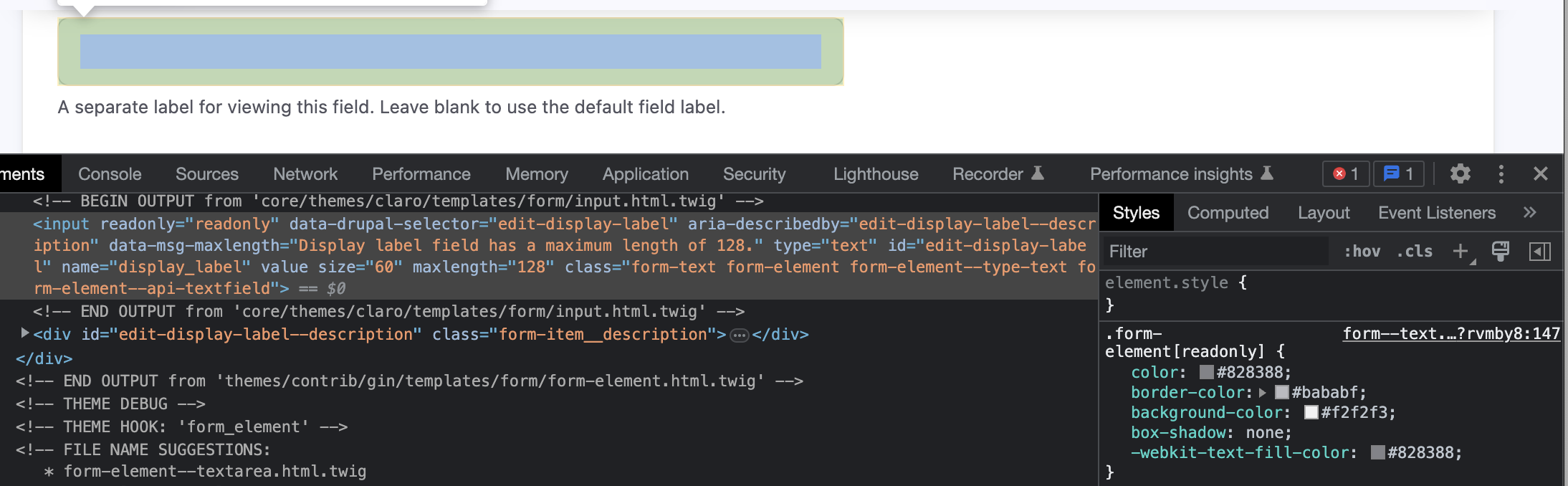
By fixing #2866383: Readonly doesn't work on #States there is a lack of the visually indication if a field is readonly.
I think we should use the disabled state or introduce a new visual guide.
Steps to reproduce
Add readonly to any textfield nothing change
Proposed resolution
Add a new css selector for apply disabled to readonly style.
.form-element[disabled],
.form-element[readonly]
Remaining tasks
User interface changes
Supporting readonly state along with disabeld state by indicating the user there is something special with the field like no editing possibility.
API changes
-
Data model changes
-
Release notes snippet
-
| Comment | File | Size | Author |
|---|---|---|---|
| #6 | 3363533-2.patch | 1.12 KB | zeeshan_khan |
| #6 | readonly-after.png | 299.1 KB | zeeshan_khan |
| #6 | readyonly-before.png | 365.01 KB | zeeshan_khan |
| #3 | 3363533-screenshot-1.png | 501.58 KB | ravi kant |
| #2 | 3363533-1.patch | 1.12 KB | Vidushi Mehta |
Issue fork drupal-3363533
 Show commands
Start within a Git clone of the project using the version control instructions.
Or, if you do not have SSH keys set up on git.drupalcode.org:
 compare


Comments
Comment #2
Vidushi Mehta commentedAdded a patch for the same
Comment #3
ravi kant commentedThe patch is working but we do not need this patch because the webform providing style already for readonly and disabled type filed. Attaching screenshot for more clarification.
Comment #4
smustgrave commentedbefore/after screenshots should be added to the issue summary.
@ravi kant is that class coming from a contrib module?
Comment #5
mukeysh commentedin #3 @ravi kant mentioned web form provides the default state for read-only and disabled but this CSS comes from the webform module which is the contrib module.
We need readonly styling in the claro theme as well.
Comment #6
zeeshan_khan commented@Mukeysh - make sense!
Added code with before/after png
Comment #7
zeeshan_khan commentedComment #8
lauriiiI don't think we should be applying the disabled styles either because disabled elements are not the same as readonly. The styles for disabled elements have been designed for that specific use case.
Are there convention to how read only fields should be styled? I checked some common design systems like Bootstrap and it looks like they also don't style the readonly fields.
Comment #10
smustgrave commentedSince this hasn't had a follow up in 2 years going to say it's outdated, if still valid though please re-open addressing #8
Thanks