

 Come together with the global Drupal community in Rotterdam, 28 Sept – 1 Oct 2026. Sessions, contribution, connection, and Early Bird savings until 8 June.
Our
icons can have low contrast in Windows High Contrast mode.
These icons need to be added via a background image. The only solution I can think of is adding a background white square behind the chevron.

| Comment | File | Size | Author |
|---|---|---|---|
| #25 | operaforcecolor.png | 323.1 KB | bnjmnm |
| #25 | opera-WCHM-bad-select-contrast.png | 189.58 KB | bnjmnm |
| #25 | opera-IE11.png | 352.26 KB | bnjmnm |
| #25 | FC-caniuse.png | 105.95 KB | bnjmnm |
| #25 | FC-mdn.png | 184.33 KB | bnjmnm |






Comments
Comment #2
mherchelThis patch inserts a
<rect>with a white background color into the background image of the<select>.Note that we can't use things like CSS shapes etc because there's no closing tag.
Comment #3
javi-er commentedLooks good to me! all the arrows seems to have enough contrast now.
Comment #4
javi-er commentedComment #5
lauriiiI think it would be helpful to have this solution reviewed by one of the accessibility topic maintainers.
Comment #6
mherchelAnother potential option is to use a combination of media queries to adjust the background image:
black-on-whiteandwhite-on-blackComment #7
andrewmacpherson commentedSetting an explicit white background is missing the point of forced-colors. The colours are supposed to be the user's choice, not the author's.
Note that "Windows high contrast" is a misnomer. Some people use it to achieve a low contrast. If a user needs sepia-on-beige because of photosensitivity, then forcing a white button background is a bit violent.
This works :-)
The tricky bit is that SVG background images don't have their colour adjusted automatically in forced-colors mode. Also, the computed
currentColordoesn't get inherited (because it's a separate document root with it's own styling scope, or something like that).Claro has been using variant images with
fill="WindowText", say. It works, but could get a bit unwieldy for some icons like the chevron, because we'll need variants for LinkText, WindowText, ButtonText, GrayText, depending on what element the chevron is used for.Note that Claro currently gets it wrong in some places. For instance it uses a
WindowTexttrash icon on a the node form's delete button, while the label text gets ButtonText. This sends mixed messages: is it a button, or not, and which bits are clickable?Don't use the legacy
black-on-whiteorwhite-on-blackvalues. I've never seen the point of these frankly.-ms-high-contrastand don't have any equivalents in the standard CSSforced-colorsmedia feature.You may see queries like
(forced-colors: active) and (prefers-color-scheme: light)or(forced-colors: active) and (prefers-contrast: more). However these aren't asserting the same thing as(-ms-high-contrast: black-on-white). They don't provide a justification for brute-forcing a white background.The nice thing about CSS shapes is it that their colour will be overridden by the user agent, so they can adapt to the button or disabled colours without us having to juggle a bunch of different SVG background images with
ButtonTextorGrayTextfills. You can make them work without using media queries at all - see #3171729: Claro Details component needs Windows High Contrast mode improvements.Some other ideas:
.form-type-select::after. The position coordinates would be tricky though, because theselectisn't the same width as the form-item wrapper. (Meh, probably a non-starter.)selectin a custom Twig template. Then a CSS shape could go inselect + span::after. It'll involve some extra effort to make the border and focus outlines go around both elements.When testing with Window's high-contrast mode, remember...
Comment #8
andrewmacpherson commentedI closed #3200642: Olivero's select chevron icon doesn't use the "high contrast" color in high contrast mode as a duplicate of this issue.
Comment #9
mherchelThis to me seems somewhat fragile. Plus it relies on Drupal's markup. One use case that I'm attempting to solve is if people paste in their own forms (for example a mailchimp signup form). We can't rely on any specific markup other than the
selectelement.I'm going to start working on this in a codepen to start off with.
Comment #10
mherchelUnfortunately, I'm completely stumped now. Firefox does not correctly support the
(forced-colors: active) and (prefers-color-scheme: dark)combination of media queries (Edge does support this). Test case at https://codepen.io/mherchel/pen/wvdyexb?editors=0100Comment #11
mherchelI believe I found a super great solution to this issue: We re-add the default browser chevron when in
forced-colorsor-ms-high-contrastmode. Then the browser will use the system colors to create the chevron.I couldn't figure out how to do a custom theme, but I tested this out in light and dark themes in FF, Edge, and IE. I'm pretty happy with this solution.
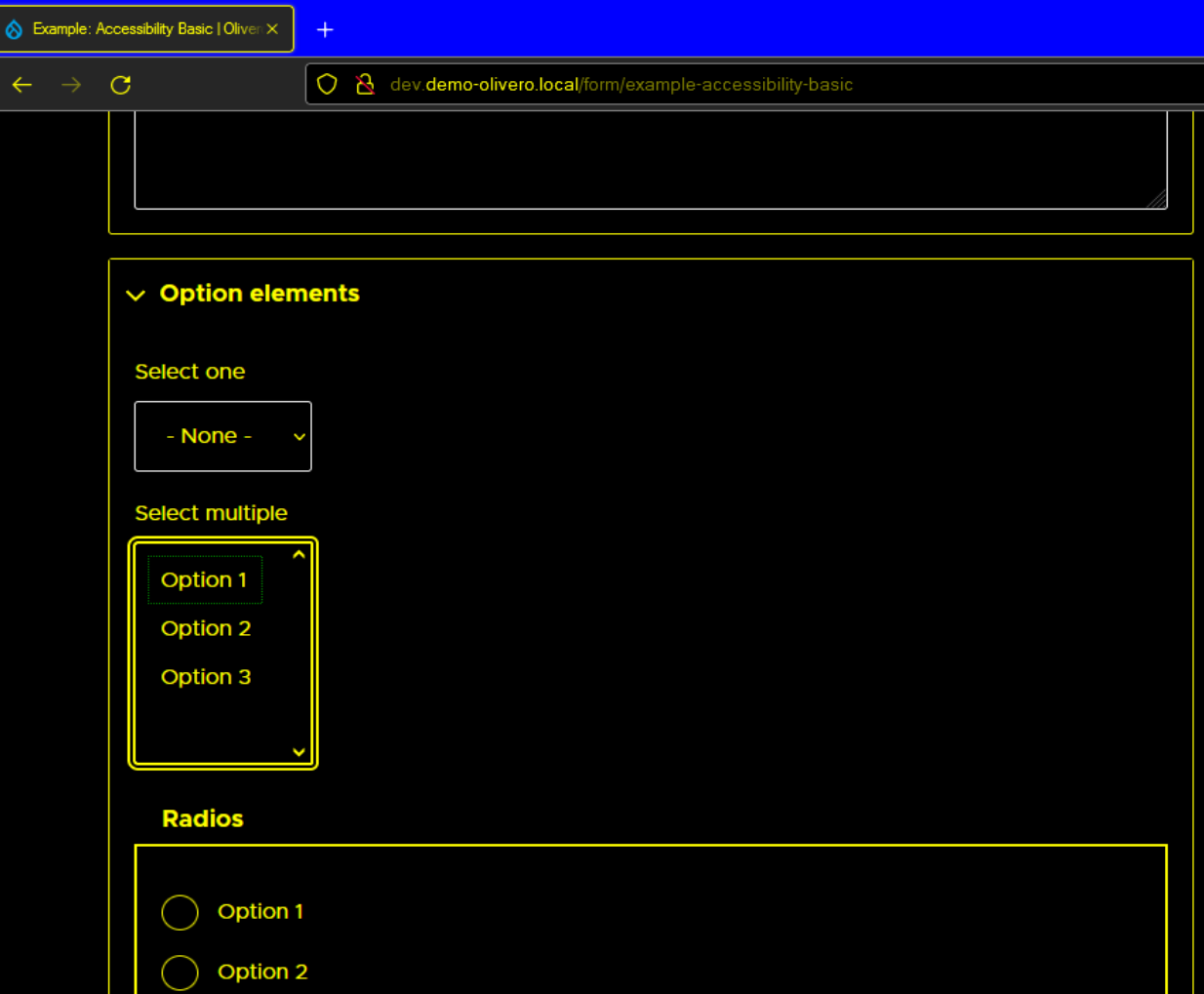
Edge:

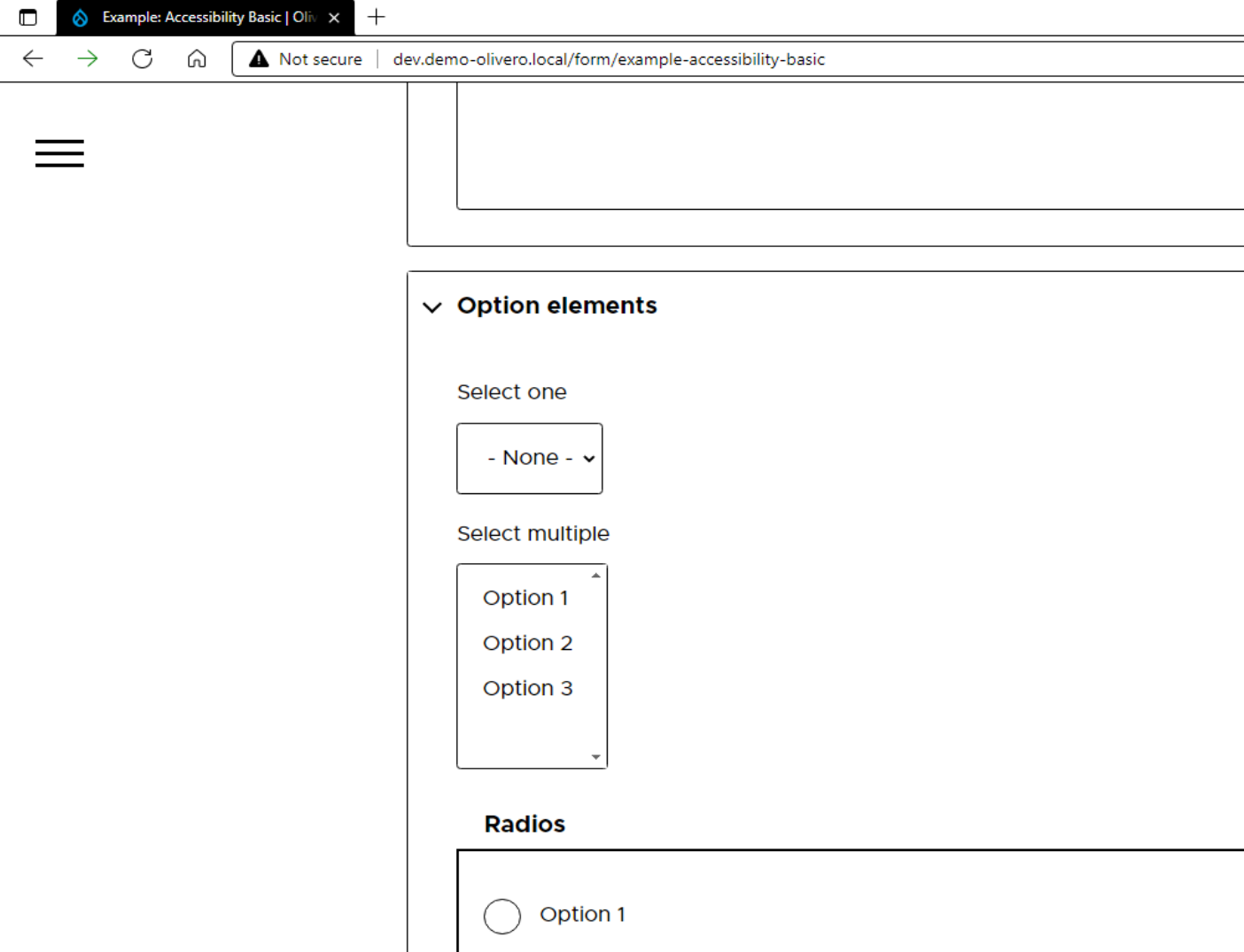
Firefox:

IE:

Edge:

Firefox:

IE:

Comment #12
mherchelHere is link to a tugboat preview with the most recent patch applied: https://3223271-select-hc-pbp23um9waawqgbrllabwu5rafg97wi0.tugboat.qa/fo...
Comment #13
bnjmnmThe approach of using native elements in these instances is a very good one. Manual review confirms this works in the browsers we need to be concerned with and with different schemes. I do have one request, but not one that precludes accessibility signoff:
Could you more explicitly explain in comments how this is being achieved? Its a good approach and I think this could be a helpful example to reference in other high contrast/forced color support issues.
Comment #14
mherchelCode comments updated!
Comment #15
bnjmnmThe additional comments look good, this should make it easier to reference when contributors are looking for ways to address future high contrast related issues.
All the changes boil down to returning to native in forced color scenarios, whether it's via revert or explicitly undoing IE-specific styles. It's a good approach and my manual testing had the same successful outcome as the screenshots in #11.
Comment #16
lauriiiSupport for
forced-colorsCSS media feature was added in Firefox 89. Drupal supports Firefox 78 as it's the current Firefox ESR release. However, Firefox is ending its support in Nov 2nd, 2021, which is before 9.3.0 is shipped.As I was testing that, I realized that this wouldn't work in Opera which we also support because it doesn't support
forced-colorsCSS media feature. 😢Comment #17
mherchelQuestion for accessibility maintainers: we commit this and then open up a followup for supporting Opera desktop?
Comment #18
mherchelI can't reproduce the issue within Opera in Windows HC mode. Note that CanIUse reports that Opera doesn't support this media query, but it obviously does.
Video attached.
Link to updated Tugboat preview: https://3223271-select-hc-2-ume8thm3p9uthiqqy5gpwsv2gbf5squ0.tugboat.qa/
Comment #19
lauriiiI can't confirm with Windows 10 + Opera 79 combo that Opera would support the media query:

I've considered our policies so that we are supporting all browsers with forced colors. However, I'm wondering if that's necessary given that for example, operating Opera in forced colors is very challenging because their internal UIs clearly don't support forced colors. I'm wondering if the accessibility topic maintainers have thoughts on this.
Comment #20
bnjmnmI had been looking into this based on the fact that there's already an understanding that in Windows, there precedence for "if you use (
foo) accessibility tool, then use (bar) browser", e.g. Firefox was recommended for the NVDA screenreader users while IE was recommended for the JAWS screenreader users. This comes from course materials written when IE had a larger browser share, but still exists as evidence that Windows users acknowledge some browsers are better suited for their accessibility needs that others.The same course materials mentioned that only OS provided browsers were recommended for WHCM. This was based on these being the browsers supporting the
-ms-high-contrastmedia query, so clearly it was written before Edge stopped supporting it in 18.0. At least in the point of view of the Deque course, there was a time one could only expect good WHCM browsing from a browser that supported a media query to identify that mode being active. Now that the three leading browsers all support MHCM detecting media queries, I'm not sure if this means it's easier to not support Opera due to the abundance of other options, or if it's more necessary as there's potentially a baseline assumption that any browser can support WHCM. I'll see if anyone on A11y Slack can provide some insight.Comment #21
mherchelSo, this totally works in Opera in Windows 10. I'm not sure what problem @lauriii is running in to, but it works fine.
Attaching a video here.
If you want to hop on a call to test this out together, I'd be more than happy to help.
Comment #22
bnjmnmThis is a screenshot of the video from #21 that states things are working fine. This is from around 0:56, and is shows Opera using the default dark WHCM.
 the voiceover says things are looking fine, but visually it's pretty clear the chevron lacks sufficent contrast.
This appears to still be exhibiting the problem reported in the issue, the chevron does not have sufficient contrast from its background. While I have to kick it back for that reason, I'm still unsure it is reasonable to expect Olivero to accommodate WCHM users, when the Opera browser itself doesn't really support forced colors.
On one hand, it could be argued that if Olivero is going to override the native select element, which would work in Opera/WHCM, then Olivero is responsible for ensuring it works fine in any browser using WHCM.
On the other hand, it could be argued that the problem is on Opera's end for not supporting forced colors, and there are plenty of (free) alternative browsers available that do. It's also not entirely clear how accessible Opera is expected to be overall, but I haven't been able to get much info in this regard.
Comment #23
pjudge commentedOpera: Version 79.0.4143.66
Windows: Version 10.0.19042 Build 19042 (Windows 10 Enterprise)
Edited to add: Using Windows default high contrast mode.
The chevrons appear to be working as in @mherchel's previous video.
Comment #24
mherchelOpera does support forced colors. Not sure why its not for @laurii. We revert the select back to the default within the code. I'm not sure what else we can do beyond that.
Can we commit this issue and create a followup? This is something that needs to get done and I feel like we're bikeshedding over the course of several weeks on this.
Comment #25
bnjmnmRe #24
In my manual testing, I can confirm Opera supports forced colors. I'm using version 79.0.4143.66.
Perhaps you see how we may have been led to believe otherwise based on the content of these typically reliable sources?
https://developer.mozilla.org/en-US/docs/Web/CSS/@media/forced-colors

https://caniuse.com/mdn-css_at-rules_media_forced-colors

That said, despite confirming the support of high contrast mode, the chevron still has insufficient contrast, something that is confirmed in the video provided in #21
So I went to https://developer.mozilla.org/en-US/docs/Web/HTML/Element/select in Opera/Windows to see a select element in Opera completely free of any Drupal context.
This confirms that Opera itself provides insufficient contrast for select chevrons when used in dark WHCM. Olivero is not introducing any contrast problems, and (although it would be nice) I don't think Olivero needs to be responsible for correcting Opera's shortcoming here if there's a straightforward way to do it (and I don't believe there is...).
Comment #26
bnjmnmI got additional assurance that not-ideal WHCM with Opera is OK via A11y Slack from user Stefany Newman. I asked "is a site not looking great in WHCM in Opera acceptable because it's understood Opera isn't great at WHCM?", and the response:
So the fact that Opera is not quite there with WHCM is understood and it doesn't seem like Olivero needs to bend over backwards to make up for that.
Comment #28
lauriiiCommitted 7357ae8 and pushed to 9.3.x. Also cherry-picked to 9.2.x because Olivero is experimental. Thanks!
Comment #30
drumm(disregard - saving to fix the issue version in the issue search index)
Comment #31
andrewmacpherson commented@mherchel - what is the follow-up mentioned in #24?
Opera turned forced-colours support on in version 74.
Comment #32
mherchelThe followup was to specifically override Opera's handling of
<select>'s in forced colors mode.I didn't create the following because of @bnjmnm's comment in #26