

 Come together with the global Drupal community in Rotterdam, 28 Sept – 1 Oct 2026. Sessions, contribution, connection, and Early Bird savings until 8 June.
Steps to reproduce:
1> Install drupal and get it to step "Set up database"
2> Enter a database name with hyphens like wrong-db-name
3> Click submit
Note: Error appears only once and to reproduce again change the DB-name
Actual result:
Screenshot 2020-07-06 at 5.51.48 PM.png
Error
The website encountered an unexpected error. Please try again later.
Drupal\Core\Database\DatabaseNotFoundException: SQLSTATE[HY000] [1049] Unknown database 'wrong-database' in
Drupal\Core\Database\Driver\mysql\Connection::open() (line 139 of core/lib/Drupal/Core/Database/Driver/mysql/Connection.php).
Drupal\Core\Database\Driver\mysql\Connection::open(Array) (Line: 380)
Drupal\Core\Database\Database::openConnection('default', 'default') (Line: 169)
Drupal\Core\Database\Database::getConnection() (Line: 366)
Drupal\Core\Database\Install\Tasks->getConnection() (Line: 81)
Drupal\Core\Database\Driver\mysql\Install\Tasks->minimumVersion() (Line: 219)
Drupal\Core\Database\Install\Tasks->checkEngineVersion() (Line: 195)
Drupal\Core\Database\Driver\mysql\Install\Tasks->checkEngineVersion()
call_user_func_array(Array, Array) (Line: 142)
Drupal\Core\Database\Install\Tasks->runTasks() (Line: 1207)
install_database_errors(Array, './sites/default/settings.php') (Line: 186)
Drupal\Core\Installer\Form\SiteSettingsForm->getDatabaseErrors(Array, './sites/default/settings.php') (Line: 169)
Drupal\Core\Installer\Form\SiteSettingsForm->validateForm(Array, Object)
call_user_func_array(Array, Array) (Line: 82)
Drupal\Core\Form\FormValidator->executeValidateHandlers(Array, Object) (Line: 273)
Drupal\Core\Form\FormValidator->doValidateForm(Array, Object, 'install_settings_form') (Line: 118)
Drupal\Core\Form\FormValidator->validateForm('install_settings_form', Array, Object) (Line: 589)
Drupal\Core\Form\FormBuilder->processForm('install_settings_form', Array, Object) (Line: 321)
Drupal\Core\Form\FormBuilder->buildForm('Drupal\Core\Installer\Form\SiteSettingsForm', Object) (Line: 945)
install_get_form('Drupal\Core\Installer\Form\SiteSettingsForm', Array) (Line: 615)
install_run_task(Array, Array) (Line: 568)
install_run_tasks(Array, NULL) (Line: 118)
install_drupal(Object) (Line: 48)
Expected result:
Screenshot 2020-07-06 at 5.48.11 PM.png
Resolve all issues below to continue the installation. For help configuring your database server, see the installation handbook, or contact your hosting provider.
Database wrong-database not found. The server reports the following message when attempting to create the database: SQLSTATE[HY000]: General error: 1007 Can't create database 'wrong database'; database exists.
Failed to CREATE a test table on your database server with the command CREATE TABLE {drupal_install_test} (id int NOT NULL PRIMARY KEY). The server reports the following message: SQLSTATE[3D000]: Invalid catalog name: 1046 No database selected: CREATE TABLE {drupal_install_test} (id int NOT NULL PRIMARY KEY); Array ( ) .
Are you sure the configured username has the necessary permissions to create tables in the database?
| Comment | File | Size | Author |
|---|---|---|---|
| #9 | Screenshot 2020-08-12 at 11.34.20 AM.png | 92.04 KB | thedrupalkid |
| #7 | Screen Shot 2020-08-07 at 11.47.28 AM.png | 221.22 KB | narendra.rajwar27 |
| #6 | 3157176-6.patch | 1.93 KB | codersukanta |
| Screenshot 2020-07-06 at 5.51.48 PM.png | 845.05 KB | thedrupalkid | |
| Screenshot 2020-07-06 at 5.48.11 PM.png | 829.05 KB | thedrupalkid |



Comments
Comment #2
thedrupalkid commentedComment #3
codersukanta commentedComment #4
codersukanta commentedIn this case for mysql, database is getting created escaping the unacceptable characters given in the database name.
After that it tries to match the given database name (Unescaped) in the database server and throws
.
There could be 2 possible solution :
Comment #5
thedrupalkid commentedHello @codersukanta, Thanks for your valuable inputs on this but what I believe the problem is that it is not throwing an error which it generally shows ie: Screenshot 2020-07-06 at 5.48.11 PM.png we need not to do this
or
As we already have a solution but in this specific case it is sometimes leads to an error screen ie: Screenshot 2020-07-06 at 5.51.48 PM.png
So as I have already defined in the Issue summary we need to have the expected result instead of the actual result we have.
Comment #6
codersukanta commentedAdding patch for the issue.
Comment #7
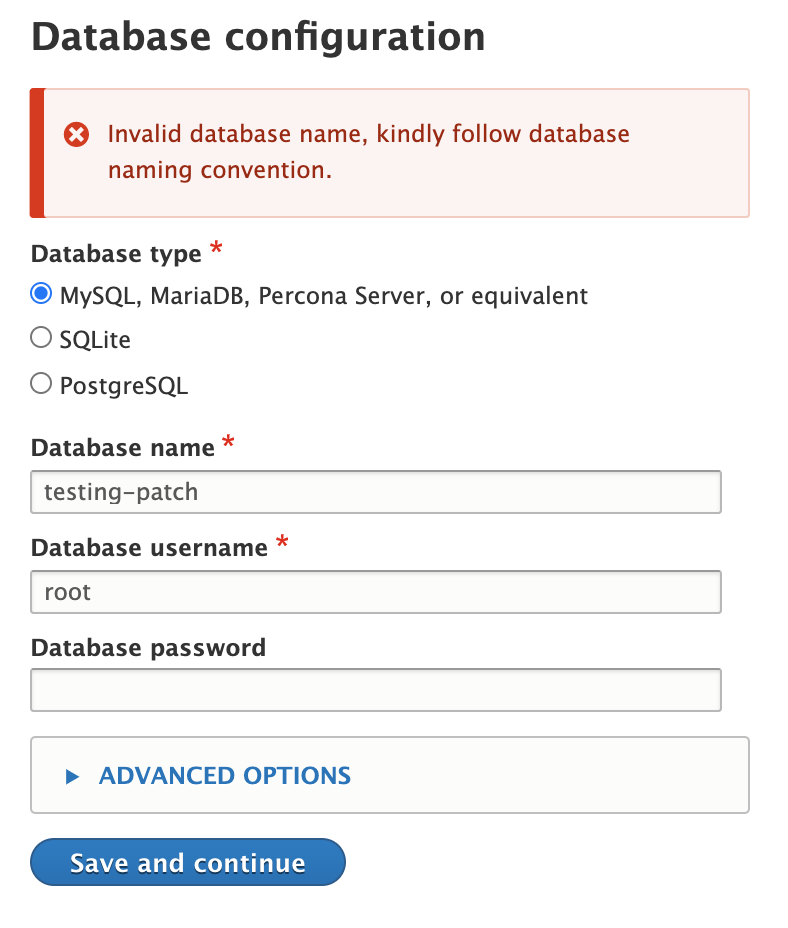
narendra.rajwar27@codersukant, Thanks for taking this forward. It seems it is now showing only the error message given and not showing rest of the error details as mentioned in IS expected result. Would be great if error details along with error message could be shown. Except that patch looks good to me.
adding SS of error message after patch:

Thanks
Comment #8
codersukanta commentedThanks @narendra.rajwar27 for reviewing the patch.
Regarding
This is not as per the expected result from issue summary because the expected message is returned only after the system has created database with the escaped DB name (this is happening @escapeDatabase function at core/lib/Drupal/Core/Database/Connection). The message in question appears only during second attempt to create the DB where in it says that DB already exists.
Ex:
The system first creates the database with name "abcabc" after escaping unwanted characters (characters that does not comply with naming convention) here because in system settings we still have "abc-abc" as DB name (actual DB created with name 'abcabc') because of which system throws DB not found error.
On second attempt with same 'abc-abc' DB name system throws/returns DB already exists error because now the same function (escapeDatabase) that previously created database in DB server by escaping the unwanted characters is attempting to do the same i.e escaping DB name and attempting to create the database with escaped name 'abcabc' which already exists.
So in this scenario it is best to prevent DB creation during early validation stage so this unnecessary DB creation by escaping unwanted characters be avoided, and this is exactly what the patch at #6 is doing and for this reason the message returned is "Invalid database name ...".
Kindly share if you have any other point of view or approach to handle this scenario.
Comment #9
thedrupalkid commented@codersukanta: As per our conversation on slack, Let's make the changes in the error message which is we do not require a list as there is only one error, also we do not require the following message
.

I have attached screenshot for the reference:
Good to have: A link reference to database naming conventions in error message just like "Installation Guide".
Comment #10
codersukanta commentedHi @thedrupalkid, Thanks for reviewing the patch.
As per the messsage display is concerned this is being shown as per default template on the page. We have not done anything to disturb that.
Working on message displaying template for this page will be scope creep.
Comment #11
daffie commentedComment #13
quietone commentedThis is a duplicate of an older issue, #2443839: Drupal does not install when auto-creating the MySQL database with special characters. That issue also has a patch with tests and much more discussion. Like here the solution is to inform the user of the naming restrictions.
Therefor closing this as duplicate
Comment #14
quietone commented