

 The 2026 Drupal Business Survey is open. Your response will help shape the future of the Drupal business ecosystem.
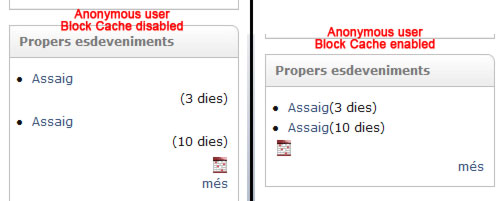
When I enable the block cache some blocks lost the style. The first page that I visit, for example the front page, all blocks looks fine but when I enter to a node page some blocks lost the style.
If I do the inverse thing occurs the same. If the first time that I visit the page is a node, all blocks looks fine in the node page, but when I change to the front page, some blocks lost the style.
If I disabled the Block cache the problem disappear.
| Comment | File | Size | Author |
|---|---|---|---|
| block-cache.jpg | 20.28 KB | oriol_e9g |

Comments
Comment #1
aryanto commentedI experience exactly this also in Drupal 6.4, particularly on the Blog's Block. The solution is exactly as written by oriol_e9g, disable Block Cache. But that is not a solution as that affects the performance.
Comment #2
moonbeam3 commentedhay can you tell me what this website is about?????
Comment #3
moonbeam3 commentedwhat??????????????
Comment #4
aryanto commentedDo you mean my site? If so, it is http://thetwins.info. I have disabled the Block Cache now. So if you clicked on any link under "Latest News", which is actually the Block for the Blogs, the colour of the link will change to "blue" as it is active. I can enable the Block Cache if you want to see that the active links will not be highlighted with blue colour.
Comment #5
aryanto commentedforgot to change the category back to "bug report".
Comment #6
WorldFallz commented@moonbeam-- pls stop these useless posts. If you don't know what this website is for, then don't post here. You've already been asked once in the other thread you spammed.
Comment #7
aryanto commentedI just would like to give an update that this issue still occurs in Drupal 6.5.
Comment #8
aryanto commentedI just would like to give an update that this issue still occurs in Drupal 6.5.
Not sure why there are two entries here. Maybe I accidently clicked on the "Post comment" twice.
Comment #9
dpearcefl commentedIs this still an issue using current Drupal 6?