

Closed (works as designed)
Project:
Drupal core
Version:
8.0.x-dev
Component:
user interface text
Priority:
Normal
Category:
Task
Assigned:
Unassigned
Reporter:
Created:
12 Jan 2008 at 17:46 UTC
Updated:
29 Apr 2015 at 22:54 UTC
Jump to comment: Most recent, Most recent file

Comments
Comment #1
pasquallethis patch displays the link
Comment #2
pasqualleComment #3
traxer commentedThere is a "Delete" button on
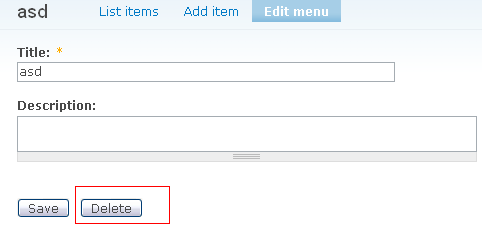
admin/build/menu-customize/%menu/edit. It's not there on system menus, only on custom menus.Comment #4
pasqualleThe user interface for delete functionality is not unified in Drupal.
Comment #5
traxer commentedI expected the delete button on exactly the page on which it shows up. What do you mean?
Comment #6
pasqualleOk, the delete button can be there, but then change it on other places.
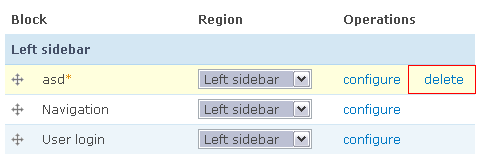
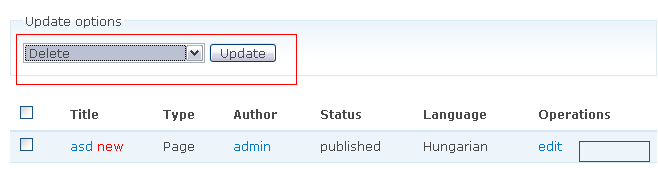
The user interface is not unified. see screenshots.
Comment #7
traxer commentedThe location of the menu delete button matches that of the node delete button (i.e. on the "Edit" page). On the node overview page, no "Delete" link is displayed under "Operations", because (I guess) there is no key candidate on that page. There is a "Delete" link on the blocks overview page, because (I have to guess again) there is no "Edit" link.
Comment #8
catchSubscribing. admin/content/node is pretty horrible. Getting this together across the board will be a reasonable sized job but needs doing.
Comment #9
pasqualleComment #10
Tor Arne Thune commentedFrom what I see, this has been dealt with in 7.x, except for the delete button for menus is still not visible in the same place as for blocks and content. So, moving to 8.x.
Comment #11
jhedstrom