The table "cache_menu" is groving to over 40 Mb in 24 our, and no "flush caches" from Drupal can get it down.
I am forced to do a manually flush by a "truncate" inside the MySql database table - 2 times per day???.
I also tried "Cron_cache", but still it not working. It is a major problem because the database is getting over the maximum size limit of 100 MB, in 20-36 our, because the site has good traffic.
I also look like that "cache_menu" is unnecessary hughe? ( some subject on that )
(I can't see any good in a cache, that needs manually flush else is grooving by it selves, who cross maximum limit of the database. )


Comments
Comment #1
spleshkaDoes it happen after update to 7.23 or this behavior was touched previos versions?
Comment #2
göran commentedSry, should have told that this problem has been from earlier versions to, and has growing because of higher traffic on site. There are also ca 500 nodes, made by visitor, asking questions (protected by mollom).
The site with biggest problem - is with a site with using traditional "blocks", but the problem is on other sites to, ie with panels use.
Comment #3
spleshkaI think that you just need to change you hosting. 100mb is not enough for database, even for small site.
Can you describe what problems with blocks and panels?
Comment #4
göran commentedNo specially problem with block or panels.
What I mean is that on both types of sites there is same problem to flush "cache_menu" - who not changing at all after flush cache (from "admin_menu" or cron or the "cron_cache" module).
On one site - not flushed for a while (truncated in DB), the "cash_menu" table was 650 MB?
Please advise - What Database size limit is proper for a Drupal site?
(attached active module list on Xcel)
Comment #5
Toongenius commentedI am having this same issue.
The cache_menu table explodes in size all by itself even when the website has no visitors, and an automatic cron job will not clear it. I have to manually go into the site each day and clear the caches or go into the mysql database server and truncate the table to get rid of the buildup. The table can easily reach over 1Gb per day.
This definitely should not be happening and it is causing major grief with my web hosting service.
Please advise.
Comment #6
spleshkaCould you please attach an sql dump of {cache_menu} table here? I want to take a brief look on it. I never found issues here.
Comment #7
Toongenius commentedComment #8
spleshkaI've imported this lines, it allocates less then 4mb of diskspace. Possibly, you just need to Optimize this table (invoke Recreate + analyze commands in any mysql client).
Comment #9
spleshkaProcessed issue data.
Comment #10
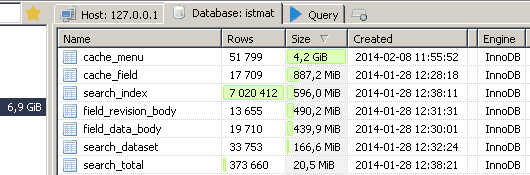
RedRat commentedI have the same issue with a huge cache_menu table. In some days it's grows up to 6-7 GB, while all other tables in sum only 2.5 GB. It leads to some very nasty problems:
Look at the attached screenshot, just after some days after table truncation it grew to 4.2 GB, and it's not a limit! Before truncation it was 6.6 GB. :-(