Closed (cannot reproduce)
Project:
Drupal core
Version:
7.21
Component:
user interface text
Priority:
Normal
Category:
Support request
Assigned:
Unassigned
Reporter:
Created:
14 Mar 2013 at 19:35 UTC
Updated:
9 May 2013 at 18:52 UTC


Ok guys,
This is a weird one, and I really need help figuring it out!!!! My site needs to go live in 1 week!
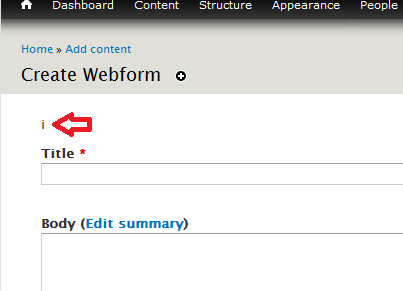
So out of nowhere, I suddenly noticed that the letter "i" just starting appearing above forms in the administration view.
It's pretty much just on the pages where you add or edit content as far as I can tell. I can't for the life of me figure out where it's coming from.
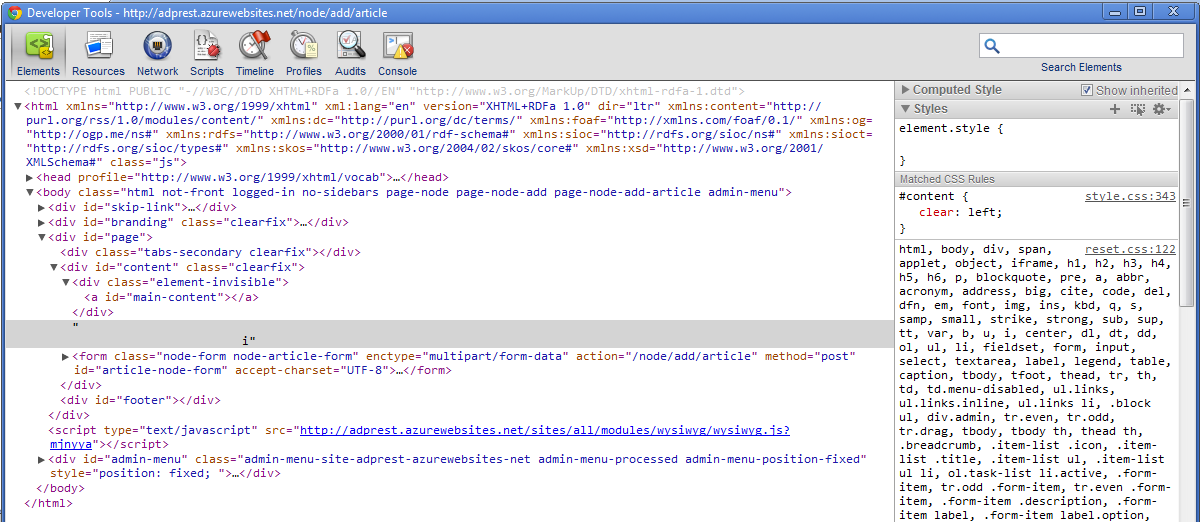
Here's the source:
  <div id="page">

          <div class="tabs-secondary clearfix"></div>


    <div id="content" class="clearfix">

      <div class="element-invisible"><a id="main-content"></a></div>

                        i<form class="node-form node-page-form" action="/node/401/edit" method="post" id="page-node-form" accept-charset="UTF-8"><div><div class="form-item form-type-textfield form-item-title">
  <label for="edit-title">Title <span class="form-required" title="This field is required.">*</span></label>
 <input type="text" id="edit-title" name="title" value="Hurricane Sandy Recovery" size="60" maxlength="255" class="form-text required" />
</div>
screen shots attached -
hope someone can help!
thank you in advance


Comments
Comment #1
longwaveSupport requests are never critical.
If you change the theme used on the pages in question, does the problem still occur? If so, the problem lies in your theme.
Comment #2
cardpages commentedThanks for the response, and sorry about the improper status.
It appears regardless of the theme I choose.
Comment #3
dman commentedThis is funny!
Looks like a typo left over from some inadvertent file editing. Do you use vi at all?
General solution, (and the final desperate step) compare your core code with what it should officially be, using your source control (if any) or a side-by-side file&folder compare with a clean checkout.
But in your case, I'd have a look around theme_form()
includes/form.inc:3858
Might not be that, but it's the next place I'd look (after eliminating the theme, as above)
Comment #4
cardpages commentedthis truly is funny! i'll poke around where you suggest. i didn't use any vi, AND i've updated Drupal core since this thing popped up! (deleted everything but sites folder and copied in the release)
Comment #5
dman commentedI just ask because "i" is the character it's easiest to fumble-finger when using vi ...
Was worth a guess.
If you are sure CORE is clean and it's not the theme, that's starting to get more mysterious even.
Comment #6
cardpages commentedits not in form.inc
am i really going to have to go through every single core file?
Comment #7
dman commentedWe have robots to do that for us. As a command-liner, the tool is "diff -r good_drupal bad_drupal".
Without knowing your preferred OS, I dunno what the best tool for you is. "recursive file compare" is a pretty useful feature, and is why we use version control and IDEs.
Comment #8
cardpages commentedcore is looking good, used Active File compare and ran through them all... it has to be somewhere inside my sites folder.
it only come up for adding/editing content
Comment #9
dman commentedIt'll end up coming down to a rogue contrib module I guess
Comment #10
cardpages commentedhmph... thanks for the help.
i hope i can figure it out before i look like a fool!
Comment #11
rszrama commented