

Closed (fixed)
Project:
Drupal core
Version:
8.0.x-dev
Component:
toolbar.module
Priority:
Normal
Category:
Feature request
Assigned:
Unassigned
Issue tags:
Reporter:
Created:
30 Nov 2012 at 17:36 UTC
Updated:
29 Jul 2014 at 21:36 UTC
Jump to comment: Most recent, Most recent file






Comments
Comment #1
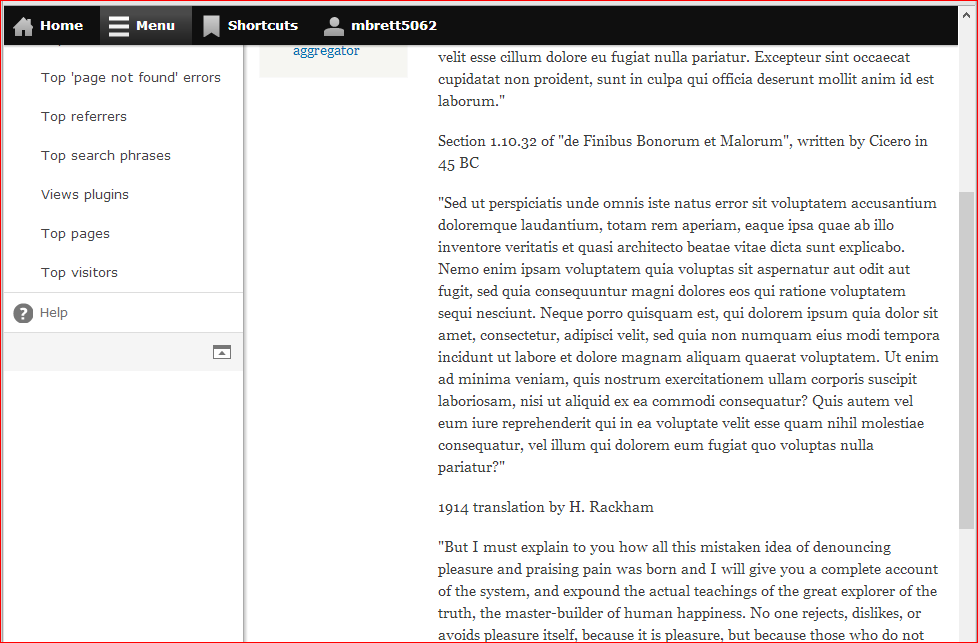
benjifisherIf the toolbar itself is too tall, then there has to be a way to scroll it. In an earlier incarnation, it had its own scrollbar. See the first screen shot below, from #1137920-206: Fix toolbar on small screen sizes and redesign toolbar for desktop. I am not sure that we want to go back to that design, but if we do, then we can probably solve the problem I pointed out in #206.
I agree that the white space all the way to the bottom of the page, as in your last screen shot, is annoying. I know enough about CSS layout to know that this is not an easy thing to improve.
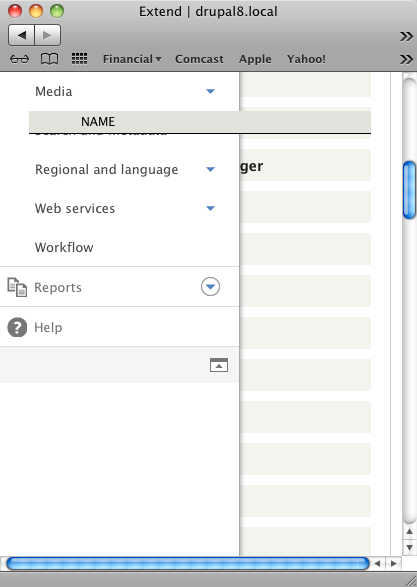
I do not have enough energy to open a new issue, but I just noticed that the toolbar links disappear, but the table header still moves below their ghosts, at certain widths. See the second screen shot below.
Comment #2
mbrett5062 commentedYep, noticed that with the table header too. Just a z-index issue. We need the tray to be above all normal page elements and only below overlays and modal dialog's. OK 'table.sticky-header' has a z-index of 500, '.toolbar .tray' has a z-index of 250. That is the problem.
I think it would be easy to get the tray 'sticky' there are a number of jquery solutions around, I am investigating now, will update issue tomorrow.
Comment #3
jessebeach commentedThanks for looking at this mbrett5062.
Comment #4
mbrett5062 commentedYes, sorry I did not get back with a patch or anything, been real busy with another issue. First on the list of 'twig' issues.
Comment #5
mbrett5062 commentedJust a quick follow up on the issue here. I am now finding this a real PITA. Been testing other issues, and keep running into the problem of the tray being off screen, having to scroll window back up to get into another part of the admin menu.
Comment #6
dave reidAs someone that hasn't checked out D8 for a while, this is a big UX WTF as an administrator that I easily have the menu go missing even though there's a nice empty space for it on the left side of my screen.
Comment #7
jessebeach commentedWhen we first put this code in place, we didn't have Modernizr and the
touch/no-touchclasses to distinguish the feature. The reason the menu scrolls is to make the mobile UX better.I wonder now that we can distinguish a touch device, if we peg the menu to a fixed position on larger screen (no-touch) and allow it to scroll with overflow. Maybe on a really narrow screen we can unfix the position even on a no-touch device. I think it requires a bit of experimentation to get it to a point of acceptability.
Comment #8
bryanbraun commentedI'm willing to take a swing at this one and put together a patch based on the Modernizer touch classes. If anyone has other ideas or suggestions, let me know.
Comment #9
bryanbraun commentedSee the attached patch. This fixes the toolbar to the window and provides overflow scrolling, unless modernizr considers it a touch device,
The fixed-with-overflow-scrolling option is what the Admin module uses for its toolbar, so I'd say it sets a good precedent. I was hoping to get that kind of behavior for all devices, since it seems like a more native experience, but it turns out that many touch devices handle overflow scrolling poorly. Some people have coded up some javascript-y solutions (like Overscroll, Scrollability, or the Gmail option), but I could see things getting complex pretty quickly if we were to include something like that.
Maybe there are ways to use progressive enhancement to offer menu scrolling on the mobile browsers that support it. It would be nice to get ahead of this one since D8 will be used long after all mobile browser support it. Just thinking out loud.
Comment #10
jessebeach commentedGreat patch bryanbraun. Surgical and effective. I think this addresses the issues Dave Reid brought up in #6.
I made a few changes to the placement of the code changes, but nothing fundamental to the changes to proposed.
I moved this code from the bottom of the file and interleaved it next to similar code.
I put up an interdiff from #9, too. Let's see if we can get Dave Reid to weigh in on this solution.
Comment #11
jessebeach commentedThis is a small fix that moves the issue forward. It also will put more eyeballs on the tweak and encourage further feedback.
I predict we'll need to further adjust this behavior especially with the introduction of touch-screen laptops and high-resolution tablets. We can finesse the behavior in further patches.
This patch at least addresses the WTF raised by Dave Reid in #6.
Comment #12
dries commentedCommitted to 8.x. Thanks.