

Closed (works as designed)
Project:
Drupal core
Version:
7.x-dev
Component:
node system
Priority:
Normal
Category:
Bug report
Assigned:
Unassigned
Reporter:
Created:
11 Apr 2012 at 18:29 UTC
Updated:
13 Apr 2012 at 07:19 UTC
Jump to comment: Most recent file




Comments
Comment #1
vineet.osscube commentedHi thoughtcat, provide more information regarding this issue like screen-shots or steps to produce the problem, it helps to identify the problem.
Comment #2
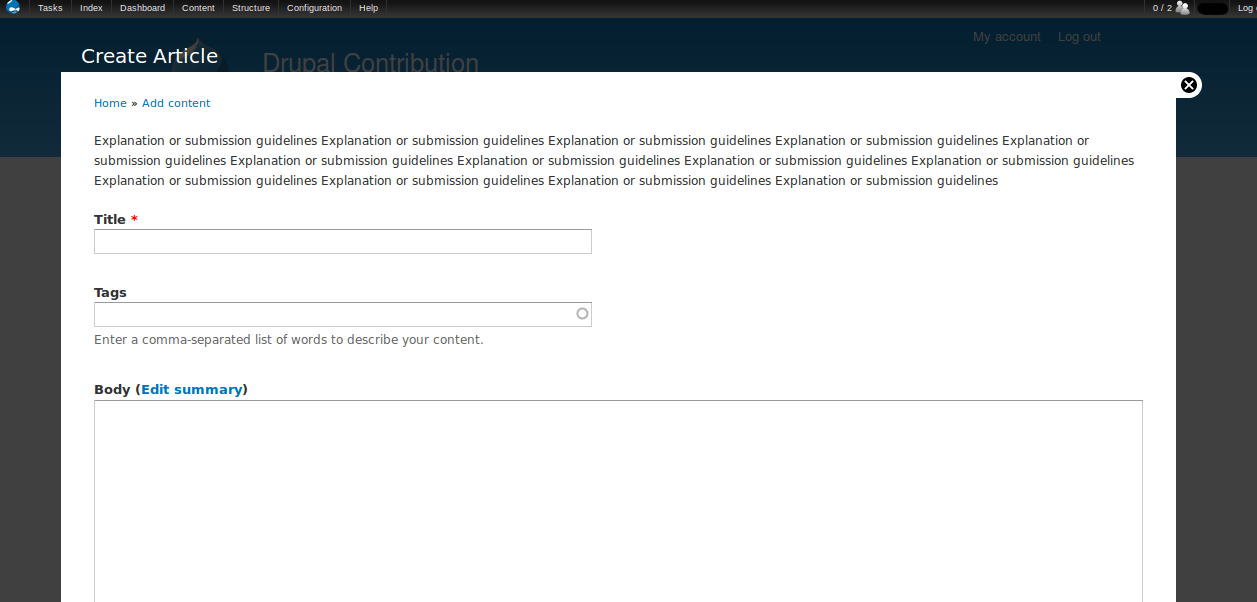
thoughtcat commentedSure thanks Osscube, I attach screenshots of the node/add/article form when logged in as admin and then as an authenticated user. In the latter the guidelines are showing up in the header of the site between the bottom of my banner logo and the main menu. My Twitter and Facebook logos are also appearing in the wrong place - they should be at the top right of the page - they do show there correctly for the authenticated user when looking at all other pages of the site.
The steps to reproduce the problem are simply to log in to a relevant user account and go to /node/add/article.
For some reason I now can't get the overlay to work for the authenticated user for the "article" content type, even though I do have "Access the administrative overlay" checked for that role.
Both screenshots from Firefox.
Comment #3
vineet.osscube commentedHi thoughtcat, sorry but not able to reproduce the issue may be some configuration issue my config is drupal 7.12 firefox 9 attached is screen-shots of my setup.
Comment #4
thoughtcat commentedOK thanks for that Osscube, I have the same setup as you. I have Display Suite installed and have been playing about with that a lot lately, although I've looked at the settings and can't see why it might be affecting it, but I'll have a check with them in case.
Comment #5
thoughtcat commentedHello, for anyone interested I did raise this in Design Suite - it was nothing to do with DS at all but with the region my "system help" block was displaying in - it had strayed into the "header" region, so I moved it into the "help" region and the problem was solved. Thanks to swentel over there for his help.