

Closed (won't fix)
Project:
Drupal core
Version:
7.2
Component:
node system
Priority:
Normal
Category:
Support request
Assigned:
Reporter:
Created:
1 Jul 2011 at 15:18 UTC
Updated:
4 Oct 2011 at 09:03 UTC
Jump to comment: Most recent file




Comments
Comment #1
emkamau commentedSame problem here. Only the title is showing up on node pages for some not all content types. Everything is there under the edit tab but nothing in the node view. Can't see any difference in content type display settings between those showing up and those not.
emk
Comment #2
emkamau commented@aggiwoods: this is likely a Display Suite problem. If you have display suite module installed make sure that you have fields enabled for the full content view mode. This is likely the issue anyway whether you have display suite installed or not.
emk
Comment #3
aggiwoods commentedThanks for your suggestion. I don't have the display suite installed. I have gone into the display settings for the content type and tried making each field visible for both teaser and full content, but that still doesn't work. Do you have any additional suggestions?
Thanks!
Aggiwoods
Comment #4
aggiwoods commentedI tried adding display suite but that didn't help
Comment #5
dddave commentedAre you still on 7.0? If so please try with 7.4.
Comment #6
aggiwoods commentedI'm not sure how to upgrade the site from 7.0 to 7.4 and I am worried that it may screw something up. Does anyone know of any other ideas that may solve this problem. Randomly, everything EXCEPT the node title stopped showing up on my nodes. When I edit the node, the fields aren't there either. All I see is the node title for editing. I need to finish the site by Tuesday so I am going to mark this as critical... Any help would be greatly appreciated.
Thanks!
Comment #7
dddave commentedI highly doubt that anybody can help you if you aren't willing to upgrade to 7.4. Not only does it include crucial security fixes it also contains megatons of bugfixes. Unless you can reproduce the faulty behavior with the latest stable release you really block any help you could get.
In addition: are you using the latest stable release of views? Did you search the views issue queue for a problem similar to yours?
Comment #8
emkamau commentedWhen I edit the node, the fields aren't there either. All I see is the node title for editing.
That is strange. Are you user 1?
If not have you checked permissions?
Do you have a field permissions module installed?
Are you using views or panels to display this content?
If views, what are the permissions for the view?
Are all relevant fields selected in views?
And it doesn't hurt to check;
Are you viewing the right content type?
emk
Comment #9
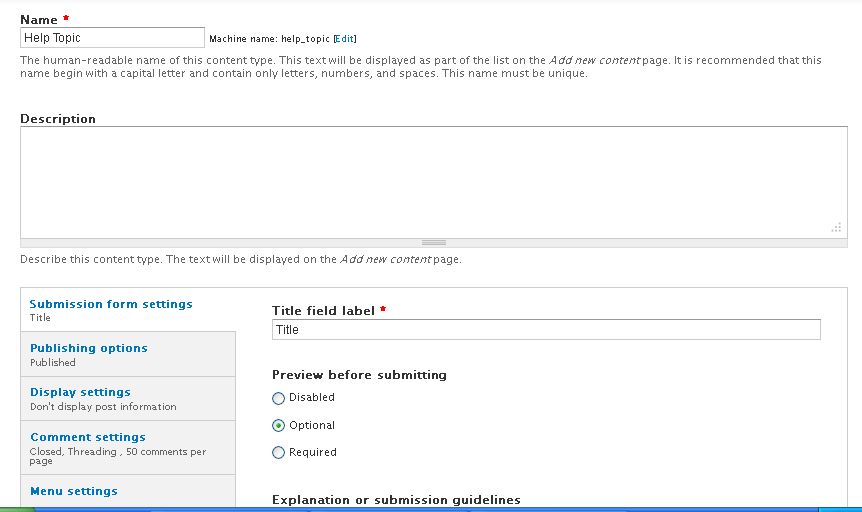
aggiwoods commentedyeah. Those things are all okay. I just can't figure this thing out. Thanks for all of your help. I am attaching detailed screenshots for people to see. If anyone has a guess, I'd be very grateful.
Thanks.
Comment #10
emkamau commentedyour node display settings jpeg shows the default settings for the node but you have selected to use full content. Are there any hidden fields in full content?
emk
Comment #11
eddourd commentedmy be ur template
take a look in node.tpl.php
Comment #12
aggiwoods commentedThanks EMK. Unfortunately, it didn't do the trick, but thanks for your help with it.
Comment #13
aggiwoods commentedThanks eddourd. What would I look for in that file? Other content types work correctly, it's just the few most recent ones that I have created that are having the problem. It seemed to take affect shortly after installing the date module and adding the date as a field on a different content type.
Comment #14
emkamau commentedaggiwoods
I'm trying to make sense of the images you posted. They seem to me to related to different content types. The initial set shows a content type "help topic" (from the bread crumb); with two fields "description" and "image". The new pic shows a content type "Terms of Use" with one field "body", with the view mode full content.
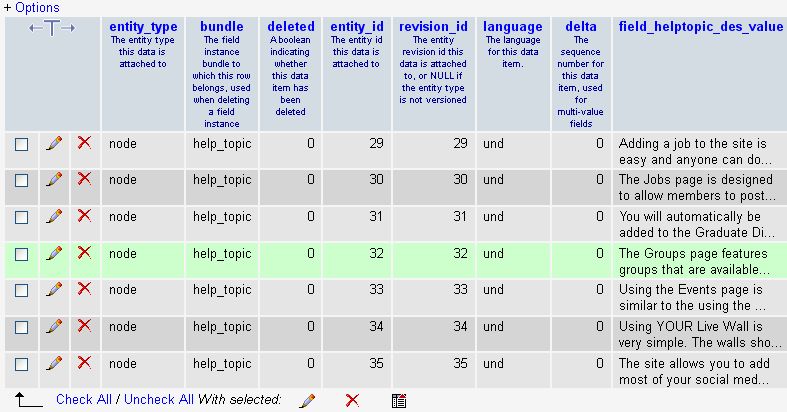
The images are really helpful but is the problem with one content type or both? Also is your data in the database? If you are using mysql can you browse the relevant tables and see your data?
emk
Comment #15
aggiwoods commentedThanks again EMK. Yes, the issue is with multiple node types. It works on the first few nodes types, but then something changed and all since then aren't showing the content. The information is in the database. I'll attach a few screen shots from the database to see if something went wrong there...
Comment #16
aggiwoods commentedAnyone else have any ideas??
Comment #17
marcvangendIs this still a problem? I'm closing this for now, but feel free to reopen if you have new information. In any case, support requests are never "critical".