

Closed (duplicate)
Project:
Drupal core
Version:
7.x-dev
Component:
language system
Priority:
Normal
Category:
Bug report
Assigned:
Unassigned
Reporter:
Created:
18 Apr 2011 at 15:10 UTC
Updated:
6 Sep 2012 at 18:08 UTC
Jump to comment: Most recent file



Comments
Comment #1
Jerome F commentedIf you've set your default language to french in admin/config/regional/language, what you're discribing here is normal.
In admin/config/regional/translate/translate (the page on your screenshot) under Language select either All languages or English, and search in only untranslated strings : then you'll get all the strings untranslated in english.
It's normal that you don't see any string that is not translated in french if you've not created content in english first.
So just click on edit and translate your string.
In the french interface labels are as follow: dans la liste de sélection "Langue" choisir "toutes les langues" ou "Anglais", il affichera tous les textes non traduits en anglais)
Comment #2
Barfly commentedSorry,
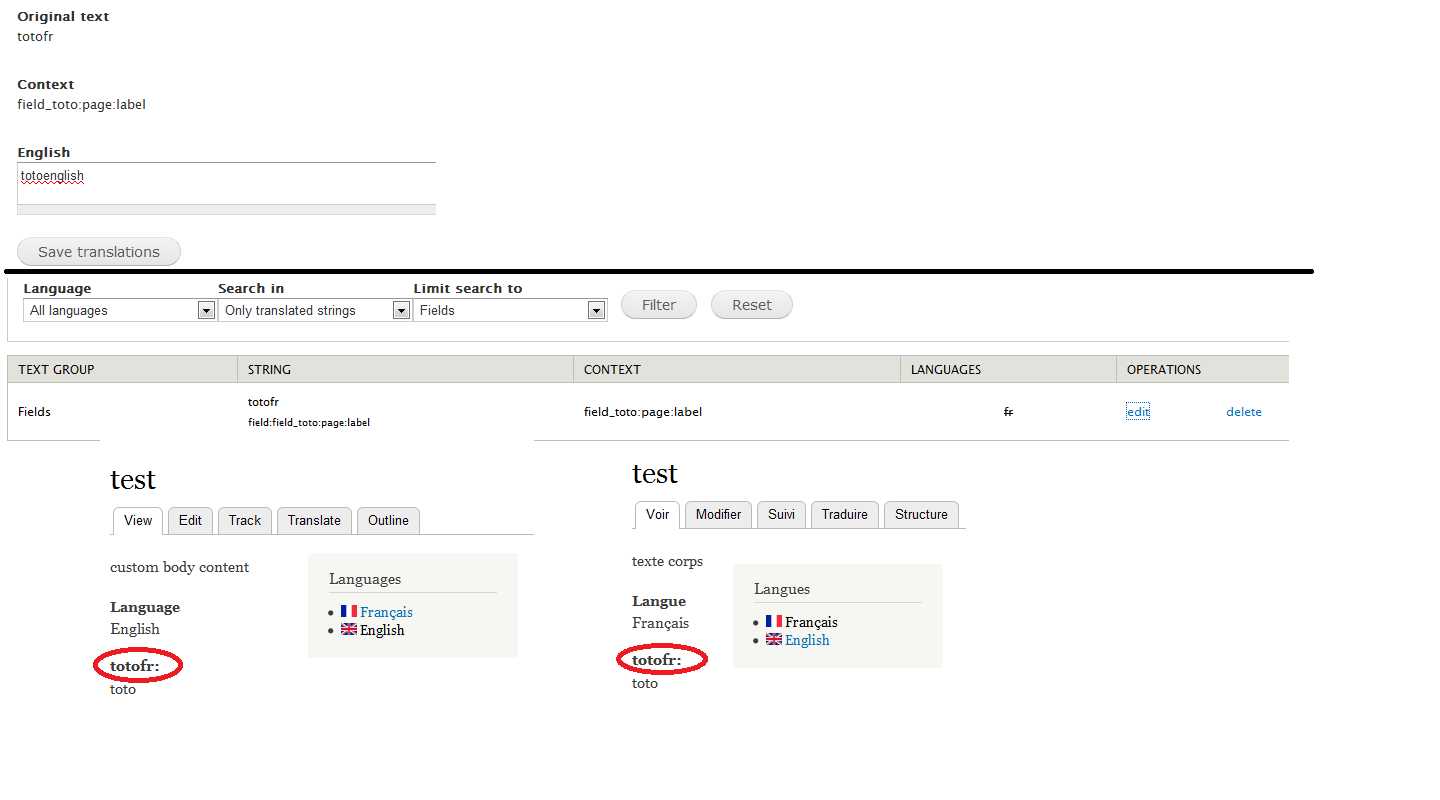
but i have edited the translation for my field but the label is not translated in my node.
Comment #3
Jerome F commentedTry to go to: admin/config/regional/language/configure
and check "URL" Determine the language from the URL (Path prefix or domain).
IMPORTANT: Do that with english as default language too, doing that for your site's default language is not enough.
Go to your default language settings page: admin/config/regional/language/edit/fr and make sure that the Path prefix language code is set to fr (your language country code)
Tell me if that helped please
Comment #4
Barfly commentedIt was already done (i use path prefix),
the node translation work but not the label field translation =(
Comment #5
Jerome F commentedDid you go to : admin/structure/types/manage/[content_type]
and check your fields in: "Content Translation" -> "Multilanguage fields to translate"?
I guess you did.
So you're right there's something wrong here!
If I just edit the translation:
"Fields foo fr default field:field_foo:multilanguage:label"
and provide an english translation "foo en translated" for this string, there's no result, as described in #2...
Digging a bit further I found something odd: if in admin/config/regional/translate/i18n_string you uncheck "Clean up left over strings", there's an other string that appears in admin/config/regional/translate/translate like:
"Built-in interface foo fr /fr/node/add/multilanguage "
If I edit that I can provide a french translation, and this translation is actually used on the french pages.
But french is my default language, shouldn't my field labels be in french and then translated to english and not the other way around?
So for your issue Barfly, there's a workaround, you can use an english label and then translate it to french like that. But still I think there is kind of an issue here.
Additionally, I have noticed that when you modify the field label, the old string in kept until you actually delete it in the string translation interface and refresh the strings.
Comment #6
Jerome F commentedComment #7
Jerome F commentedOther side note: Once the "Built-in interface" string is there you can access it via Localization client.
The remaining questions are:
1. What's the purpose of the "Fields" string translation if this translation is not displayed? Is it a bug, a missing feature?
2. (If 1. is not a bug, then) we have to use the "Built-in interface" string, why do we have to create the fields labels in english and not in the site's default language?
Comment #8
Barfly commentedThe solution is to always have "english" in "default language".(=> should be write in README)
Translating don't work when there is another default language
=> this is either a i18n bug or a locale.module bug ?
Comment #9
sahuni commentedI don't see my translated fields when viewing my node (beta 5).
I can change them in translation Interface but it's not working in the node.
With D6, with French as default language, we could translate all labels, list values .. in other languages, via translation interface and it was working well.
So I suspect the actual problem is a bug of D7.
And I think it's not true to write "The solution is to always have "english" in "default language"
Comment #10
jose reyero commentedI think this is a D7 core issue.
Field labels are translated with t() by Drupal core, though they are user defined strings. This is against the stated policy for t(), read here about $text and $user_text, http://api.drupal.org/api/drupal/includes--bootstrap.inc/function/t/7
Comment #11
plach@Jose Reyero:
are you suggesting to remove the t() calls?
Comment #12
Jerome F commentedIf I understand it well the variable substitution should be used to sanitize the variable.
Comment #13
plachRelated issue: #1016006: Default title, body and other field labels not localizable.
Comment #14
plach#717610: Remove t() calls from $instance['label'] and $instance['description']
Comment #15
ami7878 commentedAnother way to go around this isue is to bring back the t() function to the label. Just copy the field.tpl.php file from the field module to your theme folder and change the label print line to the following:
This also makes it possible to switch default language from English to whatever, long after site development has started and also solves the issue raised by the i18n module warning (bottom of page) as far as the field labels are concerned: