Closed (won't fix)
Project:
Drupal core
Version:
8.0.x-dev
Component:
Garland theme
Priority:
Normal
Category:
Feature request
Assigned:
Unassigned
Reporter:
Created:
2 Jan 2007 at 14:46 UTC
Updated:
29 Jul 2014 at 17:33 UTC


I believe it would be both an easy and great addition to the Garland theme, if you gave an easy way to change the primary and secondary links color (besides editing the CSS by hand) ;).
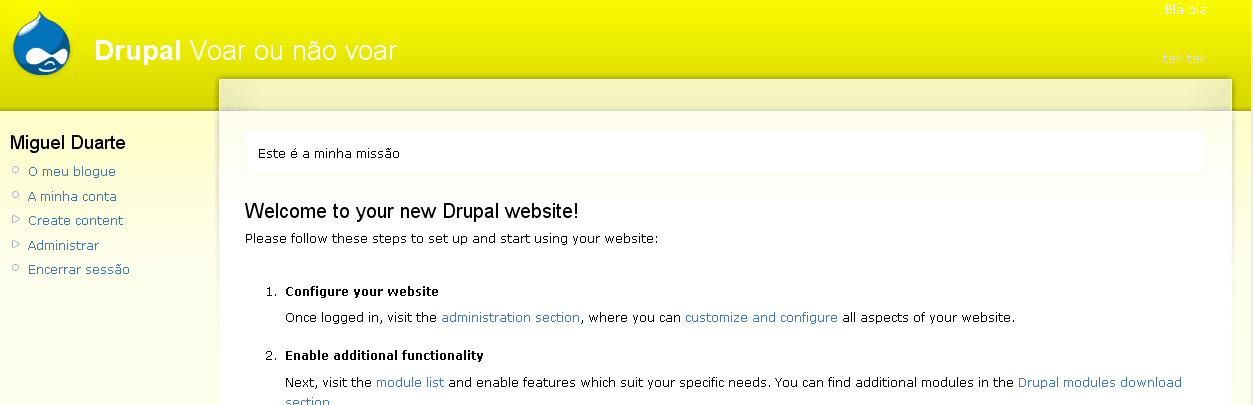
The default color works great on dark header backgrounds, but as you can see on the attached screenshot, really doesn't work at all on very light header backgrounds.
My suggestion is to simply add to the color picker two extra color options for "Primary Links" & "Secondary Links". Also, as a bonus, adding options for the Slogan font color & Mission background color would be helpfull, for the same reasons.
| Comment | File | Size | Author |
|---|---|---|---|
| test-screen.gif | 21.56 KB | mcduarte2000 |

Comments
Comment #1
sinkhead commentedI changed the font color in the CSS but they still havn't changed!
Comment #2
dvoelker commentedI will second the need for this, I am working with a client logo that essentially requires a white header section which is otherwise fine except for the primary links. I too have tried to find how to update this color manually to no avail and would be happy to have someone point out exactly where this text color is coming from so that I can update it and get on my way while the longer term issue is dealt with. It really does not make much sense to allow a color picker for the header section but force a specific color, white at that, for the text in this section.
Comment #3
marcingy commentedbumping version
Comment #4
amateescu commentedThe Garland theme has been removed from D8: #911054: Remove Garland from Core