

This project is not covered by Drupal’s security advisory policy.
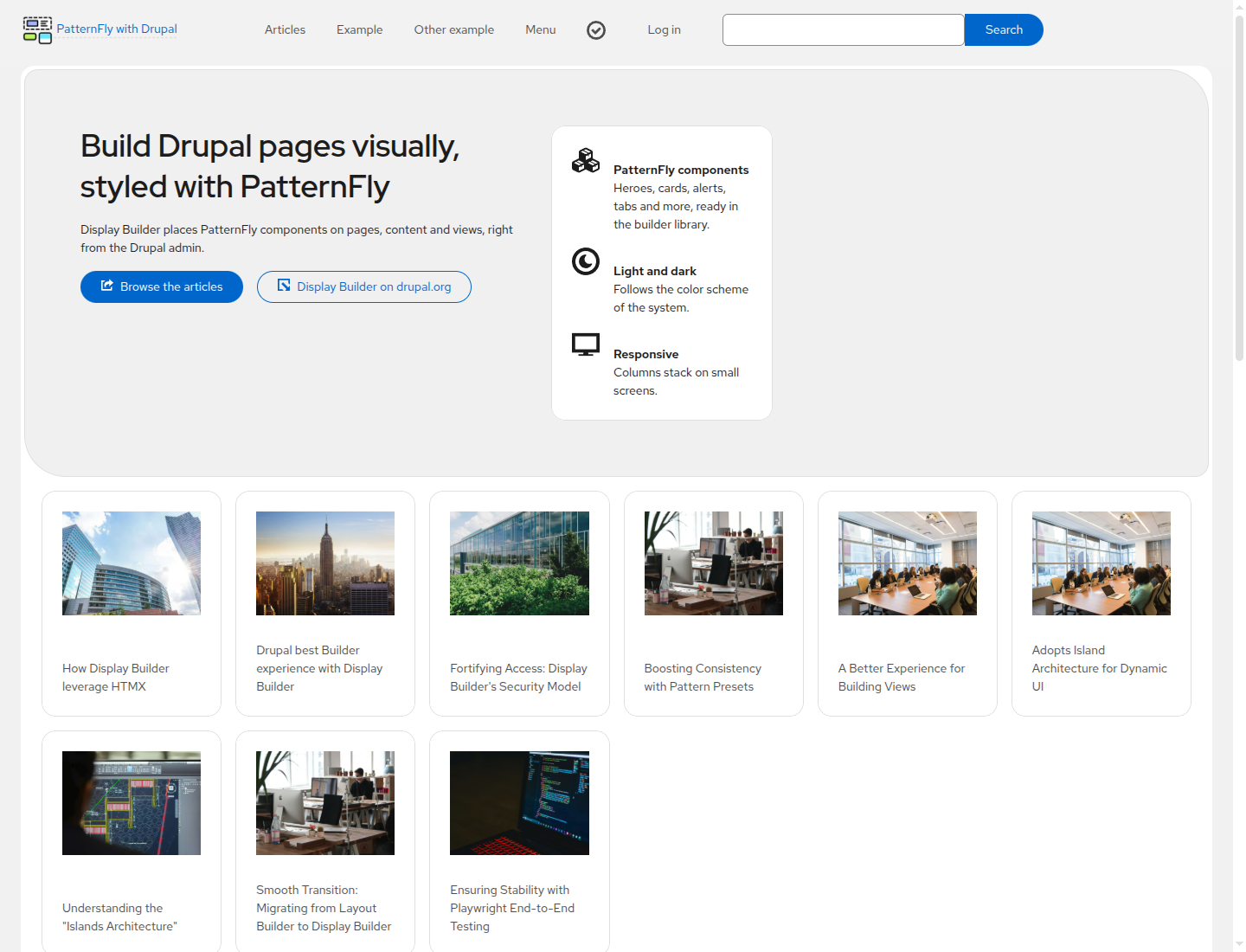
This recipe extends the Display Builder CMS recipe to provide a ready-to-use PatternFly experience in Drupal thanks to the PatternFly theme and UI Suite modules.
Introduction
- PatternFly theme
A site-builder-friendly PatternFly 6 theme.
Use PatternFly parts (components, layouts and utilities) directly from the Drupal back office (with Display Builder) in a low-code way.
- UI Suite provides a cohesive set of modules to implement full design systems in Drupal.
- Display Builder leverages the full UI Suite API in a modern visual builder.
Specific version(s)
Current documentation and 1.0 branch is for Drupal 11.4.11+ and Display Builder 1.0+ only.
Recipe documentation
First see general Drupal recipe documentation:
Then for reference Display Builder documentation:
Installation
- Start with Drupal 11.4.11+, only new website with profile minimal is supported
composer create-project drupal/recommended-project:~11.4.11 drupal_patternfly
cd drupal_patternfly
Quick Libraries Setup
PatternFly's icons are always served from /libraries: they are used in the 403, 404 and password reset pages, buttons, date badges and two main menu links, and render empty without the library. PatternFly's CSS loads from the CDN, or from /libraries/patternfly--patternfly if you pick Local in the theme settings.
Enable asset packagist, see Drupal documentation:
composer require oomphinc/composer-installers-extender:^2You can accept (y) if composer ask:
Do you trust "oomphinc/composer-installers-extender" to execute code and wish to enable it now?
Install the PatternFly package:
composer config repo.asset-packagist composer https://asset-packagist.org
composer config --merge --json extra.installer-types '["npm-asset", "bower-asset"]'
composer config --merge --json extra.installer-paths '{"web/libraries/{$name}":["type:drupal-library", "type:npm-asset", "type:bower-asset"]}'
composer require npm-asset/patternfly--patternfly:6.7.0
Quick Recipe Setup (11.4+ only)
Display Builder ships two patches for UI Patterns. Install composer-patches first, so Composer applies them. More in the Display Builder installation page, section UI Patterns patches.
composer config allow-plugins.cweagans/composer-patches true
composer require cweagans/composer-patches:^2
Install the recipe:
composer require drupal/display_builder_patternfly:^1.0 drupal/display_builder:^1.0@dev drupal/patternfly:^1.0@devDisplay Builder has no stable 1.0 release yet, and PatternFly 1.0 has none either. Composer reads the @dev flags only from your project. Keep them, or set minimum-stability to dev in your composer.json.
Install Drush (recommended):
composer require drush/drushDrupal Installation
Recipe is meant for a new website and can not be applied on an existing profile, only minimal profile is supported.
- Install the Drupal Minimal profile
For example, with DDEV and Drush:
ddev config --project-type=drupal11 --docroot=web
ddev drush si -y minimal- Apply this recipe (Drupal 11.4+ only)
Run this command with DDEV, use ddev exec:
ddev exec dr recipe ../recipes/display_builder_patternflyIf the command succeeds, you should see the following output:
[OK] Display Builder with PatternFly applied successfully
Important: Clear the Drupal cache after applying the recipe.
ddev drush cache:rebuildVisit your website, for example with DDEV:
ddev launchLogin as admin to your website:
ddev drush uliAI assistant, optional
Two ways to build displays with AI.
Chat in the builder. Display Builder AI adds a chat island to the builder. Apply the Display Builder AI Recipe on top. It asks for an OpenAI or Anthropic API key:
ddev composer require drupal/display_builder_ai:^1.0@alpha drupal/display_builder_ai_recipe:^1.0@alpha
ddev exec dr recipe ../recipes/display_builder_ai_recipe
Your own local agent. Display Builder Tools lets an agent that speaks MCP, such as Claude Code, read and change displays through MCP Server. It is the layer Display Builder AI builds on:
ddev composer require drupal/display_builder_tools:^1.0@beta drupal/tool:^1.0@beta drupal/mcp_server:^2.0@beta drupal/mcp_server_tool_bridge:^1.0@beta
ddev drush en -y display_builder_tools mcp_server_tool_bridge
Then create an account for the agent and register the server in your agent, see the Display Builder Tools README.
Trademark
This recipe and the theme are not affiliated with, or endorsed by, Red Hat. PatternFly is a Red Hat project. The recipe uses no PatternFly or Red Hat logo.
Support
Support my open source work on Liberapay. Need a feature, a fix or help on your project? I take sponsored work and freelance missions: contact me.
Project information
- Ecosystem: Display Builder
- By mogtofu33 on , updated
 This project is not covered by the security advisory policy.
Use at your own risk! It may have publicly disclosed vulnerabilities.
Releases
Demo images with no clear license are replaced by CC0 photos and drawn avatars, and every image source is listed.
