

 The 2026 Drupal Business Survey is open. Your response will help shape the future of the Drupal business ecosystem.
This project is not covered by Drupal’s security advisory policy.
What This Module Does
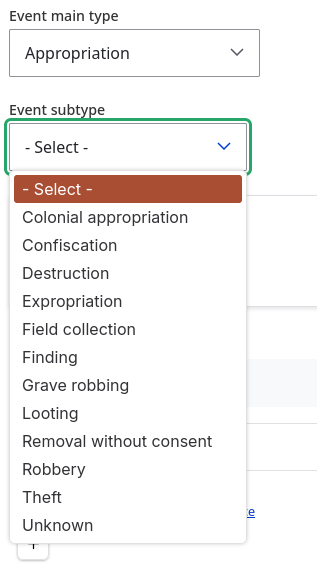
Screenshots below show how the child field options change when a different parent value is selected.
Figure 1: Acquisition selected

Figure 2: Appropriation selected
When editing an entity (e.g. a node or paragraph), a dependent list field shows different options based on the value chosen in a "parent" list field. For example:
- Parent field: "Event main type" (Acquisition, Appropriation, Archaeology & fieldwork, etc.)
- Child field: "Event subtype" -> shows Auction, Bequest, Purchase, etc. when Acquisition is selected; Colonial appropriation, Confiscation, Destruction, etc. when Appropriation is selected; etc.
The module works with list fields (list_string, list_integer, list_float) and supports both select dropdowns and radio/checkbox widgets. Options are filtered in real time via AJAX when the parent value changes.
How to Use
-
Create two list fields on your content type (or other entity type):
- A parent field (e.g. "Country") with its allowed values.
- A child field (e.g. "City") with all possible values.
-
Configure the child field as dependent:
- Go to Structure -> Content types -> [Your type] -> Manage fields.
- Edit the child field (e.g. "City").
- Open the Dependent list configuration section.
- Choose the Dependency field (e.g. "Country").
- In the table, for each parent value, check which child options should be shown.
- Save the field.
-
Use the form:
- When creating/editing content, select a value in the parent field first.
- The child field options will update automatically based on your configuration.
Requirements
- Drupal 10 or 11
-
optionsandfield_uimodules
Testing Note
Testing has been done primarily with dropdown (select) lists. Radio buttons and checkboxes may not be fully tested; use with those widgets at your own discretion.
Spell Checking (CSpell)
Run CSpell locally before pushing:
./scripts/cspell.sh
Or with npx: npx cspell . (from the module directory).
Project-specific words are in .cspell-project-words.txt. Add new valid terms there as needed.
Project information
- Project categories: Content editing experience
 82 sites report using this module
- Created by rnsrk on , updated
 This project is not covered by the security advisory policy.
Use at your own risk! It may have publicly disclosed vulnerabilities.


