

Overview
Date Customizer module allows user to customize the date field by adding hyphen or comma as a separator in between two dates or multiple dates.
We can customize the dates as shown below:
- 09 - 18 June 2015
- 09 June - 18 June 2015
- 09 - 18/06/2015
- 09, 18 - 27/06/2015
Features
- Customize date format
- Customize multiple dates
- Hide duplicate date parts
Requirements
How to Configure
To configure the module follow the steps mentioned below:
- To add custom date type
- To add custom date format
- To add the custom date format to date field in content type
- Go to Administration » Configuration » Regional and language
click on add date type, enter the date type and select the date format
you want, if you want to add different date format follow the next step.
- Go to Administration » Configuration » Regional and language » Date and time
click on add date format and enter the format string, to customize
the string format please see:
http://www.php.net/manual/en/function.date.php
- Go to Administration » Structure » Content types
select any content type you want and add the date field to it,
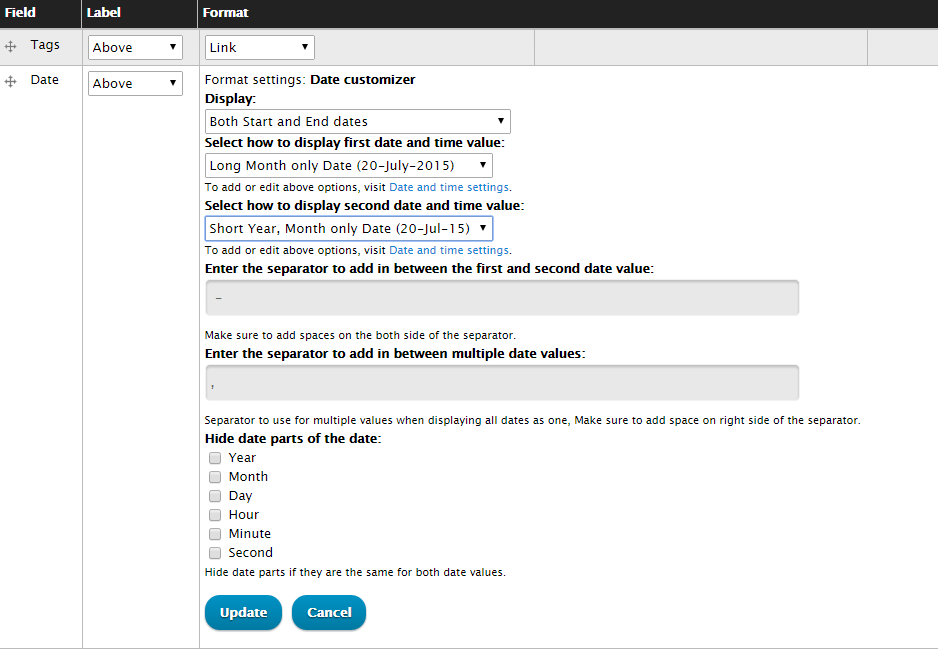
then click on the manage display, select the format as date customizer
click on the configure icon and do the configuration.
Upgrading from 7.x to 8.x
Upgrade to the latest recommended 7.x version and then to the recommended 8.x version
Project information
- Project categories: Site structure, Developer tools
 9 sites report using this module
- Created by rrfegade on , updated
 Stable releases for this project are covered by the security advisory policy.
There are currently no supported stable releases.

