

 Come together with the global Drupal community in Rotterdam, 28 Sept – 1 Oct 2026. Sessions, contribution, connection, and Early Bird savings until 8 June.
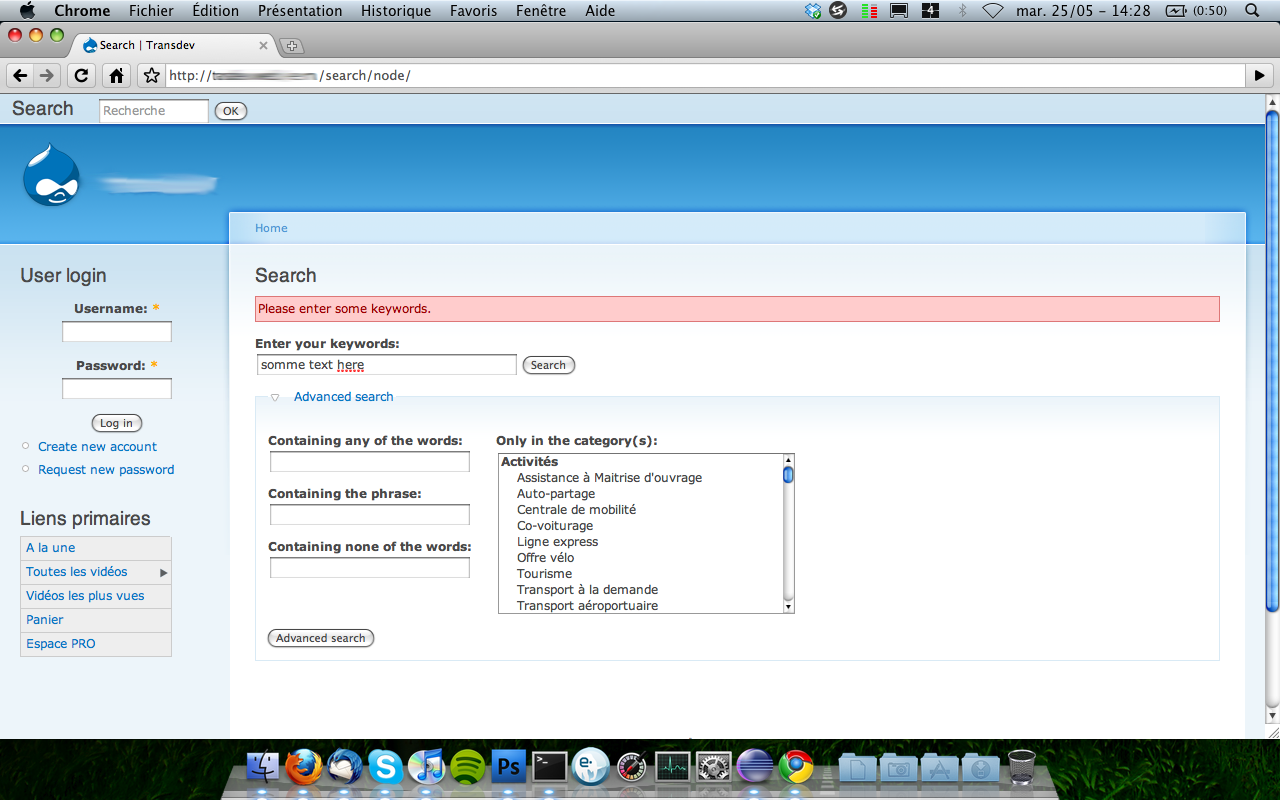
After entering keyword at Search page (i.e. http://example.com/search/node/), when the search is submitted by clicking on the "Search" button, the keyword text field will be emptied and the search request will fail, returning these text in red: Please enter some keywords.
This doesn't happen when searching via the search block on the right sidebar.
| Comment | File | Size | Author |
|---|---|---|---|
| #3 | custom-search-bug.png | 251.36 KB | Nahk |

Comments
Comment #1
darrellgray commentedjust upgraded to 1.3 from 1.2 and seeing the same problem
Comment #2
jdanthinne commentedWhat do you enter in the right sidebar?
What happens when you submit? What doesn't?
(screenshots welcome)
Comment #3
Nahk commentedI've got exactly the same issue.
When I go to the search page (http://example.com/search/node/, not the search block), and enter some search text in the “Enter your keywords:” field and hit “Search”, I got this message in red : “Please enter some keywords.” and my field is emptied.
This bug only happens if the user got the “use advanced search” permission.
I also figured out that if I type my text in the “Containing any of the words:” field in Advanced search or if I disable this field (with search_config module for example), it works just fine.
Please find a screenshot enclosed.
Comment #4
jdanthinne commentedRight, found the bug (in the javascript).
Commited the changes to DEV (clear the cache after upgrading to use the new javascript script file).
Please review.
Comment #5
Nahk commentedIt doesn't seems to work on my site, I've got exactly the same bug. :(
I've tried to clear my browser's cache (on Firefox and Chrome) and Drupal's cache but it doesn't do anything.
Comment #6
jdanthinne commentedYou have to wait until tomorrow to download the dev version, because it hasn't been regenerated yet…
Comment #7
Nahk commentedOK! Thank you for your reactivity! ;)
Edit : It works just fine, thanks ;)
Comment #8
jdanthinne commented