

 Come together with the global Drupal community in Rotterdam, 28 Sept – 1 Oct 2026. Sessions, contribution, connection, and Early Bird savings until 8 June.
If this is already posted or related to another post, my apologies for double posting.
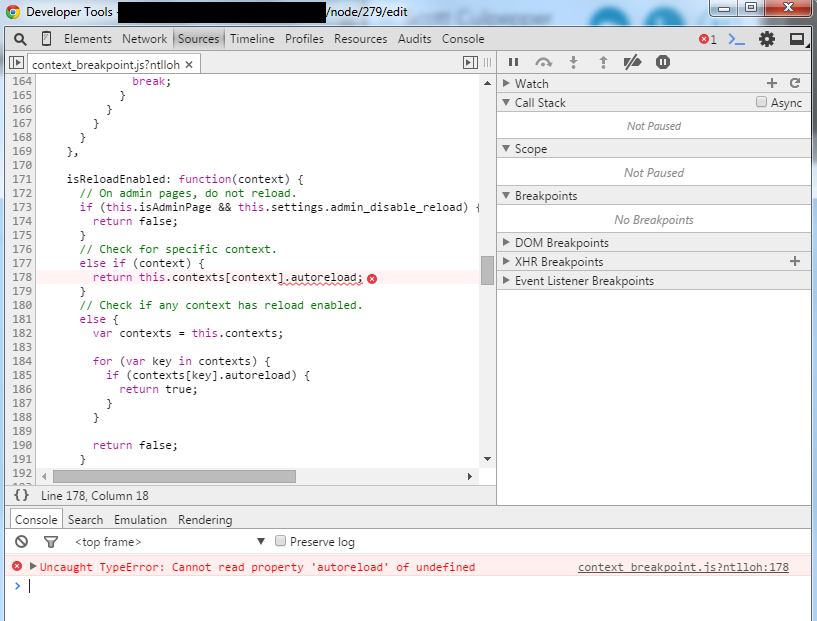
How can i prevent the reload functionality from firing on edit pages? For example, whenever i hit a node/*/edit page for the first time of the day, the page is broken with an issue in the JavaScript. you have to reload the page to get everything working correctly. I have attached an image of the error.
After the refresh of the page, the issue does not immediately return as it is cached in my browser; i assume but am not certain.
My contexts are as follows; there are two:
- Breakpoint: Mobile Breakpoint (max-width: 599px) [auto-reload NOT checked]
Path:- ~admin/*
~node/*/edit
- ~admin/*
- Breakpoint: Non-Mobile Breakpoint (min-width: 600px) [auto-reload CHECKED]
Path:- ~admin/*
~node/*/edit
- ~admin/*
I do have the auto-reload for admin pages turned off on admin/config/media/context-breakpoint
| Comment | File | Size | Author |
|---|---|---|---|
| context_breakpoint_reload_error.png | 94.04 KB | tregonia |

Comments