

This small module allows to download configs archive on slow VPS or hostings with time http timeouts.
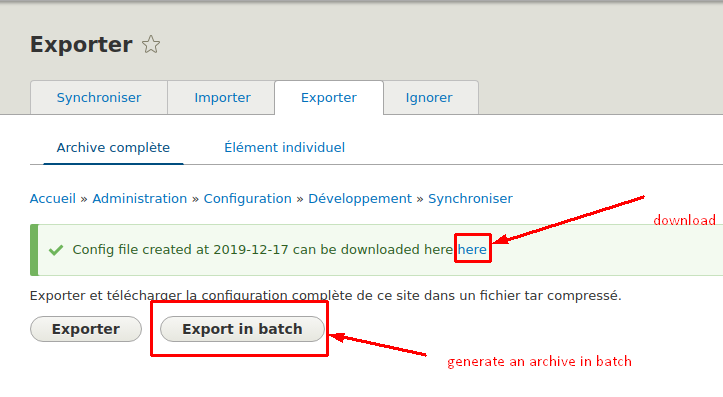
For example, if your site is using a CDN the CDN can limit timeout of server response to 30 seconds. If you have a lot of config files, the process of the archive generation can take long time. This module adds a new button for config export in batch process, which allows to prevent getting any timeout errors or etc.
Benefits of the module
1. Speed. It is creating an archive blazingly fast due to adding gzip only at the end of the operation. Even if your site has 2000 or more config files.
2. Uses small amount of RAM due to batch API.
3. No more timeouts issue while creation of the config.
4. Easy download and privacy. File is stored in private dir and deleted within gurbage colleciton after first download. The standard config module stores file in temporary folder and deletes it only when user requires a new file. This is not secure because anyone who has access to the server files can read the file easily at anytime. Configs can contain sensitive data, so it is not needed to store the configs file once it is downloaded.
This module requires that the private filesystem is configured. You can do this by creating a folder in your project root folder and editing the settings.php file to include the following:
$settings['file_private_path'] = "../path_to_private_folder"
Usage
1. Install this module via composer
composer require drupal/config_batch_export
or for dev version
composer require 'drupal/config_batch_export:^2.0'
2. Go to Extensions page (/admin/modules) and enable the module or use drush
drush -y en config_batch_export
3. Go to config export page /admin/config/development/configuration/full/export and there will be a new button "Export in batch"
4. Click this button and wait until it is finished
5. A status message with a download link will be displayed. In order to download configs file click this link.
Project information
- Project categories: Administration tools
 126 sites report using this module
- Created by cadila on , updated
 Stable releases for this project are covered by the security advisory policy.
Look for the shield icon below.


