Hi all, apologize if this actually not the right place to put this kind of issue.
First of all, not sure whether this is problem in Commerce PayPal, or DC Kickstart v.2, or maybe Message module that by default installed and used in DC Kickstart v2.
I'm using DC Kickstart v2 with Commerce PayPal v.7.x-1.0 with WPS.
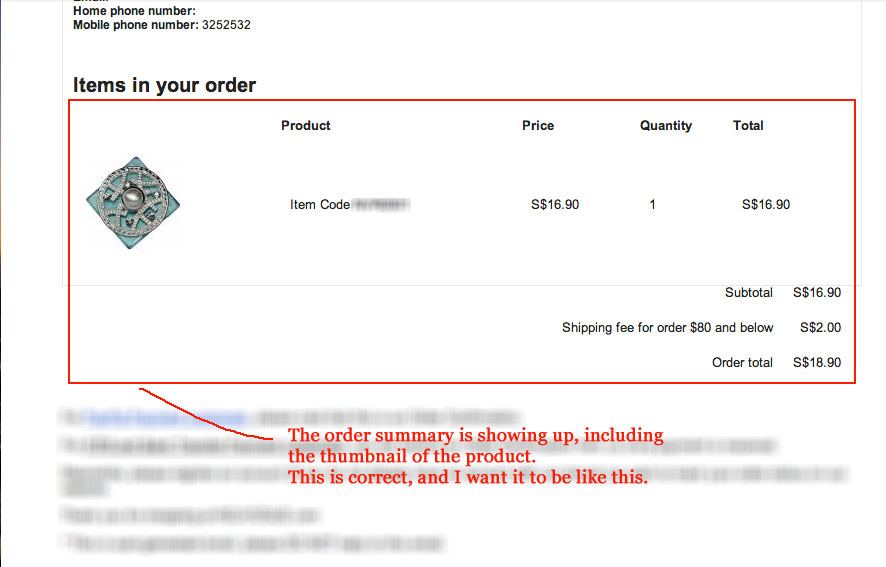
After the customer redirected to PayPal page and made the payment, drupal site (DC Kickstart v2 site) send an email notification of order summary along with image thumbnail of the product to the customer.
The problem is, the image thumbnail of the product is not showing up.
I checked that this order summary is actually coming from Views (/admin/structure/views/view/commerce_cart_summary/edit) with order id as the argument, which also being used as a Token in Message module for sending the email notification of order summary (/admin/structure/messages/manage/commerce_order_order_confirmation). The token name is !order-summary.
This is the code that I meant (/profiles/commerce_kickstart/modules/contrib/commerce_message/commerce_message.module):
function commerce_message_order_summary(Message $message) {
  $wrapper = entity_metadata_wrapper('message', $message);
  $view = views_get_view('commerce_cart_summary');
  $view->set_arguments(array($wrapper->message_commerce_order->getIdentifier()));
  $view->hide_admin_links = TRUE;
  return $view->preview();
}
I debug it also, the order_id is there in the argument, but for some reason the Views is not being rendered.
Anyone encounter this before?
Any help would be greatly appreciated.
Thanks



Comments
Comment #1
ardnet commentedOK, strangely enough, if I put http authentication in my site, I can see image thumbnail of the product in my email notification of order summary.
But I got that email after I click "Return to the store" link in PayPal page.
And I'm still using PayPal sandbox to test btw.
Anyone encounter this before? Any help would be greatly appreciated.
Many thanks.
Comment #2
ardnet commentedHere I attached some screenshot to show the problem that I meant.
Thanks
Comment #3
rszrama commentedI don't see how this has anything to do with PayPal. This module doesn't send out e-mails, unless you're talking about an e-mail sent from PayPal.
I don't know what queue to move it to either, since I'm not even aware of Kickstart attempting to send images in e-mails. You might just look at the HTML of the e-mail and see if it has a broken link for some reason that can be fixed through configuration.
If you can think of the appropriate queue, please move this there and set its status back to "active."
Comment #4
ardnet commentedHi Ryan, thanks for replying.
OK, I think this might be issue with Message module that being used by default in DC Kickstart v2, I'll move this issue to there then, and see how it goes.
Thanks a lot for your time.
Cheers.
Comment #5
rszrama commentedOk, let's start here then.
Comment #6
ardnet commentedHmmm... OK, I managed to debug it further using watchdog by creating another token in custom module using similar code as the one that used in Message module by implementing hook_entity_property_info_alter(&$info), then I put this token in Mime Mail module so it will send the order summary to my own email address.
The code can be seen below:
And I checked in watchdog from Commerce PayPal and also from my custom module, I compared all the results between those 2 cases (the one that WITH http authentication, and the one that WITHOUT http authentication), I got something below:
The one that WITH http auth
Results from my costume module
- Location: http://www.something.com/checkout/128/payment
- Referrer: http://www.something.com/checkout/128/review
- Message:
Results from Commerce PayPal
*none*
The one that WITHOUT http auth
Results from my costume module
- Location: http://www.something.com/commerce_paypal/ipn/paypal_wps%7Ccommerce_payme...
- Referrer: *none*
- Message:
Results from Commerce PayPal
- Location: http://www.something.com/commerce_paypal/ipn/paypal_wps%7Ccommerce_payme...
- Referrer: *none*
- Message:
As you can see from results above, for the one that WITHOUT using http auth, the display of the Views is not rendered/shown all, and there's watchdog shows up from Commerce PayPal. Where as for the other case is shown otherwise.
The one that I'm still not quite understand is the watchdog that comes from Commerce PayPal, it is always goes to: http://www.something.com/commerce_paypal/ipn/paypal_wps%7Ccommerce_payme...
Does this means something to you, Ryan (rszrama)? or anybody can help me with this perhaps?
Some hints or clue would be greatly appreciated.
Many thanks
Comment #7
ardnet commentedI'm still stuck with this :-/
Anybody can help me with this please?
Thanks in advance
Comment #8
ardnet commentedNevermind about this, the issue still persist actually.
But I finally not using Views anymore, I just rendered everything what ever comes from the $order object, at least that's the solution for me so far.
Thanks
Comment #9
Anonymous (not verified) commentedany progress on the solution to render !order-summary ?
Comment #10
summit commentedHi, would love to see a solution for this also to be able to render the token !order-summary anywhere using commerce_message.
greetings, Martijn