


Colorized gmap module allows to add a google map on the site as a drupal block and customize it. At the colorized gmap block creation page you are able to customize a standard google map (e.g. to colorize water, landscape , etc.) You will see changes on the map after every action.
This module is used in the Easy booking distribution project
Features:
- colorize any elements of the map
- hide unnecessary map controls
- change map controls position
- customize marker image, caption and info window
- add multiple blocks
- exportable via 'Features' module
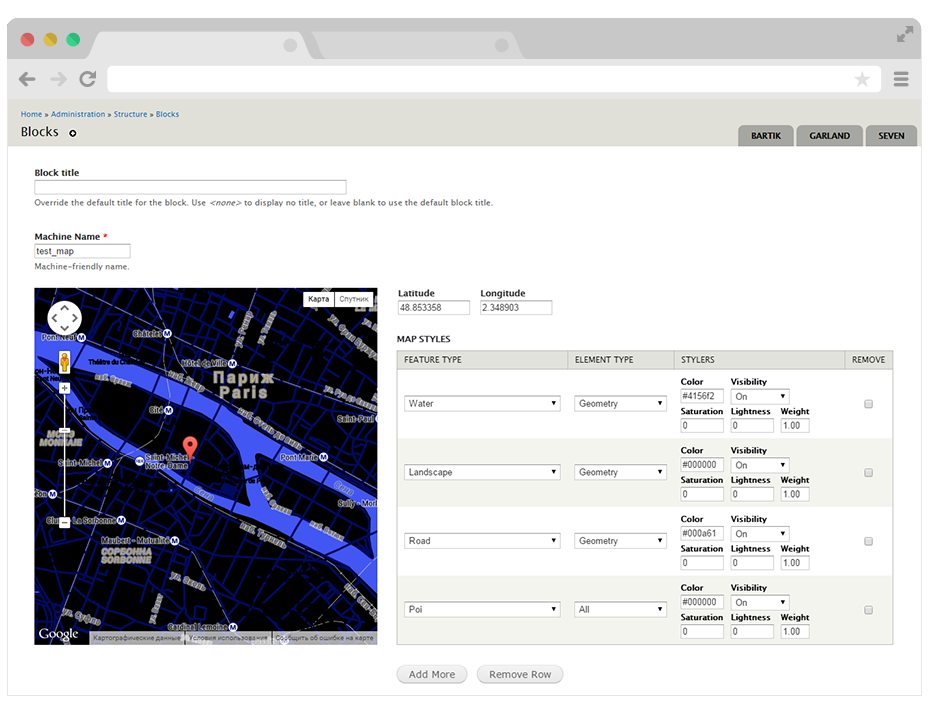
The map is 500x500px by default. But it is very easy to customize sizes via css.
Requirements:
- Libraries API (https://www.drupal.org/project/libraries)
- Entity API (https://www.drupal.org/project/entity)
- Colorpicker library (http://www.eyecon.ro/colorpicker/)
Installation and usage:
- Download and install Libraries and Entity modules.
- Download the colorpicker library into your site's sites/all/libraries/colorpicker directory.
- Download and install this module.
- Go to 'admin/structure/block/colorized_gmap_block' to create colorized gmap block.
Created by ADCI solutions team
Supporting organizations:
Project information
- Project categories: Site structure, Media, Integrations
 476 sites report using this module
- Created by adcillc on , updated
 Stable releases for this project are covered by the security advisory policy.
There are currently no supported stable releases.


