

This is a basic drupal module.
Empties cached tables, rebuilds the menu cache and theme registries, and invokes a hook so that other modules' that cache data can be cleared as well.
See https://api.drupal.org/api/drupal/includes%21common.inc/function/drupal_flush_all_caches/7 for the cache flush_all_caches documentation.
Clearing cache is relatively harmless.
Your sites may slow down while clearing cache.
For this reason, make sure you give the right people access to clear_cache.
Note: Clear Cache does not clear web browser cache,
This will need to be cleared separately. :p.
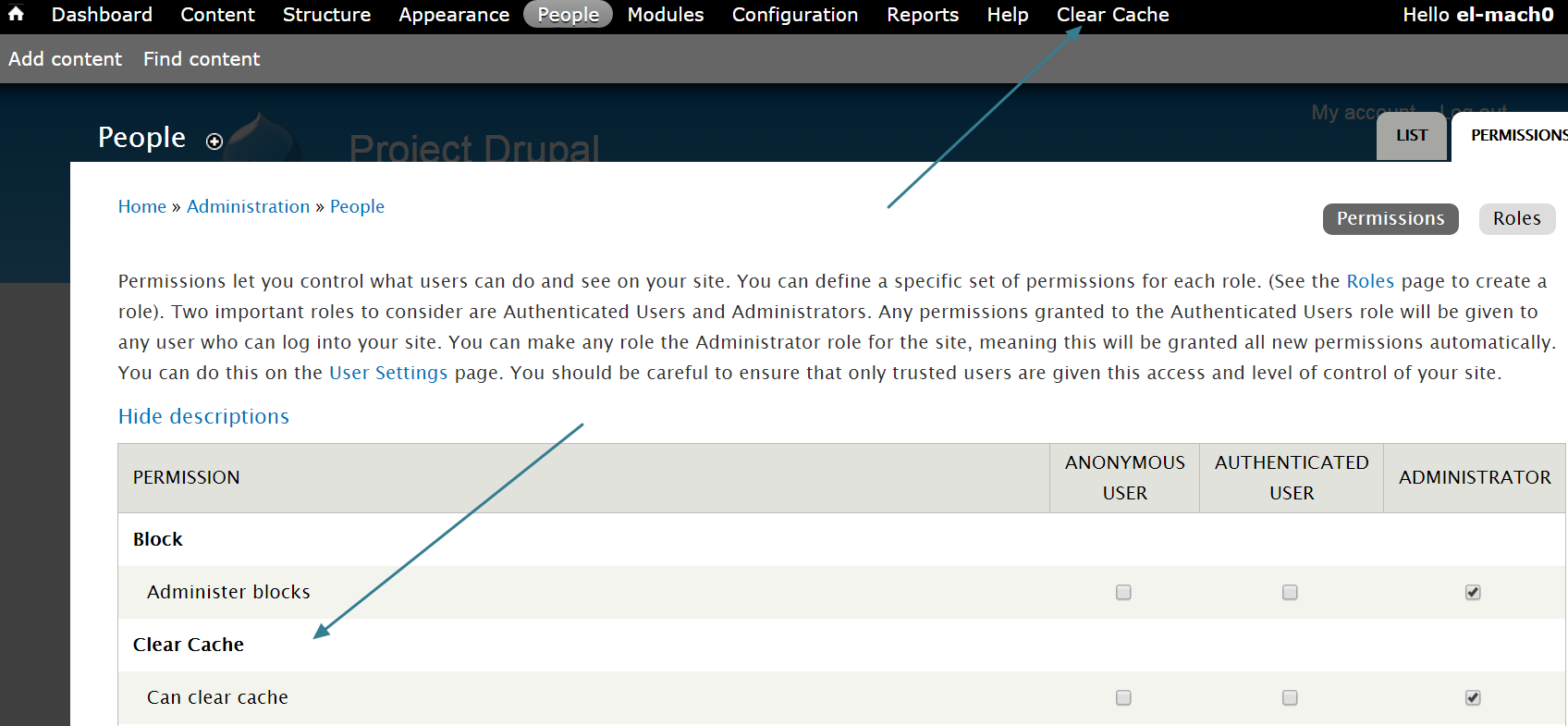
clear_cache adds a menu link item on the administrative toolbar.
Note that clear_cache is based on user permissions. See the "User Permissions" section bellow.
Install Instructions:
- Download and unzip clear_cache.
- Drag "clear_cache" file to your "sites/all/modules" folder.
If you have a "contrib" folder inside "sites/all/modules", then drag clear_cache there. - Enable "clear_cache" module, find the people "permissions" tab.
This should be in http://YOUR_SITE_URL/admin/people/permissions - Enable clear_cache for various user roles.
- Do not enable "clear_cache" for anonymous users!
- "Clear Cache" menu link will now appear on your administrative toolbar.
- Refresh your home page.
- If you use drush, use the command
drush batmanto clear cache.
User Permissions:
You will need to configure permissions for using clear_cache.
- Navigate to http://YOUR_SITE_URL/admin/people/permissions
- Locate the Clear Cache permissions from the list. Depending on your permissions list, you may need to scroll down a bit.
- ONLY check the "Can clear cache" permission for TRUSTED users.
- Save.
Why use clear_cache?
- Speed => Faster than the traditional Drupal core clear cache function. We tested clear cache on a multi-site install (with 86 sites plus 2 organic groups sites). clear_cache was at least two thirds faster than
drush @sites cc all.
* Of course, your speed may vary depending on your server hardware, database and php version. - Convenient => clear_cache adds a "clear cache" link to the administrative toolbar for faster access.
- User permissions => you can customize who can use clear_cache
- Drush integration => starting from version 7.x-2.5 , we integrated drush. e.g. Use
drush batmanto clear cache.
Using Drush:
drush en clear_cachewill enable the clear_cache module.drush @sites en clear_cachewill enable clear cache on multisite install.drush batman-clear-cachethe command to clear cachedrush batmanthe Alias, personally, I like this one better.drush @sites batmanif you have a multisite install and clear cache is enabled on all sites.- If you have the "help" module enabled, navigate to http://YOUR_SITE_URL/admin/help/clear_cache for more drush documentation
Have fun ;)
Sponsored by:
Arts & Sciences @ Washington University in Saint Louis.
Project information
- Project categories: Performance
 509 sites report using this module
- Created by geforcegtx480 on , updated
 Stable releases for this project are covered by the security advisory policy.
There are currently no supported stable releases.

