This project is not covered by Drupal’s security advisory policy.
Improve the content authoring experience by using CKEditor's new widget interface.
This module adds a dropdown menu with numerous CKEditor widgets, including a quotebox, columns based on Twitter Bootstrap's grid, and media insert.
Requirements
- CKEditor Drupal module
- Download the CKEditor library with the Widget plugin. You can also clone from this GitHub project, which will include everything you need: https://github.com/albatrossdigital/ckeditor-sandbox.
- A front-end theme that adds the Bootstrap CSS library (Bootstrap, Radix or Kalatheme are good base themes).
Installation and configuration
- Install the module at
/admin/modules - Edit your CKEDitor profile (for example
/admin/config/content/ckeditor/edit/Basic):- Open the Editor Appearance fieldset. Towards the bottom under Plugins, check the box next to: Plugin to add widgets based on Bootstrap elements, Plugin to add common widgets, Plugin for adding an Insert Template dropdown menu.
- Open the Advanced content filter fieldset. Add the following under Extra allowed content:
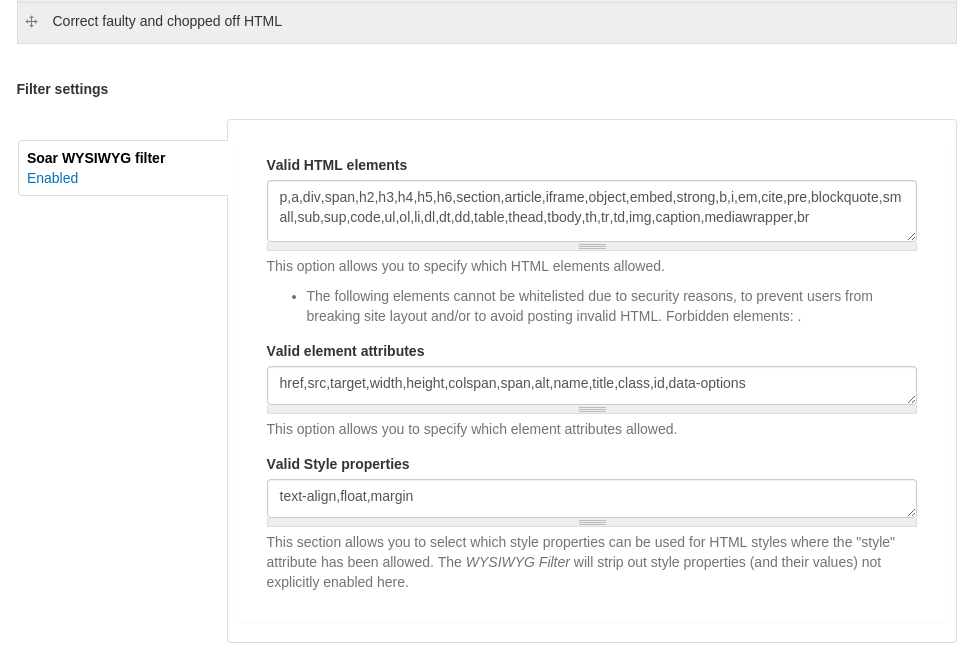
p a div span h2 h3 h4 h5 h6 section article iframe object embed strong b i em cite pre blockquote small sub sup code ul ol li dl dt dd table thead tbody th tr td img caption mediawrapper br[href,src,target,width,height,colspan,span,alt,name,title,class,id,data-options]{text-align,float,margin}(*);
- Go to Configuration > Content Authoring > CKEditor Widgets (
/admin/config/content/ckeditor_widgets). Check the boxs under Enabled dropdown buttons. - Edit your Text Format (for example,
/admin/config/content/formats/filtered_html). You will need allow all of the elements above. We recommend the CKEditor Filter module, which we created for this purpose. The project screenshot has all the settings you need for this CKEditor Widgets.
Auto-install
Don't want to go through all of the setup? Try installing our distro, Proud. The proud_input_formats feature sets up everything.
Supporting organizations:
Conception, development and maintenance
Project information
- Project categories: Content editing experience
 841 sites report using this module
- Created by jlyon on , updated
 This project is not covered by the security advisory policy.
Use at your own risk! It may have publicly disclosed vulnerabilities.