

 Come together with the global Drupal community in Rotterdam, 28 Sept – 1 Oct 2026. Sessions, contribution, connection, and Early Bird savings until 8 June.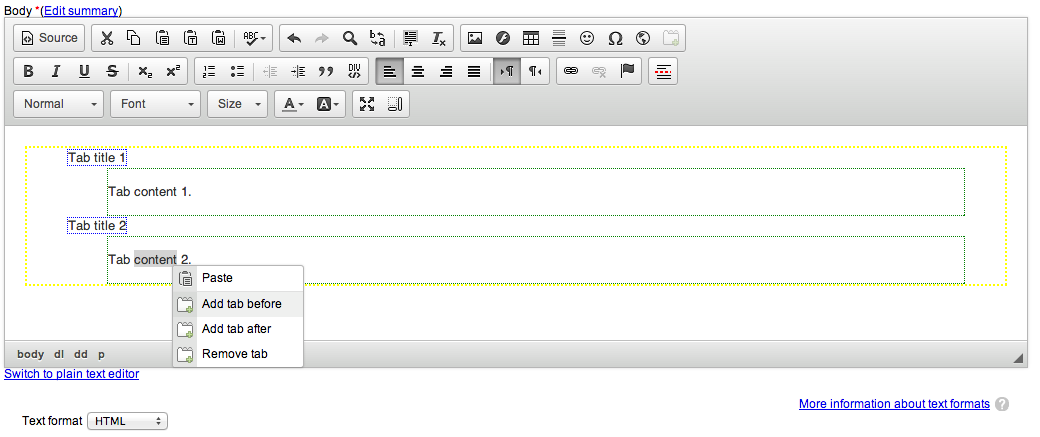
Add Tabs functionality in CKEditor project
Installation
- Enable the module
- Go to CKEditor instance configuration
- Place it in the enabled buttons list
- Enable the plugin in the list
Usage
Simply click the button, it will add 2 tabs with their header. You can then add a tab before or after one, or remove it by right-clicking on it.
This will output semantic tabs (with dl, dd and dt HTML tags).
Requirements
You need either CKEditor module or WYSIWYG module with CKEditor library
Tested with:
- CKEditor module and CKEditor library version 3 and 4
- WYSIWYG module and CKEditor library version 3 and 4
Development sponsored by: Makina Corpus
Project information
 Seeking co-maintainer(s)
Maintainers are looking for help reviewing issues.- Maintenance fixes only
Considered feature-complete by its maintainers. - Project categories: Content editing experience, Developer tools
 182 sites report using this module
- Created by SebCorbin on , updated
 Stable releases for this project are covered by the security advisory policy.
There are currently no supported stable releases.


