Upon update, I lost the editor. Going to the node edit screen, the form was there, but the window with the editor and content was missing, just a blank area.
In looking at the configuration options, I noticed the new Advanced Content Filter. This was enabled by default, so I disabled it for the Filtered HTML. Went back to edit my node which was in Full HTML. Still no window, until I changed the format to Filtered HTML. The editor window now appeared with content. I switched it back to the Full HTML format, and the editor window remained.
I went back and disabled the Advanced Content Filter for the Full HTML format. Went back to the node edit form for a node in Full HTML, and all is fine, the editor window is there as expected.
Went back and reconfigured it to enable the Advanced Content Filter for Full HTML and this also works fine now.
Perhaps set the initial install state of the Advanced Content Filter to be disabled?


Comments
Comment #1
wwalc commentedI think that could have been a cache issue.
@anyone having troubles with CKEditor after upgrading: please clear Drupal cache and browser cache and then check again if issue persists.
Comment #2
Murando commentedClearing the Drupal cache solved the problem for me. Updated from 1-3->1.4
Comment #3
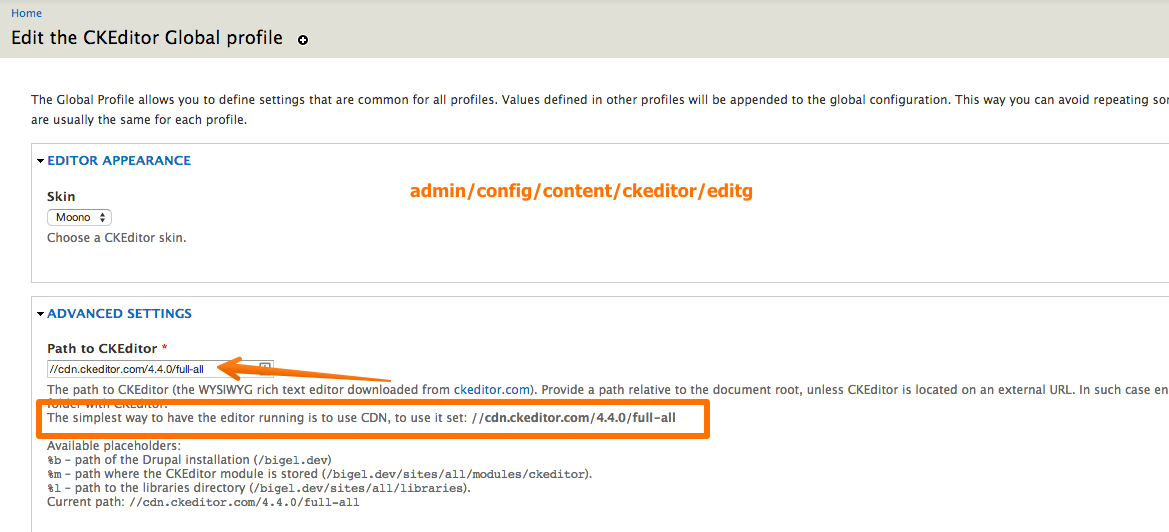
c13l0 commentedClearing caches did not work for me. I set the path for CKeditor to use CDN
//cdn.ckeditor.com/4.4.0/full-alland now works perfect.Comment #4
unleash.it commentedIn my case, the CK editor library was deleted in the update. Downloading it again and placing it in the [modules path]/ckeditor/ckeditor directory fixed the problem. I tried reverting and updating again so something definitely seems to be going wrong with the upgrade, at least on some configs. I'm sure linking to the new CDN would also fix it, but in my case I didn't want to have that as a dependency.
Comment #5
sirtetI had the same Problem, but the Source was some missing ckeditor Plugins.
Wehen updating a module, it gets overwritten, so you loose the Library, and also Plugins, if you have any.
The Solution is to move the Editor AND its Plugins to the libraries Folder, i Guess...
The Plugins Directory can be set under ckeditor global conf.
Comment #6
stinky commentedditto #4.
Comment #7
gusantor commentedSame issue here
Only way it work was using, at modules ckeditor config page : Global options -> Advanced options -> path to CKEditor //cdn.ckeditor.com/4.4.0/full-all
what is this cdn stuff ?
Comment #8
tstermitzSafari doesn't display the CKEditor "Rich Text Editor" no matter where I set the path. This appeared after upgrading Safari to 7.0.4
I'm having no problem with the CKEditor in Firefox, whether using a local or CDN path. I'm keeping the CKEditor files in Libraries, rather than Modules.
I followed the advice to Disable the Advanced Content Filter for Full HTML. Now the RTE appears. Enabling Full HTML again, and it still appears.
Comment #9
mfarineau commentedI ran into this same error when receiving a site built by a contractor and tasked with re-configuring it as a multisite and setting it up on our server: when editing a page the actual editor and input area was gone. When I switched the text format from filtered to full, everything came back. I could then switch back to filtered html and the editor remained there. This was not an issue on the contractor server so clearly something was lost in the hand over.
I finally noticed there was a js error on pages when I went to edit them:
uncaught exception: [CKEDITOR.resourceManager.load] Resource name "drupal" was not found at "/sites/all/libraries/ckeditor.style.js?t=DAEDThis led me to check out the libraries directory and of course the file "ckeditor.style.js" never made it over. As soon as I grabbed that file, my issue was resolved.
Comment #10
cindyr commentedI was having another problem with CKEditor, so I deleted my library and downloaded the full library. Cleared my Drupal cache, went to edit something, and the editor is missing again. I tried my earlier trick with disabling the Advanced Content Filter (I had to enable it first, then disable it) but neither of those steps brought the editor window back. However, I then tried clearing my browser cache, and that's what brought it back. Thanks wwalc, it appears that's all it was in my situation.
Comment #11
mfarineau commentedClosing this issue as it appears it was solved through clearing cache and/or changing to the CKEditor CDN.
Comment #12
mfarineau commented