Closed (fixed)
Project:
CKEditor 4 - WYSIWYG HTML editor
Version:
7.x-1.12
Component:
User interface
Priority:
Normal
Category:
Bug report
Assigned:
Unassigned
Reporter:
Created:
10 Mar 2013 at 01:15 UTC
Updated:
17 Apr 2013 at 15:10 UTC


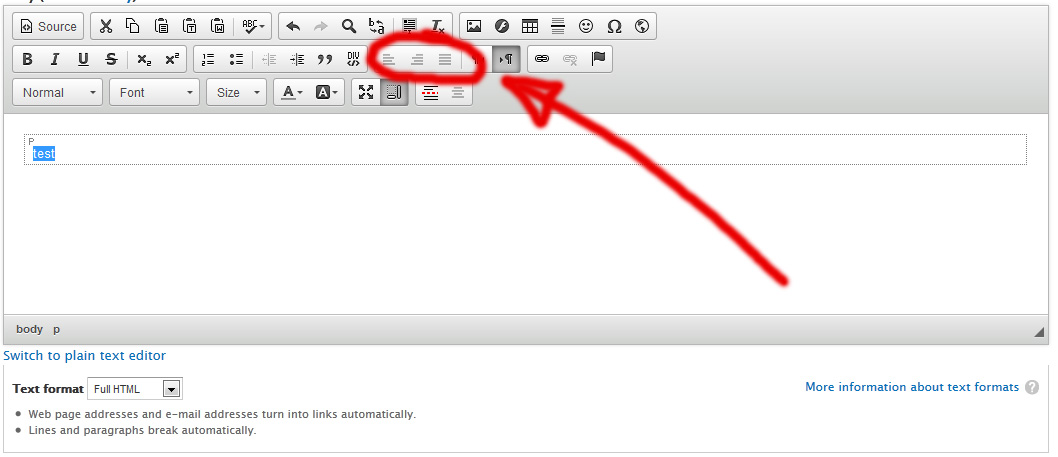
On my Drupal installations they're all greyed out and I can't click on them.
They work fine in my sample folder. (/modules/ckeditor/ckeditor/samples)
Here's a screenshot of the problem:
| Comment | File | Size | Author |
|---|---|---|---|
| ckeditor.jpg | 79.21 KB | Bester |


Comments
Comment #1
tomaa-1 commentedI have the exact same issue and have been trying to solve it for the past few days.
Here is what I tried so far:
Nothing. I don't have a clue. I will keep searching and will eventually post the results of my mischief.
Comment #2
new123456789 commentedHow do I get align icons to appear???
I am using ckeditor with imce image uploader.
Comment #3
Bester commentedYou probably downloaded the standard version of CKeditor instead of the full one.
Comment #4
Bester commentedIssue resolved by reinstalling another version of CKEditor libraries.
Comment #5
new123456789 commentedThanks for that. I don't have any ckeditor libraries in my sites/all/libraries folder. I did however download CKEditor 4.0 (27 Nov 2012) which is in my ckeditor/ckeditor directory. Is this the library you are referring to?
Comment #6
new123456789 commentedI downloaded http://download.cksource.com/CKEditor/CKEditor/CKEditor%204.1%20RC/ckedi... and am now seeing what you were seeing. The alignment icons are greyed out. WHere do I get the ckeditor libraries from?
Comment #7
wwalc commentedIt was caused by http://dev.ckeditor.com/ticket/10213
Fixed in CKEditor 4.1 (stable).