Closed (fixed)
Project:
CDN2 Video
Version:
6.x-1.9
Component:
Code
Priority:
Normal
Category:
Support request
Assigned:
Unassigned
Reporter:
Created:
1 Nov 2010 at 13:06 UTC
Updated:
20 Jan 2011 at 21:10 UTC


Hi there.
I'm attempting to integrate a CDN2-hosted Video into an existing front page slideshow. The effect I want is for the video node to be playable without leaving the front page. The problem I have is that the structure of the slideshow was designed for images, which simply link to their nodes.
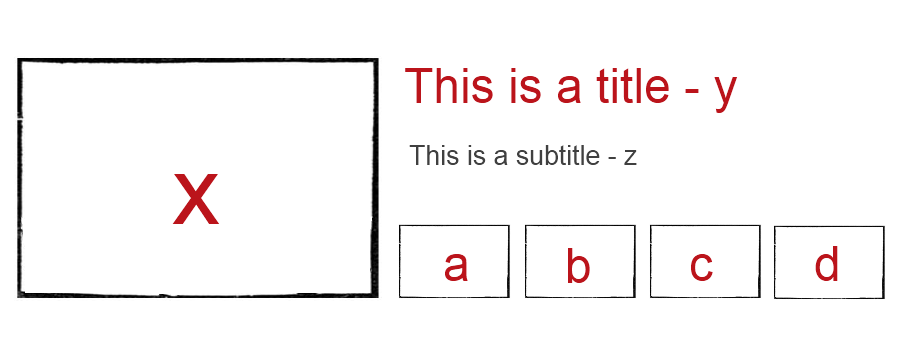
See attached png file for reference to the positions. I want the video freeze frame to appear in position 'a' and, when clicked, to display the entire node in position 'x' (along with relevant title and subtitle). The difference with the current setup is that I need that large image to NOT link to its node, but to play where it is. I also need it to hide the small images in positions 'b', 'c', and 'd'.
The relevant theme override file, called node-fp_selection.tpl.php, contains the following code:
<div id="main-pic">
		  <a href="/node/<?php print $field_node1[0][nid];?>">
		    <img src="/<?php print $field_node1img[0][filepath]; ?>"
		    id="main-pic1" alt="<?php print $field_node1t[0][view]; ?>" />
		  </a>
		   <a href="/node/<?php print $field_node2[0][nid];?>">
		    <img src="/<?php print $field_node2img[0][filepath]; ?>" class="hidden"
		    id="main-pic2" alt="<?php print $field_node2t[0][view]; ?>" />
		  <a href="/node/<?php print $field_node3[0][nid];?>">
		    <img src="/<?php print $field_node3img[0][filepath]; ?>" class="hidden"
		    id="main-pic3" alt="<?php print $field_node3t[0][view]; ?>" />
		  </a>
		  <a href="/node/<?php print $field_node4[0][nid];?>">
		    <img src="/<?php print $field_node4img[0][filepath]; ?>" class="hidden"
		    id="main-pic4" alt="<?php print $field_node4t[0][view]; ?>" />
		  </a>
		</div>
A javascript file hides that "hidden" class for a larger picture when the relevant smaller picture is clicked, thus displaying the image in the X position. The relevant JS code is:
		  function jqClickHandler() {
			  var mainPics = $("#main-pic img");
			  mainPics.addClass("hidden");
			  var mainLinks = $(".main-link");
			  mainLinks.addClass("hidden");
			  switch (this.id) {
			  	case "pic1a":
			  	  $("#main-link1").removeClass("hidden");
			  	  $("#main-pic1").removeClass("hidden");
			  	  break;
			  	case "pic2a":
			  	  $("#main-link2").removeClass("hidden");
			  	  $("#main-pic2").removeClass("hidden");
			  	  break;
			  	case "pic3a":
			  	  $("#main-link3").removeClass("hidden");
			  	  $("#main-pic3").removeClass("hidden");
			  	  break;
			  	case "pic4a":
			  	  $("#main-link4").removeClass("hidden");
			  	  $("#main-pic4").removeClass("hidden");
			  	  break;
			  }
		  }
So, the steps I took to try and make this work were as follows:
1. I added a Node reference field to the Slideshow content type, allowing it to only reference nodes of type Video. I sat this field within the 1st node in the content type and named it 'field_video_focus'.
2. To get rid of the frame and asset display around the actual video, I overrode the theme function for cdn2 video in template.php, as instructed here ...
3. I amended the node-fp_selection.tpl.php file so that the first item displayed as the main picture was not an image, but whatever node was referenced by the 'field_video_focus'. I also took the hyperlink off the image, so that the Play button would actually work when clicked.
4. The problem is that the video node is displaying when ANY of the other small images are clicked. It needs to be hidden. I can see that the js file is rendering the various pictures according to the "hidden" tag, but I can't figure out how to display the node, remove the link while also keeping in sync with the system of removing the "hidden" tag.
Basically, I think the solution boils down to effectively adding that tag and Javascript command to the 'field_video_focus' (as it's not an image). I tried both displaying the field as an image (wrapping it with an  tag), and trying to make the js file refer not only to images, but to no avail.
I know this is a very site-specific support request, but I'm not in touch with the person who designed the system, am not a programmer in either of these coding languages, and am nearly at my wit's end. I'd really appreciate any pointers.
| Comment | File | Size | Author |
|---|---|---|---|
| frontpage_selection.png | 38.05 KB | derrynairn |

Comments
Comment #1
sphism commentedAren't you using views slideshow module?
It's very good and allows you to slideshow full nodes, teasers, fields etc etc.
give it a go,
matt
Comment #2
derrynairn commentedNo, the slideshow was developed for us by the site designer. His contract is now up, so we are stuck with the design. I will take a look at the Views Slideshow Module you suggest, however. Thanks. That might be a way to sidestep this whole issue...
...Still interested in any other suggestions, however.
Comment #3
derrynairn commentedAfter downloading, enabling and playing with Views Slideshow a little bit, it seems that it won't meet my requirements. I need to have mixed node types within the slideshow - ie. first an image linked to a story, then an embedded video that doesn't link, but plays in its place. Correct me if I'm wrong, but that doesn't appear to be possible with Views Slideshow. It seems to want a specific node type to display PER slideshow, not PER image. A pity... Not least because the issue I raised remains unresolved.
Comment #4
sphism commentedThe slideshow should display any view you like.
You could use the 'promote to front page' flag for example - flag all the nodes you want in the slideshow then the view would be 'display all nodes flagged as promote to front page'
or it you are using that flag for something else you could use sticky flag...
Custom flags can be made with Flags module.
Or on your home page you could have a Node reference field, reference all the nodes you want in the slideshopw from there...
Or you could set up a taxonomy for slideshow - yes, no - use the taxonomy in all the node types you want in the slideshow...
The actual view would probably just display a node teaser...
Sorry about the swift reply, bit busy today, gime a shout if you need more help and i'll try to explain it better.
matt
Comment #5
derrynairn commentedUpdate: so where I'm at now is, I have a working slideshow, using Views Slideshow and DDBlock. This is located to the left. To the right, I have the CDN2 video, stripped of assets.
The problem is that the video isn't playing for non-admins. I have checked permissions repeatedly but can't figure out what the problem is.
I have made a screenshot of the resultant frontpage view as an admin...
http://screencast.com/t/W4c1QwxjLIbt
...and as a an anonymous user:
http://screencast.com/t/hhPmvmd2ian
The field for the video just disappears.
My suspicion is that this is not accessible because of an extra function we added to template.php to handle the video display. I will post this code here, in the hope that someone with better Drupal skills than me can help us out. What I'm wondering specifically, is which part of the function relates to role access to the node:
Comment #6
sphism commentedjust had a very quick look...
if (user_access('view cdn2 video transcoded with ' .$asset['preset_name'])
do you have a permission called 'view cdn2 video transcoded with myPresetname'
(where myPresetname is the preset name ;)
and does the use have permission to view it....
are you using content permissions? sometimes you have to grant access to specific fields....
gotta run
good luck
matt
Comment #7
derrynairn commentedThanks Matt. Don't think it's a permissions issue, unfortunately. I've made lots and lots of experimental changes to the settings there (including a particularly exasperated attempt at giving anonymous users ALL permissions!) and can't get anything to change.
The only transcoding I need is 'view cdn2 video transcoded with flash_flv_640x360' and this has been ticked for a while. Ditto the field holding the video.
I'm sure there's something else affecting access for un-logged in users in the template function I listed above. Anyway, thanks again.
Comment #8
stewsnoozeIn CDN2 module the user access checking is done in both theme_cdn2_video_asset and theme_cdn2_video so you would need that extra function also overridden to remove the privilege check.