

Closed (duplicate)
Project:
Address field for CCK
Version:
5.x-1.x-dev
Component:
User interface
Priority:
Normal
Category:
Support request
Assigned:
Unassigned
Reporter:
Created:
10 Aug 2007 at 18:06 UTC
Updated:
8 Sep 2007 at 19:40 UTC
Jump to comment: Most recent file



Comments
Comment #1
rconstantine commentedUm, which browser? The latest firefox is fine so far as I can tell. I use garland for testing.
As for a fix, adjust the css file to suit. I've got a bit more experience with theme functions now and will try to implement one when I can get to it (soon).
Comment #2
raddevon commentedIt looks like on another computer running Firefox with a nearly identical set of extensions, the fields appear normal. I guess the problem is on my end. Thanks for the reply.
Comment #3
rconstantine commentedEven so, it should work with all setups, so if you adjust the CSS file such that it works for you, please post a copy here so I can review it and possibly make the changes available to others that run into the same issue.
Thanks.
Comment #4
rconstantine commentedNevermind, I was thinking of another module that doesn't have a theme function for display.
Anyway, were you on different OSs? Perhaps there's an issue there with the same browsers on different platforms?
If I don't hear more from you, I can't fix anything. I don't see any problems with the code. I typically give such issues 2 weeks or so before closing them. If you come back and it's closed, be sure to reopen it by setting it to active.
Comment #5
tanjerine commentedhi, the same thing happens to me. im using drupal 5.2 with cck_address-5.x-1.x-dev on firefox. with the default garland theme and i haven't made any css changes. thanks.
Comment #6
rconstantine commentedWhich OS? I'd like to narrow this down. I've got the same versions you have on WinXP and things are fine.
Have you tried to play with the CSS file and make things better? Please do.
Comment #7
sw0rdf1sh commentedI have the same issue with Mozilla Firefox 2.0.0.6 at Windows XP.
Here is the decision of the problem:
div.cck-address-street1 .form-item {margin-right:.5em;}
instead of
div.cck-address-street1 .form-item {float:left; margin-right:.5em;}
Comment #8
rconstantine commentedI'm wondering if I didn't update the css file. What I have is this:
but your comment would suggest that you don't have the same file. I'm going to check the CVS right now.
Comment #9
rconstantine commentedIt seems you guys aren't using the dev version. I thought you were, so I thought this was a new issue with the display, but it looks to be the exact same thing as this: http://drupal.org/node/133175
So unless the css file I've quoted above doesn't do it for you, I'm marking this as a duplicate.
Comment #10
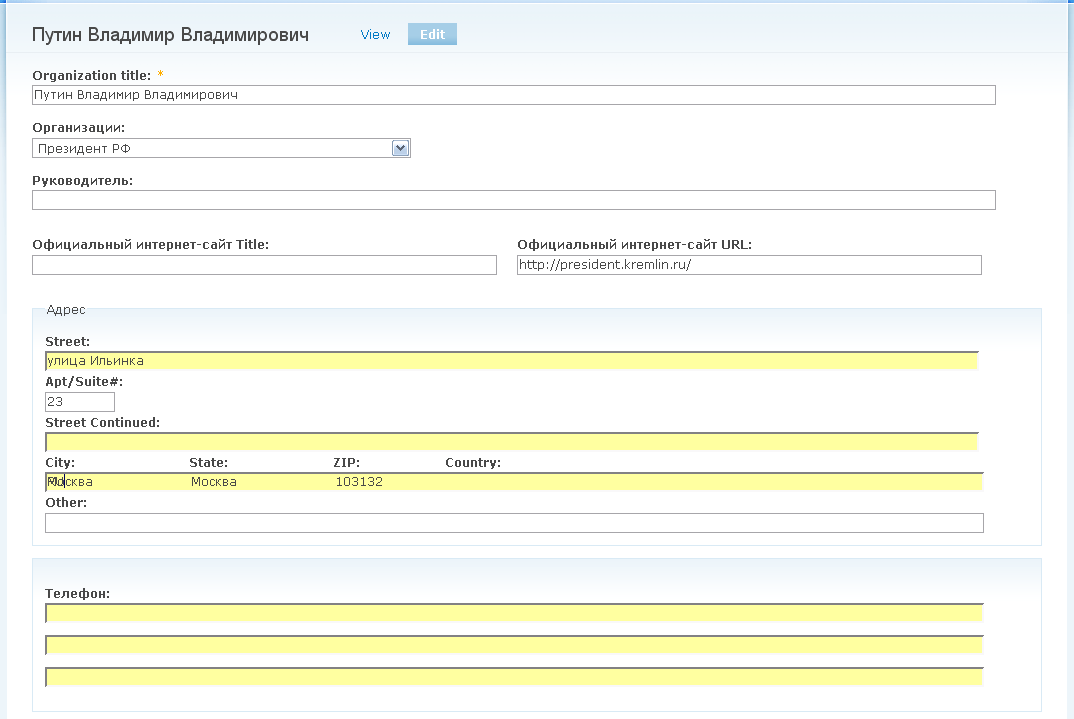
sw0rdf1sh commentedI have just installed latest version (5.x-1.x-dev)
now CSS file is same as was posted, but still the same bug in Firefox (screenshot attached)