

 Come together with the global Drupal community in Rotterdam, 28 Sept – 1 Oct 2026. Sessions, contribution, connection, and Early Bird savings until 8 June.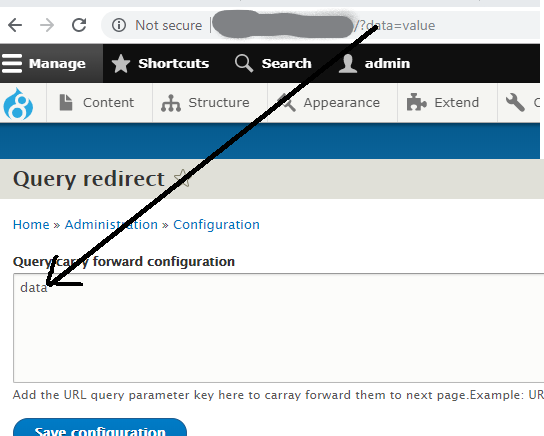
This module provides functionality to carry URL address query parameters across all the pages.
No need to use javascript or jQuery to append the query parameters to HTML tags or buttons.
Below are the steps:
- Add the query parameter key in the configuration that needs to be carry forwarded to next pages.
- Note: Links added in the ckeditor are not processed by this module. For adding links in ckeditor use [link:route:?] or [link:path:?] token. For example [link:route:system.admin] or [link:path:admin/content] in this way module can process the URL's. advanced usage of these tokens mentioned below
How to use link tokens:
We can use link tokens with following token format to place the HTML a tag.
[link:route:< route.name >,id=<id>,class=<classnames sperated by | symbol>,text=<text to appear in HTML a tag>]
exapmple:
[link:route:system.admin,id=myid,text=mandatory text appears in a tag,class=myclass1|myclass2]
[link:path:admin/content,id=myid,text=mandatory text appears in a tag,class=myclass1|myclass2]
Supporting organizations:
Project information
- Project categories: Administration tools
 44 sites report using this module
- Created by sainathdb on , updated
 Stable releases for this project are covered by the security advisory policy.
Look for the shield icon below.
Releases
8.x-1.4
released 2 February 2024
released 2 February 2024
Works with Drupal: ^8 || ^9 || ^10
Drupal 10 Compatibility fix
Install:
Development version: 8.x-1.x-dev updated 2 Feb 2024 at 05:53 UTC

