Closed (works as designed)
Project:
Calendar Link
Version:
2.0.0
Component:
Code
Priority:
Normal
Category:
Bug report
Assigned:
Reporter:
Created:
14 Dec 2020 at 14:49 UTC
Updated:
11 Apr 2022 at 17:32 UTC
Jump to comment: Most recent


1. Install a standard drupal(9.0.0), make sure the views(9.0.0) and views UI is enabled.
2. Install calendar_link using composer
3. Create a test article content.
4. Create a test view showing "content" of type "article" with "fields", display "page"
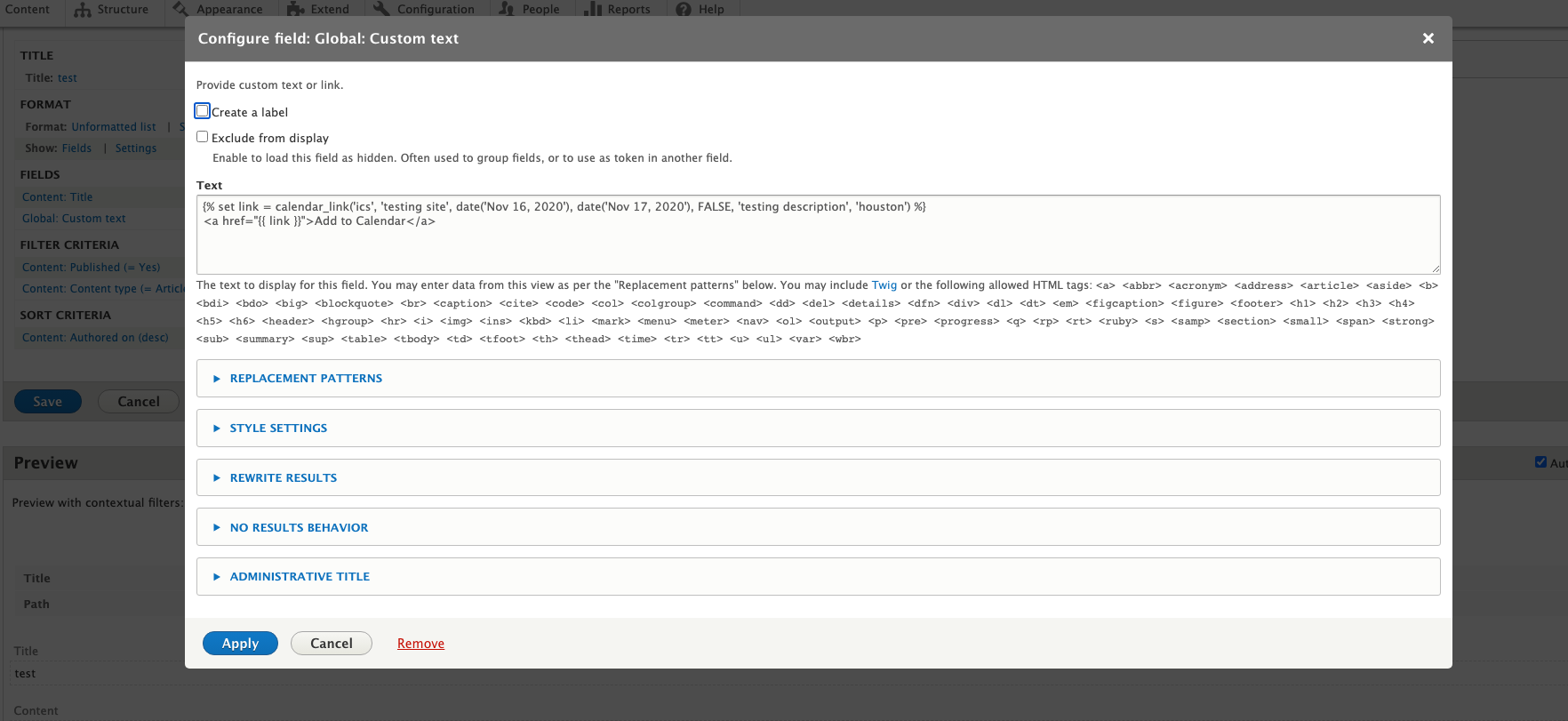
5. Add field "Global: custom text" and put this code in it and hit save.
{% set link = calendar_link('ics', 'testing title', date('Nov 16, 2021'), date('Nov 17, 2021'), FALSE, 'testing description', 'houston') %}
<a href="{{ link }}">Add to Calendar</a>
6. In the output you would see the link but it doesn't download the .ics file, the reason for that is the href is getting updated and it removed the "data:" string from the output.
7. If you put the same above code in page.html.twig then it works perfectly fine.
Please see the screenshots for the same.
| Comment | File | Size | Author |
|---|---|---|---|
| correct page.html_.twig sample.png | 181.24 KB | bakulahluwalia | |
| views issue sample.png | 182.03 KB | bakulahluwalia | |
| code for view field sample.png | 157.01 KB | bakulahluwalia |


Comments
Comment #2
bakulahluwaliaComment #3
wellsThis looks to be a core issue with how data scheme URLs are handled. When rendering the View fields,
Drupal\Component\Utility\UrlHelper::stripDangerousProtocolsis called on the link generated by the field and it stripsdata:because that is not a whitelisted protocol. Apparently that particular method is not called on links added directly to templates.I can't seem to dig up any issues or code/comments that specifically say
data:should be treated as insecure, but doing so does make sense.See also #3040688: Url::fromUri($uri)->isExternal() and UrlHelper::isExternal($uri) do not always match. Somewhat related, though it doesn't do anything to solve this issue.
Unfortunately it seems like this just isn't possible without a core patch that supports the data scheme in a secure way and that could be somewhat complex. Perhaps this module's README and description needs to be updated to note that link adding is only supported in templates.
Comment #4
bakulahluwalia@wells Thanks for the update. Not sure if I would like to wait for core team to provide a fix/patch. Here is an alternative that worked for me if anyone else facing the same:
New code in views twig:
Add these lines in javascript:
Thanks again for the quick response @wells, not sure how would you like to handle this ticket. The js solution can also be implemented in this module as well.
Comment #5
wellsI'll leave this ticket open for now. I'm thinking of creating a core issue and patch to address this and your workaround may be useful for others (though I don't want to take that path for the module itself). Thanks for providing it!
Comment #6
benjarlett commentedhmm.. any clues on how to add this javascript?
Comment #7
wells@benjarlett you would need to implement it as a library and then attach that library wherever you need the code to run.
The easiest place to do this would probably be in your theme. You would create the library there and attach it in a template with the
attach_libraryfunction. Take a look at Adding stylesheets (CSS) and JavaScript (JS) to a Drupal theme for some guidance on that.Comment #8
benjarlett commentedThanks, sounds beyond me though.
Comment #9
wellsComment #10
liquidcms commenteddeleted.