Problem/Motivation
There is no option to hide or style days, which are overlapping a month. I need this for a vacation calendar and it is a little bit confussing if these days are displayed.

Proposed resolution
I added these options to the calendar format settings form and added conditions to add css classes to the month overlapping days.
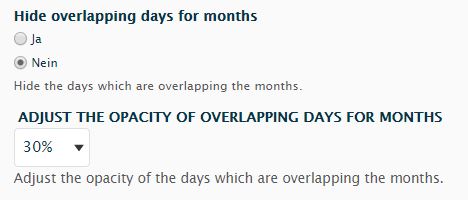
If "yes" is selected a css class with visibility: hidden; is added to these days.
If "no" is selected a new form select element appears with opacity values in 10% steps. A css class will be added with the chosen value. For example 30% addsopacity: 0.3;
I reused parts of the orignally code am not sure if it is the best way to do this.
btw this is my first issue/patch so feel free to point me in the correct direction if something should be different.
Remaining tasks
review needed, better naming of the elements/descriptions
User interface changes
Added two options to the calendar format settings. Radio buttons to hide month overlapping days and a select field to specify the opacity of these days if you didn't want to hide them completely.




Comments
Comment #2
neslee canil pintoThis has been fixed in 2.x branch.