


This project is not covered by Drupal’s security advisory policy.
Block Timer is a module for analyzing page block performance.
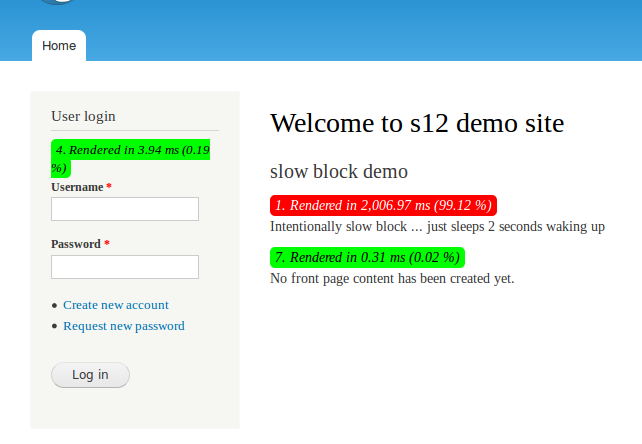
It will display a small text box underneath each block title showing the time (in milliseconds) it took to render that block. Hovering your mouse over the text box will display a popup window with some more useful detail to help you analyze the load time of your pages.
On a complex page where you may have over 20 to 30 different blocks generated by the same module (ie. Views, Superfish), it is difficult to isolate a slow rendering block. Block Timer will help identify the performance causing block which you can then analyze further using XHProf and/or Display Query Log in the Devel module.
Block Timer should only be enabled in a development or test environment since it alters the display of your pages and it will have a performance impact, albeit slight, on the total page rendering.
Similar modules: panels_why_so_slow
Project information
 Minimally maintained
Maintainers monitor issues, but fast responses are not guaranteed.- Maintenance fixes only
Considered feature-complete by its maintainers. - Project categories: Developer tools
 1 site reports using this module
- Created by helmo on , updated
 This project is not covered by the security advisory policy.
Use at your own risk! It may have publicly disclosed vulnerabilities.


