Closed (fixed)
Project:
Barracuda
Component:
Code
Priority:
Critical
Category:
Bug report
Assigned:
Unassigned
Reporter:
Created:
28 Oct 2012 at 11:47 UTC
Updated:
14 Nov 2012 at 21:30 UTC
Jump to comment: Most recent, Most recent file


I have just freshly installed BOA (with o1 max) on a new rackspace cloud server. After the installation when I go to one time login link for master instance to reset password then every thing goes ok as normal. However when I visit the one time login link for octopus satellite instance at o1.server.domain.com/user/reset/1/ i get the following on a blue vanila drupal theme:
Error
The website encountered an unexpected error. Please try again later.
I read somewhere that I need to remove cookies for this domain from browser. I did clear all the cookies and caches but no success. I tried in three different browsers. I also rebooted the server after installation of BOA.
This is happening only on this occasion on rackspace debian sqeeze cloud server. I did it few times before on virtualbox local, hp cloud and amazon ec2 but this problem never occured. Is there any new update within the last 2-3 days which is breaking anything.
| Comment | File | Size | Author |
|---|---|---|---|
| #18 | 20121028-162752.png | 70.87 KB | aanjaneyam |
| #3 | 1825298-3.patch | 969 bytes | Anonymous (not verified) |

Comments
Comment #1
Anonymous (not verified) commentedSame problem here...
Comment #2
Anonymous (not verified) commentedHi,
The problem is a misconfig of Redis,
hash-max-zipmap-entries 64 (hash-max-ziplist-entries for Redis >= 2.6)
hash-max-zipmap-value 512 (hash-max-ziplist-value for Redis >= 2.6)
as stated on: http://redis.io/topics/memory-optimization documentation shows that config has changed in versions >= 2.6
Also
maxclients 0 in config fails, commenting out this line, defaults to unlimited
change this config in /etc/redis/redis.conf
then start redis:
/etc/init.d/redis-server start
Greets
TimLeytens
Comment #3
Anonymous (not verified) commentedPatch attached
Greets
TimLeytens
Comment #4
InTheLyonsDen commentedCould this be related to my upgrade issue #1825154: Octopus Update Killed - Help!?
I'm seeing this when running the upgrade in debug mode:
Also, does the patch get overwritten by updates/upgrades from BOA?
Thanks!
Kevin
Comment #5
aanjaneyam commentedI made the changes described in the patch in the file /etc/redis/redis.conf and when I executr /etc/init.d/redis-server start I get the following:
Comment #6
aanjaneyam commentedI don't know if this is a worthy candidate for being marked as critical but marking as major as it is disrupting the entire operation of octopus instance.
Comment #7
aanjaneyam commentedOk after several retries the conclusion ins that we first need to stop the server and then make changes to /etc/redis/redis.conf and then start redis-server. Simple start or restart was not working for me. Now the site is back. Hopefully there are are no more bugs like this as I am readying this server for production sites.
Comment #8
InTheLyonsDen commentedI manually applied the patch and redis started up and my Octopus admin access was restored. I then was able to successfully update/upgrade Baracuda and Octopus and it appears that the redis patch changes persisted.
I have not ran the tuning script on this server to know if it will overwrite the patch.
Thanks TimLeytens!
Kevin
Comment #9
Anonymous (not verified) commentedMarking as critical because of now, octopus is unable to install
Comment #10
Anonymous (not verified) commented#3 indeed solved the problem; thanks! One remark: the following lines result in 'duplicate content' in the config file.
As under these lines the
hash-max-ziplist-entriesandhash-max-ziplist-valueare already set to these values.So just commenting these lines out is sufficient.
Comment #11
aanjaneyam commentedJust for information. I have created #1825400: All the platforms on a freshly installed BOA system (o1 instance) failing . I don't know if these two issues are related.
Comment #12
aanjaneyam commentedmarked to major by mistake. Remarking to critical.
Comment #13
aanjaneyam commentedI think the patch only restores the admin access but does not seem to solve the underlying problem so marking as active.
Comment #14
Anonymous (not verified) commented@InTheLyonsDen @amsri you can close your tickets marking them as duplicate of this one
Comment #15
Anonymous (not verified) commented@amsri, what other problem are you experiencing?
Comment #16
aanjaneyam commentedduplicate of what?
Comment #17
Anonymous (not verified) commented@joachimroeleveld it's not just commenting those lines out, lines beneath say:
list-max-ziplist-entries 512
list-max-ziplist-value 64
Instead of hash...
Greets
TimLeytens
Comment #18
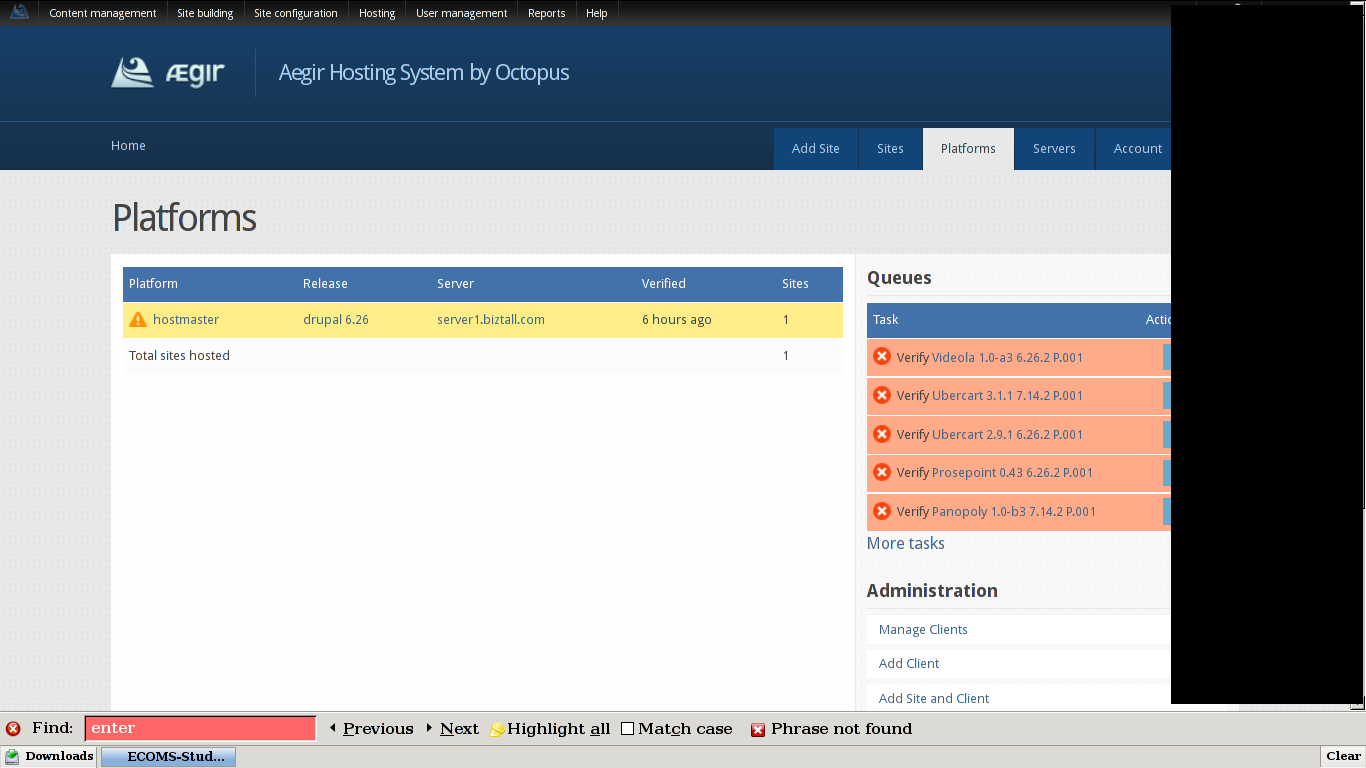
aanjaneyam commentedwell as platforms cannot verify none of the platforms are available to create sites. Imahe attached.
Comment #19
Anonymous (not verified) commentedHave you tried re-running the verify task? Or you could try adding a new octopus instance to see if problem also still occurs there
Comment #20
aanjaneyam commented@TimLeytens reverify task fails. If you see my log in #1825400: All the platforms on a freshly installed BOA system (o1 instance) failing you wiil see that provision-verify is missing. The drush command '@ provision-verify' could not be found. Octopus install does not work.
Comment #21
Anonymous (not verified) commented@amsri try adding a new octopus instances now, after having applied the patch:
boa in-stable public server.mydomain.org my@email o2 miniand see if o2 is able to verify the platforms.
Comment #22
Anonymous (not verified) commentedComment #23
aanjaneyam commentedI created a new o2 instance and it seems to be working. It is verifying the platforms. So then how to repair the broken o1 instance. A rebuild of rackspace server and reinstallation of BOA with fresh o1 instance would mean back to square 1 with "Website encountered an unexpected error. Please try again later."
How could such a bug creep in stable working branch of BOA.
Comment #24
omega8cc commentedIt was a result of known issue with new Redis cache server version, which introduced some changes not backward compatible and without updating its own configuration, even when it is installed via standard package and not from sources - which is default for Squeeze, so it is probably Dotdeb folks fault.
Comment #25
omega8cc commentedFix committed in HEAD: http://drupalcode.org/project/barracuda.git/commit/c935281 (plus a few following commits).
This means that BOA-2.0.3 is currently broken on Squeeze, so you should use pretty stable HEAD for upgrades or new installs.
Comment #26
aanjaneyam commentedWill it be possible to come back to stable from HEAD when BOA-2.0.4 stable is released.
Comment #27
omega8cc commentedYes, BOA-2.0.4 will be the same as HEAD, just with the release label. We are running some final tests to fix really serious bug in a caching logic.
Comment #28
omega8cc commentedThis is not fixed yet, since newer Redis version seems to fail randomly with error:
RedisException: Redis server went away in Redis->auth()Comment #29
omega8cc commentedThis patch seems to fix the problem: http://drupalcode.org/project/barracuda.git/commit/2807c5d
Comment #30
omega8cc commentedYet another fix required: http://drupalcode.org/project/barracuda.git/commit/dde222f
Comment #31
aanjaneyam commented@omega8cc many thanks for all the efforts you are putting in. I have installed BOA Head as mentioned above. However, I am a bit sceptical about putting production sites on HEAD as many updates seem be coming in. Will it convenient for you to let us know an estimate of when would the BOA 2.0.4 stable be available. Or do you think for the time being HEAD is OK for production sites and then revert to stable (using barracuda up-stable command) when 2.0.4 stable comes up. Sorry for any inconvenence.
Comment #32
omega8cc commented@amsri As things stand now, BOA HEAD is already much more stable than (already broken) BOA-2.0.3, and we are using it in production - yes, we are that crazy ;) but the point is that it works pretty well. But yes, we also need BOA-2.0.4 release badly, so it should be ready ASAP. However, we have yet another major issue to fix first: #1825992: Redis cache is never cleared on cron nor with drush on command line
Comment #33
tribe_of_dan commentedThanks for your work omega8cc.
I just encountered this issue also. I tried a fresh, vanilla install on Debian 6. I did know there was a critical issue that needed to be resolved before 2.0.4 was released but I wasn't aware that this also affected 2.0.3.
I have an existing VPS with BOA 2.0.3 that has been experiencing problems. I'm getting a lot of 504 errors and in octopus cron doesn't seem to be running tasks. Could that be related?
Comment #34
omega8cc commentedTo get BOA-2.0.3 based server up again, don't use
barracuda up-stableto update it, but install previous Redis version manually:Now wait 10 seconds for auto-healing to start Redis automatically. Done.
Comment #35
omega8cc commentedBut the sites cron not running issue is separate and fixed in HEAD only.
Comment #36
tribe_of_dan commentedGreat, thank you!
Comment #37
Mojah commentedThe error showed up when I ran aptitude full-upgrade, which updated redis server and associated libraries(?).
I had to...
...and then I edited /etc/redis/redis.conf with #3 and #10 to use the new config format for redis.
Comment #38
omega8cc commentedWow, running
aptitude full-upgradeis a bad thing. We have tried to support this gracefully, but it always tends to hit us with unpleasant surprises, so I recommend to avoid that, and always usebarracuda up-{stable|head}