I use the solr 3.5 with the included new grouping function. This works very well but there are some pitfalls to get it work.
First, to use the grouping, you have to set some values in your solr query to get the expected result
group=true
group.field=YOUR-FIELD-TO-GROUP
group.main=true
If you dont set the group.main=true value your result set will always be empty! I think it is caused by the Solr Php Query Library. Here begins the problem.
If you set the group.main to true you will get your results printed to your screen, but the numFound value is calculated by all matching entries before they get grouped.
A suggested solution is to use the facet functions to calculate the correct numFound result. This doesn't work for me, even with the facet.limit=-1 and facet.minimum=2 or 1.
I researched the solr result without the group.main and with group.main and saw the diffrence.
without group.main
<lst name="grouped">
<lst name="site">
<int name="matches">6</int>
<arr name="groups">
<lst>
<str name="groupValue">http://www.domain-1.com</str>
<result name="doclist" numFound="2" start="0" maxScore="0.64790744"><doc>
<float name="score">0.64790744</float>
<str name="body">

</str>
with group.main
<result name="response" numFound="6" start="0" maxScore="0.64790744">
<doc><float name="score">0.64790744</float>
<str name="body">

</str>
As you can see the diffrent structure of the output. This explains the empty result in drupal if you not use the group.main value.
If you use the group.main the correct numFound values change to the matches values. This small diffrence make it impossible to use a pager.
Is this a solr bug or is this caused by the Solr Php Library or just a drupal issue? I am struggling to find a working and correct solution and thinks that there must be others with the same problem and maybe give me a hint.
I mark this as critical because you loose the ability to use the pager correctly without getting weird results or none in my case.


Comments
Comment #1
nick_vhAre you sure about solr 3.5? This is a branch that is not even released yet? Would it be possible to use solr 3.4 and be willing to create a patch that would allow grouped results in solr to be shown in drupal correctly?
Thanks!
Comment #2
nick_vhComment #3
broncomania commentedAh sorry my mistake! Of course 3.4
Currently I am not a java programmer and I don't know how to fix this issue. The grouping works very well and delivers exactly the search results as I excpect but the group counting is the big problem. It destroys the usabiltiy of the pager complete. I mean u get 4 results and your pager shows you three more result pages.
The obviously problem is the structure. The solr query library is not able to parse the grouped result with the correct infomations if I use it without the group.main=true settings. So as a workaround I use the setting but get now the confused pager.
Comment #4
broncomania commentedI get the first response about the problem if you use the group=true functionality in relation with the setting group.main=true.
The obviously problem is without the group.main=true setting that the response couldn't be parsed any more. If you use the this setting the drupal pager gets confused about the wrong numFound values. It is not clear at the moment if the solr community will extend the group.main functionality to the "correct" numFound values.
I agree what Martijn van Groningen says that the grouping will be extended and more features will be included in the near future. These values wouldn't be integrated in the simple resultset. Obviously it is better to enhance the apache response parser to read also grouped returned results.
Maybe is the best of course to do both. Solr on their site and on the Drupal site the enhancement of the query response parser.
I will start to find out where drupal can step in the response query process. Any hints and Ideas are welcome.
Comment #5
broncomania commentedSo this problem is solved. Additional code in the Apache Solr Php Library is nessesary to use the grouping function in Drupal. I submit my code there and hope it will be commited that these real cool feature will be available for others.
Cheers
Comment #6
nick_vhCould you also post the code here for other people that might be interested in this feature? A bit more explanation would be appreciated! :-)
Comment #7
broncomania commentedNooo! It's my treasure! :-)
Okay this is how it works. Grouping with the apachesolr 2.dev module.
The grouping is a new feature in solr and helps you a lot for organizing your search results. The obviously problem is that the grouping resultset from solr delivers its own data structure. It's a little bit diffrent and that's even enough to break the output as a searchresult. Solr offers the setting group.main=true. This setting formats your solr response so that the Apache Solr Php v22 can read the grouped response. That's nice isn't it? Yeah, but also didn't work. Now you can see the search results appearing in your browser, but you will get a totally confused pager. Sure you grouped the results and may only want to display the first 2 results of each group. So your real visible response set is smaller than the found documents in the search request. Solr didn't catch the count of the groups that will be delivered and overwrite the numFound value.
To find this out it annoys me really some time. The easiest solution is to extend the apache solr php library. You must edit the Response.php to make it work.
And you must add the group.ngroups=true setting to your search query!
Response.php
add this code after
or just download my attached Response.php to make it work. For the moment it is just a workaround. I posted this issue also in the Solr Php Library forum and it's not clear at the moment what will be the best way to extend the library, because other pugins have also a different schema and needs also to wrap some code.
That's it
bronco
Comment #8
broncomania commentedI would say it's fixed.
Comment #9
nick_vhWell, nothing is really fixed until it appears in the module ;-)
Would you like to be our guinnea pig and make a patch for this functionality (for our D7 version) so people can easily apply and review your changes? Say for example that you add a configuration option to a custom search page where you mention the results have to be grouped (so you add the group parameter to it) and you also make those changes to the library.
It might not be that easy to actually commit this, but at least we make the life of a developer a bit easier!
Comment #10
broncomania commentedI would start with the integration in the D6 module, because that's my workplace and I haven't any experiences with D7 for the moment.
What is nessesary to make it use for others?
I would start to add a form where you could choose your grouping field and how many results you want to get delivered for each group. That's the first and I am not really sure for the moment what's the best for parsing the resultset. At the moment it is nessesary to add code to the ApacheSolr Php Library, but one of the maintainers offers to build a plugin system for additional parsing. If this comes true, it would be easy to extend the search with some small additions. This module could then easily ported to the drupal 7 version.
I think this is the best way for the moment, but if someone has a better idea to integrate this feature let me know. Yes and views 3 should also use this feature. I think.
By the way you are right, it's just fixed for me :-)
Comment #11
nick_vh#927542: Field Collapsing now in Solr 4.0 dev has interesting information about this.
Comment #12
nick_vhComment #13
nick_vhComment #14
christianadamski commentedHi,
I just started to use this mechanism. What I just did, is modifying apachesolr_do_query() so it reforms the result from using group = true, without group.main to the default result form. Additionally to make this useful, I add the groupId and groupValue to the $results. And of course in a custom module I add the needed search parameters. This results in having the groupId + groupValue available in the search-result.php template, so I can do magic via Javascript.
Now, is this an approach worth generalizing?
Comment #15
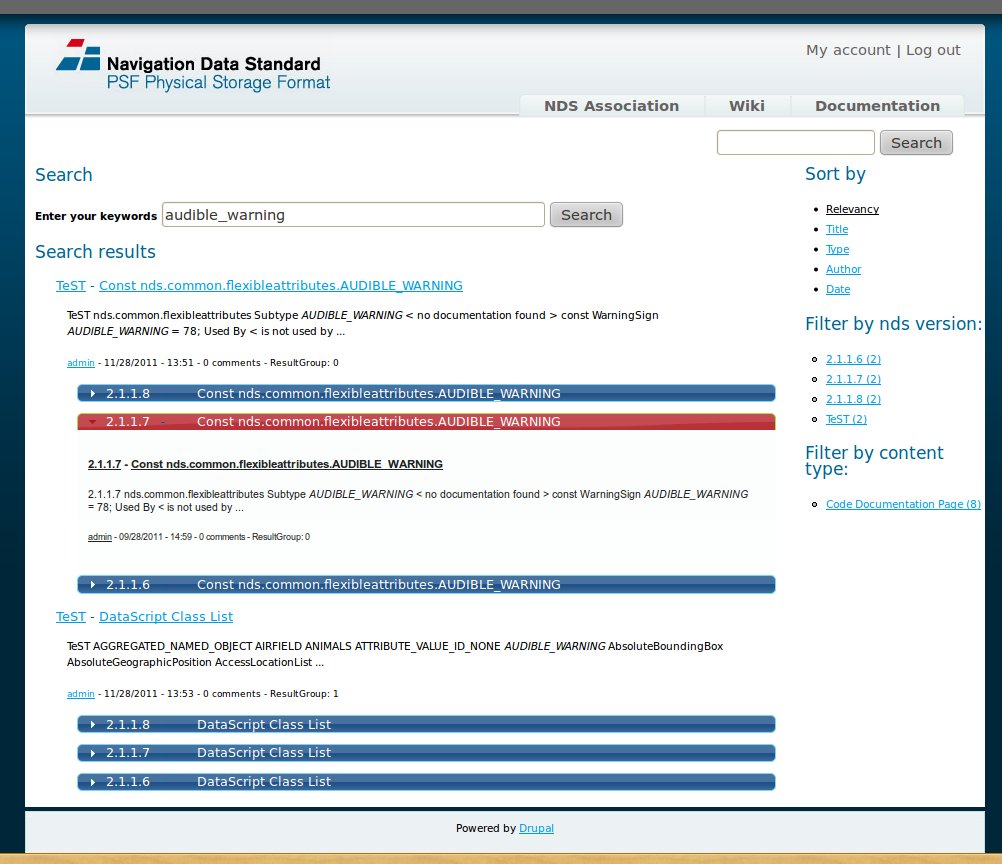
christianadamski commentedThe attached screenshot shows, what is working at the customer now. As mentioned above, this required me to modify apachesolr.module.php apachesolr_do_query(). Using group.main=true to receive results in the usual form, seems to prevent identifying more then result inside a group.
I would like to work on this further, but I don't know, if this approach is worth to follow on.
Comment #16
nick_vhFirst of all, please go for a modular approach first and see if you can make it work using a custom module. (sandbox?) Once that works we can see if we can incorporate this change back in to the main branch. Would you be able to do this?
Other that that it looks like you are on the right track, please show us some code in a sandbox ;-)
Comment #17
theapi commentedHow about implementing a hook to preprocess the response before apachesolr_search_process_response() does it's thing. That way we can handle $response->grouped which has all the results just not in the structure expected by apachesolr_search_process_response().
Comment #18
christianadamski commentedFunny, I was about to propose the same thing, after rewriting my current code accordingly :)
However: apachesolr_search_process_response() is too late, because the response gets already cached in apachesolr_do_query() and all the blocks and external modules will use the response from their.
I recommend implementing the hook_apachesolr_preprocess_response() in apachesolr_do_query() right before the apachesolr_static_response_cache() call.
I am still planing to do this in a proposal, probably later this week/next week.
Comment #19
theapi commentedHaving re-read the README there is the option to provide your own query class via the variable apachesolr_query_class. I'm investigating that route for manipulating the response in the query object itself, by extending SolrBaseQuery and implementing the search function.
Comment #20
nick_vhComment #21
theapi commentedFYI, this is how I'm using grouping by implementing my own query class that extends SolrBaseQuery.
Bear in mind this is a very bespoke solution that needs all sorts of manipulation with hook_apachesolr_query_prepare() & hook_apachesolr_process_results(). You probably don't want your query class to do this but the point is to show an easy place to manipulate the response without patching the apachesolr modules.
contents of Mymodule_Search_Solr_Base_Query.php
Comment #22
christianadamski commentedVery good. Works like a charm without touching apachesolr core code. Really nice work.
Where do you set the variable?
Comment #23
theapi commentedI set the variable on module install/update.
Comment #24
christianadamski commentedHey,
took me a while, but here is a first shot:
http://drupal.org/sandbox/ChristianAdamski/1623610
It should already work, based on a new install with only 3 articles / ApacheSolr 3.6
I'm also adding the current state as an attachment.
Just download the module and enable it, should work. You can set the field to group by in the admin area.
This is my first Drupal module. Should there be interest & feedback, I will try to apply it.
Comment #25
nick_vhLet's continue this in the apachesolr sort module
Comment #26
christianadamski commentedYou can install my grouping module and the sort module parallel to each other. They don't conflict, but they also don't do much in combination. It seems to me the grouping module might be best fit as a separate module?
Comment #27
christianadamski commentedI've send my sandbox project through Coder and PHP_CodeSniffer and adjusted the code accordingly.
Should I apply to publish it as a module on its own or move the other way and join it into apachesolr_sort code?
I would be sorry to just abandon the code.
Comment #28
nick_vhI'd love to join this in this module, so if you can start a patch perhaps?
We have facilitated this issue #1700472: Make 'apachesolr_search_process_response_callback' a search environment variable so you can now hook in to the process function to massage the results coming from solr.
This should make it much easier to have the grouping per environment.
Comment #29
nick_vhNow without custom query class :)
Comment #30
nick_vhI'm still not able to have pagination with the current patch, but grouping works already + first page is grouped. Custom theming is necessary though.
Thanks to ChristianAdamski for giving us the first start. I did tweak it and I am still tweaking it so it is a hard work in progress.
Comment #31
nick_vhThe following patch adds perfect pagination + some configurable values for the grouping
How to use :
Apply Patch
Enable the module
Go to your environment edits page
Select : Enable grouping
Select how many results per group you want + the field you want to group on.
Comment #32
nick_vhComment #33
nick_vhNow with valid patch
Comment #34
nick_vhCleaner patch :)
Comment #35
nick_vhLast one, I guess I am committing this patch and hope for a follow-up.
Feel free to improve the javascript bit.
@ChristianAdamski : I ripped out most of the accordeon code, because it was too project specific. I am adding the group name above each group now.
Comment #36
nick_vhCommitted.
If someone want to make a backport, feel free.
Comment #37
christianadamski commentedSo just for understanding: does this include my patch grouping stuff and this is done?
Comment #38
nick_vhThis includes a lot of your initial patch. If you want to make follow-ups, please create a new issue so we can improve that step by step.
Thanks again for getting the ball rolling on this one.
Comment #39
christianadamski commentedWell, what do you want improved?