


This project is not covered by Drupal’s security advisory policy.
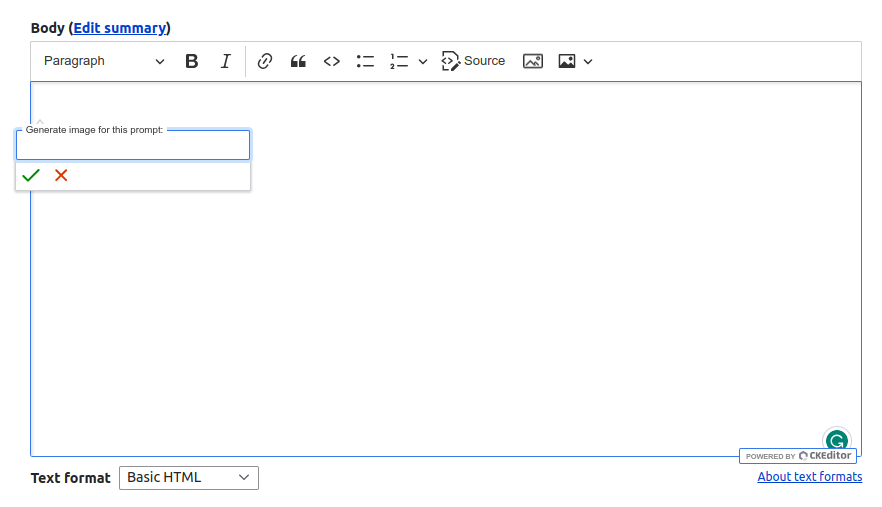
AI Image adds an image-generation button to Drupal’s CKEditor 5. It uses the
Drupal AI framework, so it does
not call model APIs or store provider credentials itself.
Use any configured Drupal AI provider that supports the
text_to_image operation. AI Image sends the prompt through Drupal
AI, saves the returned image as a permanent file, and inserts it into the
editor with accessible alt text.
Requirements
- Drupal 10.5+ or 11.2+
- CKEditor 5
- AI 1.4+
- A configured AI provider that supports
text_to_image
Provider credentials are configured by the provider module, commonly with
the Key module.
Installation and configuration
- Install and configure Drupal AI and a compatible text-to-image provider.
- Configure a default
text_to_imagemodel in Drupal AI, or select a model for each text format. - Enable AI Image for the text format’s CKEditor 5 configuration and add the AI Image toolbar button.
- Grant Generate AI images only to trusted content editors.
The module includes configurable per-user generation limits to help control
provider costs, a progress indicator, and browser-side cancellation.
Important: AI Image 2.x is a rewrite
AI Image 2.x is not backward compatible with the legacy 1.x module. It does
not migrate legacy configuration, direct OpenAI or Stable Diffusion connections,
routes, or JavaScript APIs.
Do not enable legacy and 2.x code together: they use the same machine name.
The legacy code line is unsupported.
AI assistance disclosure
The 2.x rewrite and refactoring, including automated tests, documentation,
and CI configuration, were created with assistance from GPT. The maintainer
reviewed and tested the implementation and remains responsible for the
module’s code, dependencies, security, and releases.
Release status
2.0.0-alpha2 is the current testing release of the rewritten module. It has been verified end-to-end with Drupal AI and OpenAI image generation, and its full GitLab CI pipeline passes. Please report issues through the project issue queue.
Project information
- Project categories: Content editing experience
- Ecosystem: AI (Artificial Intelligence)
 18 sites report using this module
- Created by istankevych on , updated
 This project is not covered by the security advisory policy.
Use at your own risk! It may have publicly disclosed vulnerabilities.
Releases
CI-validated second alpha of the Drupal AI-based CKEditor 5 image generator.
Development version: 2.0.x-dev updated 23 Sep 2026 at 17:56 UTC
Development version: 1.0.x-dev updated 13 Mar 2025 at 17:22 UTC

