This theme and the Focal Point module are incompatible. I'm opening this issue here because the bug appears when I enable this theme and because it's not reproducible in e.g. Seven.
Symptoms
Focal Point lets editors upload an image and using a crosshair cursor select a point in the image that should have focus when it is automatically cropped by Drupal image styles and effects. It looks like this:
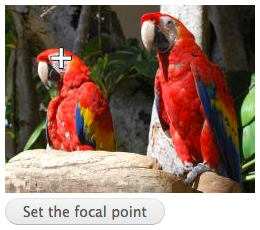
When Adminimal Theme is downloaded and enabled, and editors use the Focal Point crosshair cursor, they drag it into position. When releasing the cursor, it "jumps" up 20 px.
Steps to reproduce
- Install Focal Point + Adminimal Theme (simplytest.me works well)
- Go to Focal Point test page at /focal_point/test-drive
- Find the cursor in the image and drag it around and release
- Note the "jumping" cursor
Suggested solution
Remove the .form-wrapper class in /css/styles.css. See patch below.


Comments
Comment #1
achtonComment #2
ANDiTKO commentedThanks for the good info and for the patch. I will test it out soon.
Comment #3
bruvers commentedAttached improved patch. The bottom margin is needed for the wrapper surrounding the preview and help text. The margin can be removed just from the crosshair indicator.
Comment #4
ANDiTKO commentedFixed. Just needed the following css: