

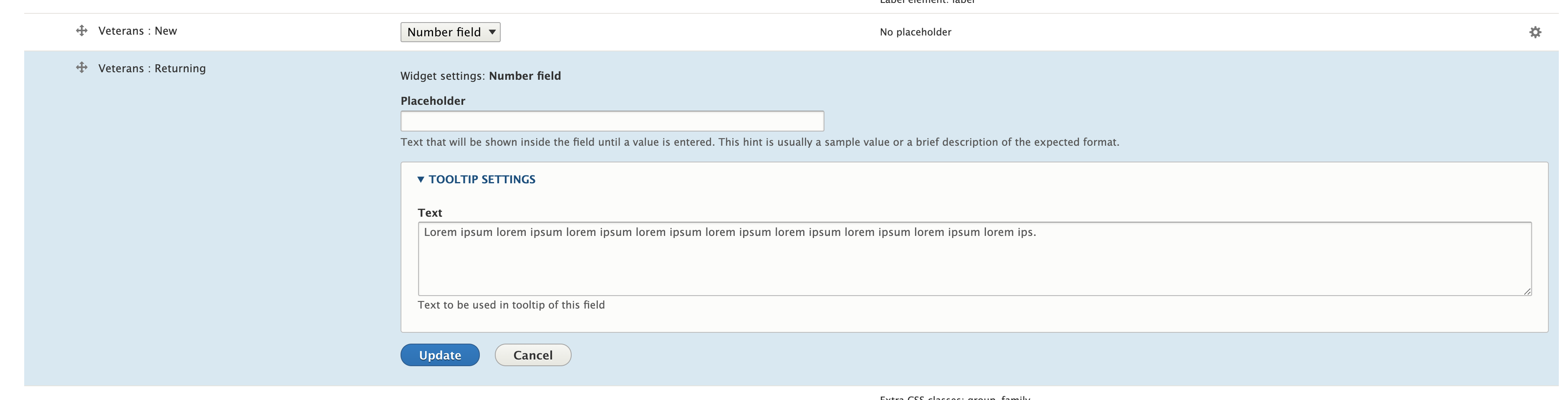

Admin Tooltips
The module provides a way to add a tooltip to fields in drupal forms from the form display settings which can be found at /admin/structure/types/manage/article/form-display for the article content type.
Installation
If your site is managed through composer, you can install this module with composer require drupal/admin_tooltips. Make sure to enable the module at /admin/modules or with drush drush pm:enable admin_tooltips.
To add a tooltip to a field :
- Go to the form display where we need add tooltips, e.g. admin/structure/types/manage/article/form-display.
- Click on the field setting configuration icon. Usually on the far right.
- Use TOOL INFO SETTINGS to configure the text that will be displayed as tooltips.
- Click on update button.
- Click on save button.
To customize the styling :
The tooltip uses a template that could be overridden from the site theme.
The CSS can also be overwritten the same way.
Supporting organizations:
Funded original development
Drupal 10 and Drupal 11 updates
Project information
- Project categories: Administration tools, Site structure
 32 sites report using this module
- Created by tesla863 on , updated
 Stable releases for this project are covered by the security advisory policy.
There are currently no supported stable releases.


