The Editor
Ace Editor auto-completion feature

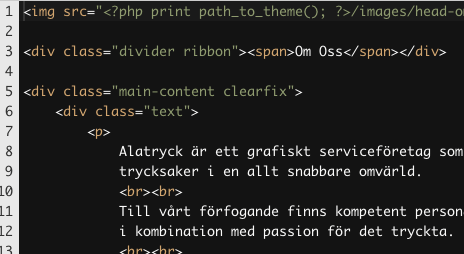
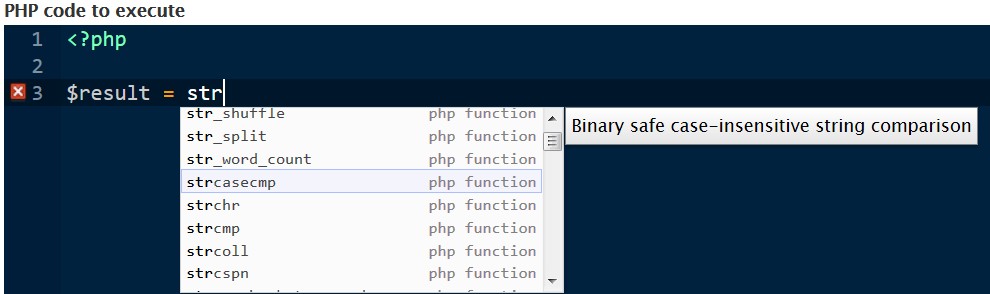
Ace is a code editor written in JavaScript, allowing you to edit HTML, PHP and JavaScript (and more) in a very natural way. It provides syntax highlighting, proper indentation, keyboard shortcuts, auto-completion, code folding, find and replace (including regular expressions). Try out a demo of the editor here.

This module integrates the Ace editor into Drupal's node/block edit forms, for editing raw HTML, PHP, JS, etc... in a familiar way.

It also provides a display formatter, along with a text filter and an API to embed and show code snippets in your content.

Drupal 10/11 Installation requirements and steps

Define npm-asset repository in the composer.json file, to allow downloading the ACE Editor JavaScript library to the correct folder:

composer config repositories.assets composer https://asset-packagist.org
composer config --unset repositories.0
composer config repositories.drupal composer https://packages.drupal.org/8
composer config --json extra.installer-types '["npm-asset", "bower-asset"]'
composer config --json extra.installer-paths.web\/libraries\/ace '["npm-asset/ace-builds"]'
composer config --unset extra.installer-paths.web\/libraries\/\{\$name\}
composer config --json extra.installer-paths.web\/libraries\/\{\$name\} '["type:drupal-library", "type:bower-asset", "type:npm-asset"]'

Require the composer installer extender

composer require oomphinc/composer-installers-extender

Download the ACE Builds library. or require it by composer with.

composer require npm-asset/ace-builds:~1.0

Better to get the library from https://www.npmjs.com/package/ace-builds

Download the ACE Editor module and install it:

composer require drupal/ace_editor:~2.0
drush en ace_editor

Features

Editor: edit HTML, PHP, JS... in your nodes and blocks like a pro

  • D7: go to admin/config/content/ace-editor and configure the module for node/block editing. Select 'Ace Editor' text format and enjoy the Ace editor.
  • D8+: go to admin/config/content/formats and select a format eg: Full HTML. Select Ace Editor from 'Text Editor'. Enjoy the Ace editor in the selected format.

Display fields using syntax highlighting

Manage the display of any textarea fields attached to a node and select the "Code syntax highlighting" (D7) / "Ace Format" (D8+) format. This outputs the content of the field as a ready-only editor with syntax highlighting in your node view using the selected options.

Embed code snippets in the body of your nodes or blocks

Add the syntax highlighting filter to any of your text formats. The module will now convert all content inside an <ace> tag to display the code using the selected options. You can override the default options by adding attributes to the <ace> tag, for example:

<ace theme="twilight" height="200px" font-size="12pt" print-margin="1">SOME CODE</ace>

Check out the README for a complete list of attributes.

Support to PHP console from Devel module (D7 only, try Devel Ace for D8+)

Get syntax highlighting, revision and auto-completion while using Devel's module PHP console.

  • Press Ctrl+Space to use the autocomplete option while coding

Use syntax highlighting from your template files (D7 only)

You can use the ace_editor_add($content, $settings) function to add syntax-highlighting code display anywhere in your template files. An optional array contains settings as shown below.

D8 release

Thanks to boaloysius for the development of the initial D8 release.

Supporting organizations: 
D7/D8/D9 module maintenance: bug fixing, support and feature requests.
D10/D11 module maintenance

Project information

Releases