I just installed the latest dev and when I run update I get the following error:
user warning: Can't DROP 'PRIMARY'; check that column/key exists query: ALTER TABLE xmlsitemap_sitemap DROP PRIMARY KEY in C:\wamp\www\drupal\includes\database.mysql-common.inc on line 386.
Under this warning I get the message:
The directory sites/default/files/xmlsitemap/NXhscRe0440PFpI5dSznEVgmauL25KojD7u4e9aZwOM has been created.
Under this I get this query information:
The following queries were executed
xmlsitemap module
Update #6203
* ALTER TABLE {xmlsitemap_sitemap} ADD `max_filesize` INT unsigned NOT NULL DEFAULT 0
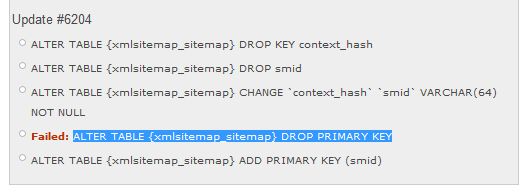
Update #6204
* ALTER TABLE {xmlsitemap_sitemap} DROP KEY context_hash
* ALTER TABLE {xmlsitemap_sitemap} DROP smid
* ALTER TABLE {xmlsitemap_sitemap} CHANGE `context_hash` `smid` VARCHAR(64) NOT NULL
* Failed: ALTER TABLE {xmlsitemap_sitemap} DROP PRIMARY KEY
* ALTER TABLE {xmlsitemap_sitemap} ADD PRIMARY KEY (smid)
I updated from 6.x-2.x-dev (2010-Aug-26) to 6.x-2.x-dev (2010-Aug-31)



Comments
Comment #1
Anonymous (not verified) commentedThe ALTER TABLE to ADD PRIMARY KEY didn't fail. The ALTER TABLE to DROP PRIMARY KEY failed because the table didn't have a PRIMARY KEY to begin with. This isn't a real problem but one that maybe should be documented. Dave?
Comment #2
dave reidHrm I tested the crap out of this because I was getting errors when trying to drop the primary key before dropping the field.
Comment #3
Anonymous (not verified) commentedThen the results may be dependent on database engine versions. I suspect that the version Dave tested with was buggy and the version that tomsm uses DTRT. I.E. the order should be
Comment #4
lars toomre commentedI just updated the xmlsitemap module for 6.x-2.x-dev on what I believe is a fairly normal LAMP account hosted by Slicehost. When running the update.php script, the update script reported an error like that mentioned above:
user warning: Can't DROP 'PRIMARY'; check that column/key exists query: ALTER TABLE xmlsitemap_sitemap DROP PRIMARY KEY in {...}/includes/database.mysql-common.inc on line 386.
Perhaps a check for the existence of the PRIMARY key field should be performed before the ALTER command is issued?
Thanks Dave Reid much for a great job rewriting this module. I will be adding other feature requests and suggested enhancements/fixes in the near future.
Comment #5
vacilando commentedSee attached screenshots. Something funny is going on.
"ALTER TABLE {xmlsitemap_sitemap} DROP smid" seems to have executed all right and there is an error on "Failed: ALTER TABLE {xmlsitemap_sitemap} DROP PRIMARY KEY" (primary key being on "smid").
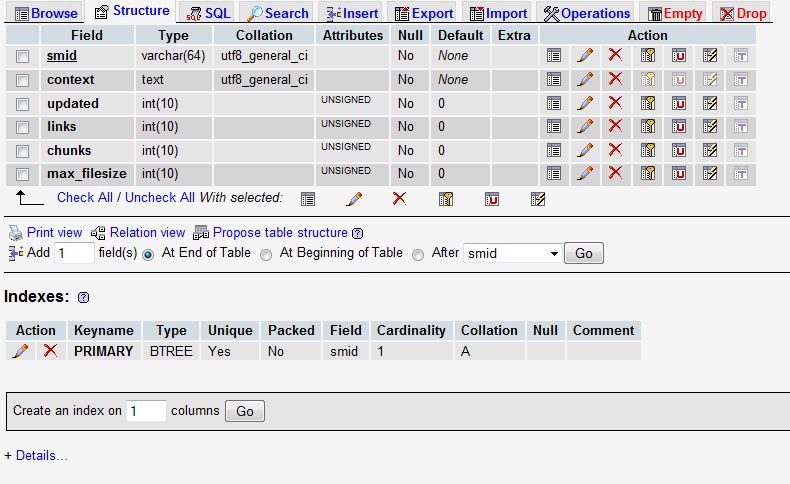
But look at image "b" -- it shows that column "smid" still exists! So the main problem may be that "smid" is not removed, without an error.
I am on EC2 and Mercury (Pressflow).
Whatever the solution to the install script, could somebody please advise whether any manual db change needs to be done to keep XML sitemap running OK. Thanks.
Comment #6
bwv commentedFor the record, I received same error mentioned in the first line of the first post, following an upgrade from 6.x-2.0-beta1 to the 6.x-2.x-dev version ($Id: xmlsitemap.module,v 1.20.2.45.2.185 2010/08/30).
After uninstalling the dev release and re-installing the beta1 version, I was unable to run cron ("cron run failed").
I manually deleted the two DB tables,, and did a fresh reinstall of the beta module, but was still unable to run cron to regenerate the sitemap cache files.
NOTE: After several hours cron began to function properly.
Comment #7
YK85 commentedsubscribing - coming from #905062: errors on latest dev update
Comment #8
bryancasler commentedI just ran into this problem myself. What's the best course of action? I'm not comfortable digging around in the DB, anyone have a suggestion?
Comment #9
AlexisWilke commentedanimelion,
If you want to go back, you need to restore a database backup. There is no other way with Drupal. All the upgrades are one way streets...
Good luck.
Alexis Wilke
Comment #10
AlexisWilke commented@vacilando,
smid is supposed to still be there. Notice that context_hash is renamed smid.
Comment #11
bryancasler commentedThanks Alexis, one more clarifying question.
Would uninstalling XML sitemap undue the damage caused by this error? If so could you then just re-install the older version?
Comment #12
AlexisWilke commentedanimelion,
Uninstalling deletes the tables from your database. If you had no special case (or very few and you know what they are) then completely uninstalling and going back to the previous version is good enough. Yes.
If you had a few hundred pages with a special XML setup (i.e. Not in Sitemap, higher/lower priority, node types with different settings...) then to the minimum you should restore those tables and re-enable the old modules.
The best practice is actually to have a duplicate of your site on a development computer and test there instead of the main website (not like I follow my word either... 8-} just saying...)
Good luck!
Alexis
Comment #13
AlexisWilke commentedAh! I had a server still running version 1.x and just upgraded to 2.x and getting a few errors. I'm actually thinking this is because I upgraded to 2.x without first upgrading to the latest 1.x version. Although I would think that all the upgrades from 1.x are included in 2.x, right? Meaning that it should first bring 1.x to the latest version and then applies 2.x.
The 1.x I had has the date 2010-03-03 in the .info, I have PostgreSQL and the errors I got are the following:
Although interestingly enough, the only FAILED that we see in the list below is:
Failed: ALTER TABLE {xmlsitemap_sitemap} DROP CONSTRAINT {xmlsitemap_sitemap}_pkeywhich makes me think some of your update_#() do not collect all the return data from some database updates... it could help us to fix those if that's indeed the reason why some FAILED are missing.
Note that I think that the CONSTRAINT error comes from the fact that the column was already dropped by that time and thus it tries to drop something that doesn't exist (i.e. Database Core handling mistake.)
Thank you.
Alexis Wilke
Comment #14
crashtest_ commentedThis patch takes out the line removing the primary key, which as I understand is getting removed when the field is removed initially.
Comment #15
crashtest_ commentedSetting to needs review.
Comment #16
dave reidCommitted to CVS.
http://drupal.org/cvs?commit=478274
http://drupal.org/cvs?commit=478276
Comment #18
Balbo commentedUpgrading from
6.x-2.0-beta1to6.x-2.0-beta2I got:user warning: Can't DROP 'context_hash'; check that column/key exists query: ALTER TABLE xmlsitemap_sitemap DROP KEY context_hash in /.../includes/database.mysql-common.inc on line 417.Comment #19
Anonymous (not verified) commentedIf you drop a key that doesn't exist then you get a warning but that isn't an error, it is information that the key wasn't created in the first place. There is nothing to worry about here concerning the upgrade itself. One would ask why wasn't it there but it doesn't matter now since you have already upgraded.